

 scripting
The DW menu: How I share scripts with you
In the last post, I showed you how to start your own Scripts menu, and you wrote a Hello World script, and invoked it from a command in the Scripts menu.
The DW menu
The DW menu is a way for me to show you how scripting works in Drummer.
To add the DW menu to the Drummer menubar:
-
Choose Settings from the System menu, the menu at the right edge of the menu bar, with your Twitter name as its title.
-
In the Testing tab, check the "Include DW's test menu" box. Click OK.
-
Reload Drummer. There should now be a DW menu in your menu bar. Pull down the menu, you'll see a list of commands and sub-menus.
Drummer will remember this setting, so the DW menu will remain in your menu bar until you uncheck the box.
When I make a change to the menu, adding scripts, fixing bugs, responding to feedback, that will be reflected in the DW menu. Just reload Drummer to see the changes.
A screen shot
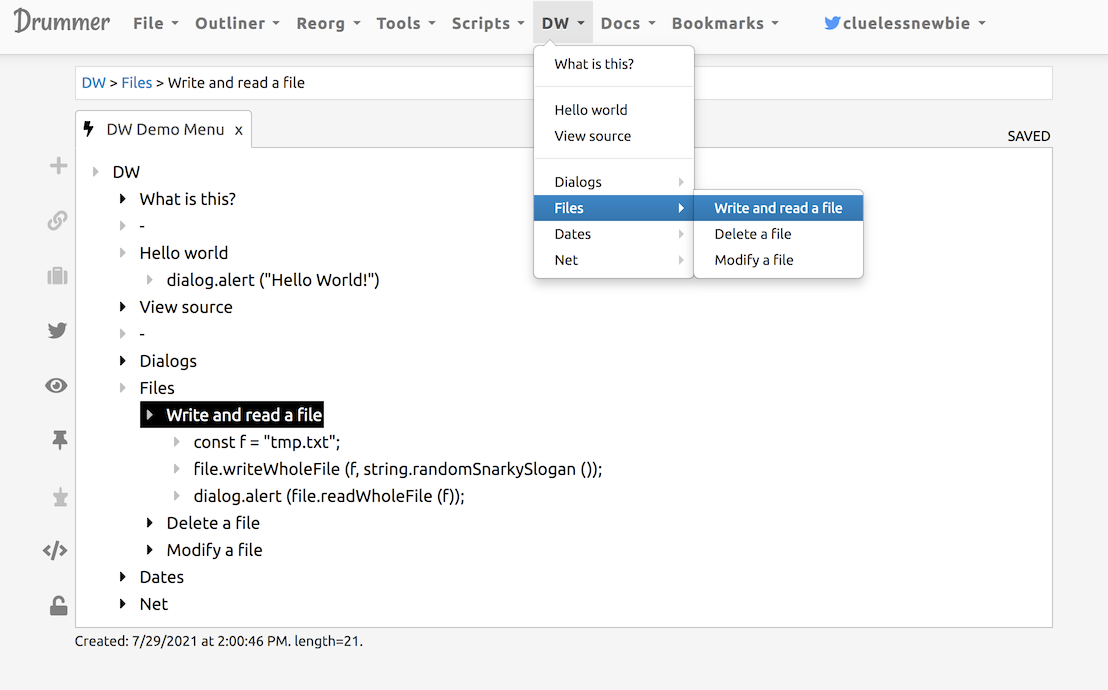
Here's a screen shot that shows the source for the menu, as well as two of the scripts, with the menu pulled down so you can see the relationship between the outline and the menu. You can see that menus are perfectly hierarchic, and therefore an outliner is the ideal tool for editing a menu.
The examples
A list of some of the commands and sub-menus in the DW menu.
-
Hello world -- presents a dialog that says Hello World.
-
View source -- confirms that you want to view the source for source outline for the DW menu. If you say yes, the outline opens in a new tab in Drummer.
-
Dialogs sub-menu -- scripts that illustrate how to use dialogs built into Drummer. A dialog is a way of asking the user a simple question, to enter their name, make a choice, confirm something, or other more powerful things.
-
Dates sub-menu -- to start, only one script that illustrates how to use string.formatDate.
Lifting the hood
To see the scripts in the DW menu, choose the View source command from the DW menu. Here's a screen shot of what that looks like.
There are already a number of example scripts in the menu. I will add more over time, illustrating different programming concepts in Drummer.
The DW menu may only be part of the testing process for Drummer. By the time we're done, there might be easier and/or more powerful ways to distribute example scripts.
