

 scorpion81
UV Example not working in 3.2v and 3.3.
I cant seem to get the UVs to map in test_uv_moolecular.blend example. Any advice?

Please note that the Particle Info node in the material on the Sphere (aka the object being instanced) is relevant. It must be connected to the vector input of the texture. And you need to use cycles and need to be in the rendered preview or render mode, otherwise the particle info node doesnt work. Furthermore you first need to bake the molecular simulation with "Bake UV at ending" checkbox enabled.

So how can I keep the UVs mapped, if i "Make Instances Real" separating meshes in to different objects, or getting a mesh somehow with proper UVs of the particles?
@scorpion81 I could write a patch if you can explain to me the process.
First, a disclaimer. I didnt write the UV baking code in the first place, that is work done by pyroevil. So please bear in mind i may read / interpret the code not 100% correctly.
In operators.py, starting from line 75 on, there is an operator "MolSetActiveUV". There is the code how the UV is generated during running the sim. basically a triangulated copy of the particle system object (the cube) is being made. Then the uv coordinate closest to each particle is being sampled there and stored once per particle and frame. This is written to angular_velocity per frame (for all particles) and into a custom property named "par_uv" . The latter should contain one frame of all particle uv data at the same time.
I am now trying to write a script which:
- makes a particle instance modifier from this particle system so we have a mesh to work on
- reads per frame per particle from angular_velocity the UV data and write that into the appropriate mesh UV portion, aka write a UV map with that data
This way the UV data is baked permanently. But there is a catch (or maybe not ?) I wonder whether the UV changes at all over time (because of the particles are moving). But i guess it could be enough to write this once. Atm it is i think written per frame. I just utilized the angular velocity because it was accessible by a node and could be easily fed as vector input into the texture. For this i think i just copied the UV over and over per frame. This is because i can read par.angular_velocity then per frame without needing to "rewind" to frame one. (you cannot directly access the cache via frame). par.angular_velocity just internally accesses the point cache for that particle and the current frame. par refers to the current particle here, obtained from a loop iterating over all particles.
I am now trying to write a script which: makes a particle instance modifier from this particle system so we have a mesh to work on reads per frame per particle from angular_velocity the UV data and write that into the appropriate mesh UV portion, aka write a UV map with that data
perfect ! I could wait until you finish that or is there anything that you would like me to work on for the next steps?
I wonder whether the UV changes at all over time (because of the particles are moving). But i guess it could be enough to write this once.
I can think use cases for both,
- selected frame (default 0)
- frame range with collision/bounce count (like dragging particles multiple moving canvases against a brush then brushes against a canvas after collision with canvas, canvas -> physics-> canvas in iterations) like a secondary UV load/transfer/unload, but lot of work i assume. Related : blender.stackexchange Question Specially this Answer
Latter might even help create a whole new weight paint and distribution system. :D
So I think if we can get a good handle on UV distribution on both over frame and instance, And implement some common use cases as operators, and in an advanced setting panel which just directly controls the all bpy.props related to the subject, leave it to the user to decide on what to do with it. then reiterate maybe.?
I'm still going through the code. trying to do some refactoring and introduce some Utilities from my other repositories.
Hmm i think one of the main problems is how to to actually map the UV to a static mesh first, and then a moving one (because it will involve either a particle instance modifier or a mesh sequence cache modifier )
I tried the first case already, but that let blender crash even. Not sure how to map the UV data dynamically either. I was attempting to write a python node for this, but i couldnt figure out how to propagate things to the output socket correctly (a NodeFloat socket accepts only one float, a NodeFloatVector Socket just 3 floats, but you have 1000 data sets 3 floats each in the example file )
Unfortunately, i deleted my non working node code. But it was basically just reading the particle angular velocity and attempting to stuff it through the output socket, all at once. Perhaps it may work if you iterate over all particles and just write the angular velocity per particle to the socket, and call that in the node's update() function.
Didnt try that yet, because i dont know which format the UV Vector input of a texture requires. Btw you can hook up this new node into the materials shader node tree as well if you set the tree type to ShaderNodeTree (check the Python Custom Node template in blenders script editor )
I will try this in parallel too.
Sigh.... see also my failed attempts for a simple solution in the branch "uv_mapping" of this repo. The Particle Info node i guess does some black magic behind the scenes, which I cannot (easily) replicate in python I think.
Btw you can hook up this new node into the materials shader node tree as well if you set the tree type to ShaderNodeTree
Will try that.
a NodeFloat socket accepts only one float, a NodeFloatVector Socket just 3 floats, but you have 1000 data sets 3 floats each in the example file
Just spitballing here but only decent and progressive way I can think of for this is to find a way to bake the angular_velocity UV to a texture.? then Attach that texture with Particle Index set as a Custom value per instance? That should take care of the instance count limitations. even with per frame. wonder if that's even possible. might have to/possibly using a UV slot/grid Index if not enough to pack into RGBA? I wonder if some relevant nodes might buried Animation Nodes code. Let me know your thoughts on that. I can try some R&D on it.
Let me know your thoughts on that. I can try some R&D on it.
Hmm do you want to just attach some UV and texture to a mesh (sequence) ? And sorry for the unstructured brainstorming which follows now :smile:
-
In case of a static mesh, we would create it by removing the instance object rendering from the particle system and converting the instance object to a particle instance modifier object (referencing the cube and particle system 1).
-
We would need to generate a proper mesh sequence, in case we want also to capture all frames of the simulation. This could be done with blenders onboard tools like Alembic or MDD / PC2 export, but i guess only if we ran the simulation not via instances, but with a particle instance modifier (runs much slower then) Or we could to try to read / write json, or other custom mesh-per-frame storage formats via python, the possibilites are endless. The amount of work to implement as well :rofl:
-
The UV for the mesh could be unwrapped from the original instance object and being replicated according to how the instances were positioned. Replicating the UV could allow even more texturing detail in theory (as each sphere / instance object could have individual texture parts instead of only one color)
-
Alternatively, instead of replicating UVs for each sphere, we could use the angular velocity value which is a uv coordinate in respect to the cube, and perform the same calculation as the original code did. With the given position, extract the closest color from the cube to the spheres. But what happens with the "Inner" spheres then ? Do they remain untouched, or get the closest projected color along some axis.... hmm.
Just spitballing here but only decent and progressive way I can think of for this is to find a way to bake the angular_velocity UV to a texture.? then Attach that texture with Particle Index set as a Custom value per instance? That should take care of the instance count limitations. even with per frame.
- The question is, can we squeeze that into a node (possibly not, since how to push UVs through a socket. Except with an entire custom node tree doing python calls each of its nodes, using custom sockets etc.). Could be a start for some particle node tree, or even simulation tree via python. Just as a proof of concept. Even if performance sucks in the first place. Hey we can try to throw cython or numpy or stuff like that at the code to make it faster. Just as perspective lol. We could also make just a regular operator with a nice button or more ui elements in a panel as well.
might have to/possibly using a UV slot/grid Index if not enough to pack into RGBA?
Not quite sure how this would work, can you elaborate further ?
I wonder if some relevant nodes might buried Animation Nodes code.
Yes, thats actually a good idea to look into existing node systems like Animation Nodes or Sverchok for example :+1:
Hmm do you want to just attach some UV and texture to a mesh (sequence) ?
I'd like this as a fallback and also for an immediate use for me. But no not only that. Id like to find a way to map the UVs properly for usability with fractures.
That's alot of info there I'd like to get back to that one by one after some research. firstly I wanted to portray the idea I had for:
Not quite sure how this would work, can you elaborate further ?
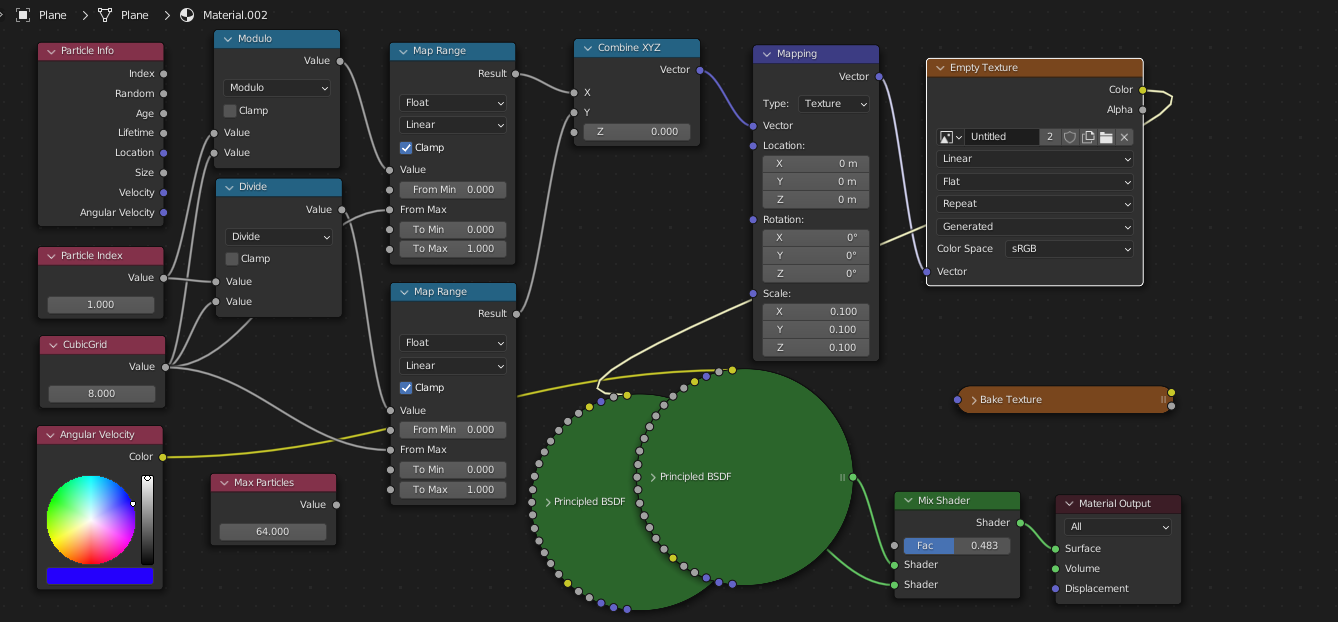
something like this is what I had in mind. but i couldn't get it shade properly in the allotted time. forgive my shader math; its way off. If its working It should draw the "Angular UV color" in to the top left slot (for index 0) on a 8x8 Grid. Might have to use face index at some point?? Please correct me if I'm on the wrong path with this. ("Particle Index" and "Angular UV color" is for testing on non particle mesh to check if the shader works properly without particles)
But what happens with the "Inner" spheres then ? Do they remain untouched, or get the closest projected color along some axis.... hmm.
Btw , I was searching if there was a way to fracture the Volume. Even though not possible in blender i found some references to VDB. will follow up on that later. as I get time.
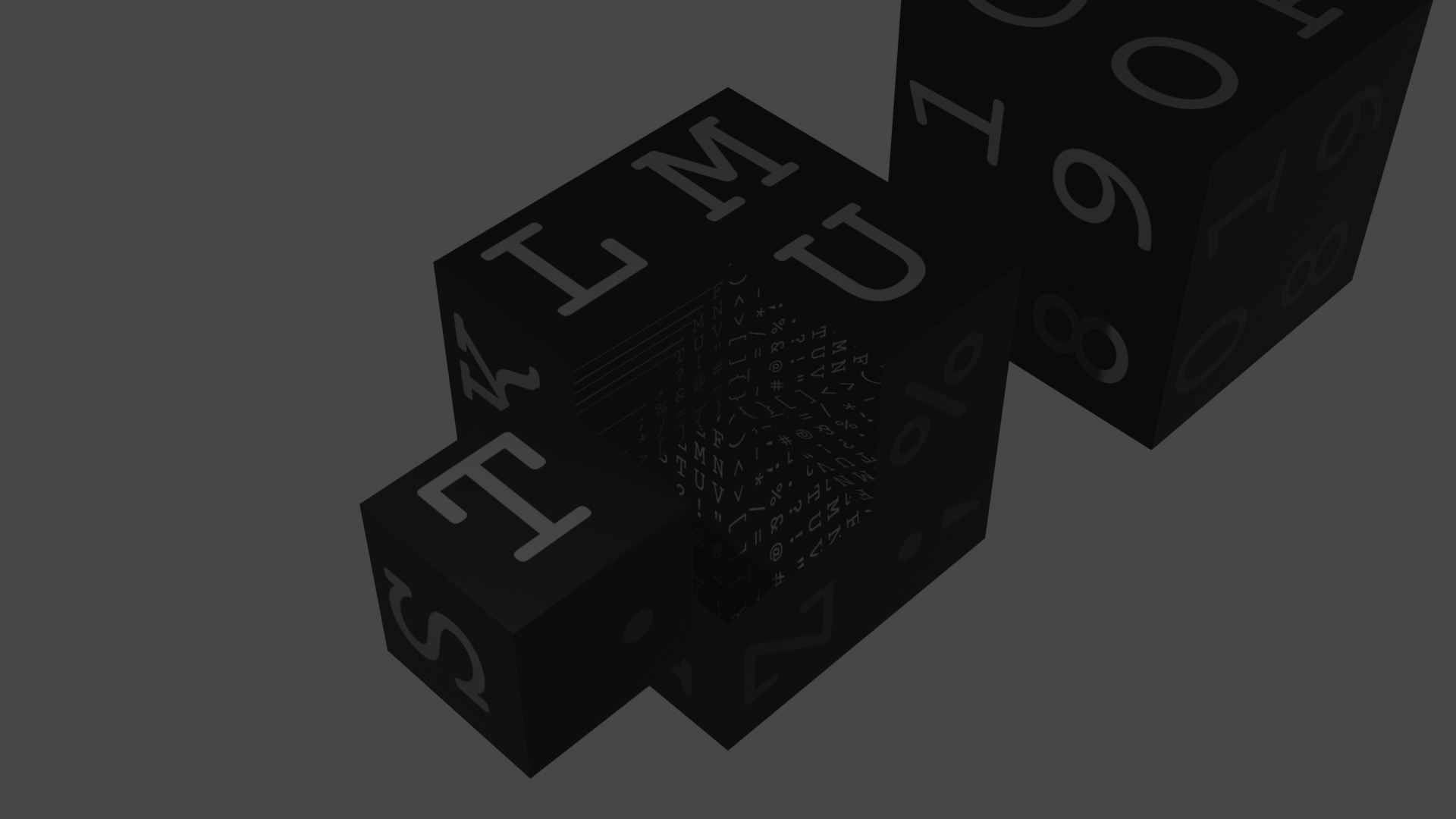
4 . Alternatively, instead of replicating UVs for each sphere, we could use the angular velocity value which is a uv coordinate in respect to the cube, and perform the same calculation as the original code did. With the given position, extract the closest color from the cube to the spheres. But what happens with the "Inner" spheres then ? Do they remain untouched, or get the closest projected color along some axis.... hmm.
If I we can fix the Cube and Sphere bounding box in one go, then what we can do is: (Choices)
- 'Texture Project' from That Cube/Sphere as Bounding-Cube/Sphere to abstract geometry.
- Use same Baycentric mapping for the 6 side Cubic Texture per face.
Even though not perfect with a little bit of adjustments and some preplanning one might be able to achieve desired effect.