

 schlagmichdoch
Can't connect with pairdrop in docker behind reverse proxy
Describe the bug When I go to https://pairdrop.mydomain.com, I can't connect to any device. While on local network, it works.
To Reproduce Steps to reproduce the behavior:
- Go to Nginx proxy manager
- Create proxy host for pairdrop service
- Go to https adress
- No links available / can't coonect
Expected behavior I should be able to see other devioces on the same network just like when I use LAN adress
Desktop (please complete the following information):
- OS: Win10
- Browser [Librewolf]
- Version [117.0-1]
Smartphone (please complete the following information):
- Device: [Oneplus ?ord2]
- OS: [oOs]
- Browser [Fennec]
- Version [latest]
Bug occurs on official PairDrop instance https://pairdrop.net/ No Version: v1.7.7
Bug occurs on self-hosted PairDrop instance Not on LAN, but on https
Self-Hosted Setup Proxy: Nginx Proxy Manager Deployment: docker-compose Version: v1.7.7

So you can load your PairDrop web app but devices do no connect to each other?
Please provide the browser console logs. Probably, some more information about the error can be found there. Also, do your devices connect when you pair them? Then only the auto discovery feature would not be working properly

So you can load your PairDrop web app but devices do no connect to each other?
Exactly. It lacks the little chain icon in the top right.
Please provide the browser console logs. Probably, some more information about the error can be found there.
I indeed get an error
Service Worker registered ui.js:2240:21
Database initialised. ui.js:1861:21
Request successful. Retrieved key-pair: editedDisplayName - PC ui.js:1927:29
Retrieved edited display name: PC ui.js:57:21
LibreWolf ne peut établir de connexion avec le serveur à l’adresse wss://pairdrop.mydomain.com/server/webrtc. network.js:37:19
error { target: WebSocket, isTrusted: true, srcElement: WebSocket, currentTarget: WebSocket, eventPhase: 2, bubbles: false, cancelable: false, returnValue: true, defaultPrevented: false, composed: false, … }
network.js:207:17
    _onError https://pairdrop.mydomain.com/scripts/network.js:207
    onerror https://pairdrop.mydomain.com/scripts/network.js:42
WS: server disconnected network.js:185:17
LibreWolf ne peut établir de connexion avec le serveur à l’adresse wss://pairdrop.mydomain.com/server/webrtc. network.js:37:19
error { target: WebSocket, isTrusted: true, srcElement: WebSocket, currentTarget: WebSocket, eventPhase: 2, bubbles: false, cancelable: false, returnValue: true, defaultPrevented: false, composed: false, … }
network.js:207:17
    _onError https://pairdrop.mydomain.com/scripts/network.js:207
    onerror https://pairdrop.mydomain.com/scripts/network.js:42
    (Asynchrone : EventHandlerNonNull)
    _connect https://pairdrop.mydomain.com/scripts/network.js:42
    _reconnectTimer https://pairdrop.mydomain.com/scripts/network.js:188
    (Asynchrone : setTimeout handler)
    _onDisconnect https://pairdrop.mydomain.com/scripts/network.js:188
    onclose https://pairdrop.mydomain.com/scripts/network.js:41
WS: server disconnected network.js:185:17
LibreWolf ne peut établir de connexion avec le serveur à l’adresse wss://pairdrop.mydomain.com/server/webrtc. network.js:37:19
error { target: WebSocket, isTrusted: true, srcElement: WebSocket, currentTarget: WebSocket, eventPhase: 2, bubbles: false, cancelable: false, returnValue: true, defaultPrevented: false, composed: false, … }
network.js:207:17
    _onError https://pairdrop.mydomain.com/scripts/network.js:207
    onerror https://pairdrop.mydomain.com/scripts/network.js:42
    (Asynchrone : EventHandlerNonNull)
    _connect https://pairdrop.mydomain.com/scripts/network.js:42
    _reconnectTimer https://pairdrop.mydomain.com/scripts/network.js:188
    (Asynchrone : setTimeout handler)
    _onDisconnect https://pairdrop.mydomain.com/scripts/network.js:188
    onclose https://pairdrop.mydomain.com/scripts/network.js:41
    (Asynchrone : EventHandlerNonNull)
    _connect https://pairdrop.mydomain.com/scripts/network.js:41
    _reconnectTimer https://pairdrop.mydomain.com/scripts/network.js:188
    (Asynchrone : setTimeout handler)
    _onDisconnect https://pairdrop.mydomain.com/scripts/network.js:188
    onclose https://pairdrop.mydomain.com/scripts/network.js:41
WS: server disconnected network.js:185:17
Also, do your devices connect when you pair them ?
When I use LAN address, they do connect and transfer.
So it's a problem with the websocket connection and not the webrtc connection. Probably your nginx is misconfigured.
If you provide your nginx conf I could help debugging it.
So it's a problem with the websocket connection
You pointed me in the right direction ! In Nginx Proxy Manager, there is an option for websocket support. I just had to tick it.
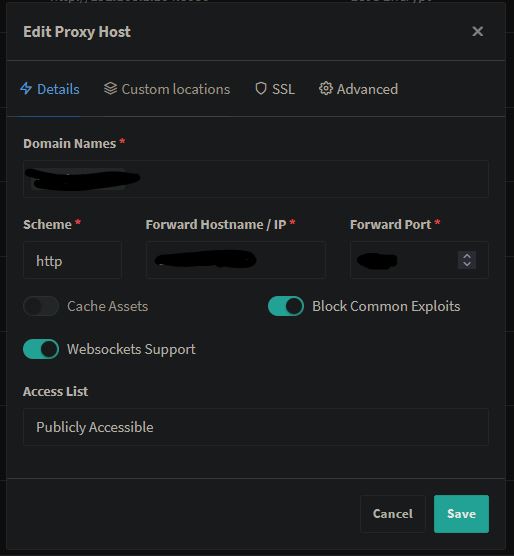
I see clients are discovering each other properly, but it seems they are also discovering themselves. Reading the docs, I see I have to set the X-Forwarded-For.
How would I do that using Nginx Proxy Manager ? I feel like I should input the config in advanced tab, but what I tried to extrapolate reading the docs doesn't work. Could you enlighten me ?
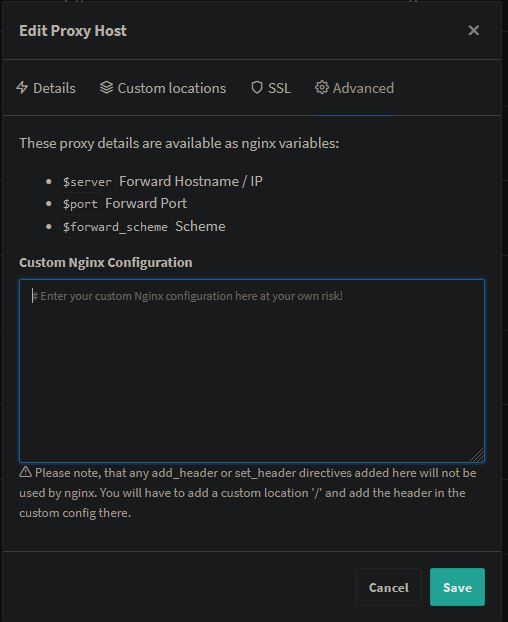
EDIT: don't mind this last part as it seems I don't have a problem after all. Still interested to know how and if I have to set up X-Forwarded-For.
So it's a problem with the websocket connection
You pointed me in the right direction !
In Nginx Proxy Manager, there is an option for websocket support. I just had to tick it.
I see clients are discovering each other properly, but it seems they are also discovering themselves.
Reading the docs, I see I have to set the X-Forwarded-For.
How would I do that using Nginx Proxy Manager ?
I feel like I should input the config in advanced tab, but what I tried to extrapolate reading the docs doesn't work. Could you enlighten me ?
EDIT: don't mind this last part as it seems I don't have a problem after all.
Still interested to know how and if I have to set up X-Forwarded-For.
I have a similar problem. How did you enter the additional parameters "forward..."?

I have a similar problem. How did you enter the additional parameters "forward..."?
I gave up