
three-vr
 three-vr copied to clipboard
 schickling
Device controls and render steps for mobile virtual reality applications
three-vr 
Device controls and render steps for mobile virtual reality applications
Installation
Note: three.js has to be installed as well.
$ npm install three-vr
Usage
Can be loaded with Browserify, RequireJS as three-vr or simply included via <script> tag and accessed via global variable THREE.VR.
// load three-vr extension
var threevr = require('three-vr');

// init rendering
threevr.init({
  renderer: renderer,
  camera: camera,
  scene: scene
});

// attach to your animation loop
function animate() {
  requestAnimationFrame(animate);
  threevr.animate();
}
API
init(options)
Initializes the extention. Pass the options below.
options.renderer (required)
Specify your application's renderer.
options.camera (required)
Specify your application's camera.
options.scene (required)
Specify your application's scene.
animate()
Updates the renderer. Should be called within your animation loop.
How it works
three-vr takes the original camera and creates a stereoscopic effect by using two separated cameras. Each image is then rendered with a Barrel Distrotion.
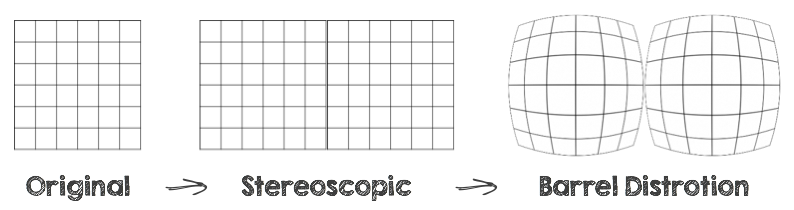
Each camera has a slightly different position and thus a different perspective. The Barrel distrotion is implemented via a WebGL fragment shader which runs in parallel on the GPU.
Development
Build library
$ make build
Run demo application
$ npm start # builds demo
$ python -m SimpleHTTPServer # starts webserver
Open localhost:8000/demo in your browser.
Authors
License
Metadata
Owner
 schickling
Metadata
Device controls and render steps for mobile virtual reality applications