

 scenee
static UIHostingController content shifting with when added as a child view
Description
When using a SwiftUI UIHostingController as the content view controller, the .static content is displayed under the handle and then shifts when swiping up to the max position
When the content mode is .static the view position is incorrect until swiped up to the max position When the content mode is .fitToBounds the view position is correct from the start
Start

Swipe up
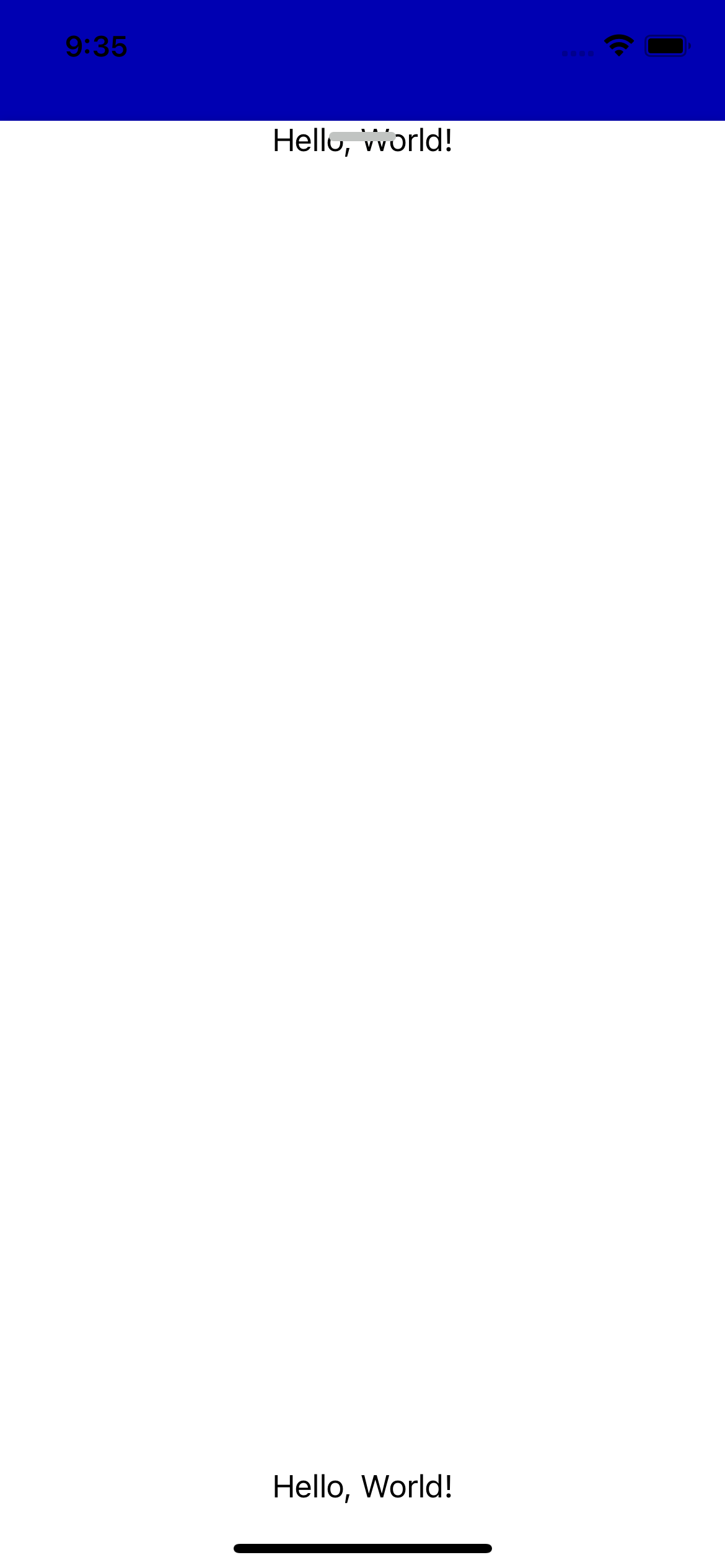
Expected behavior
The view is displayed at the top because there is no padding
Actual behavior
The view is displayed under the handle with extra padding that disappears after moving the content to full position
Steps to reproduce
- Run the below code example with fpc.contentMode = .static
- Swipe up to max position
- See content move to overlap under the handle
- Run code example with fpc.contentMode = .fitToBounds
- See content overlapping with the handle
import UIKit
import FloatingPanel
import SwiftUI

struct SwiftUIViewTest: View {
    var body: some View {
        VStack{
            Text("Hello, World!")
            Spacer()
            Text("Hello, World!")
        }
    }
}

class ViewController: UIViewController, FloatingPanelControllerDelegate {
    var fpc: FloatingPanelController!

    override func viewDidLoad() {
        super.viewDidLoad()
        // Do any additional setup after loading the view.

        self.view.backgroundColor = UIColor.blue

        fpc = FloatingPanelController()

        fpc.contentMode = .static
        //fpc.contentMode = .fitToBounds

        // Assign self as the delegate of the controller.
        fpc.delegate = self // Optional

        // Set a content view controller.
        let contentVC = UIHostingController(rootView: SwiftUIViewTest())
        fpc.set(contentViewController: contentVC)

        // Track a scroll view(or the siblings) in the content view controller.
        // fpc.track(scrollView: contentVC.tableView)

        // Add and show the views managed by the `FloatingPanelController` object to self.view.
        fpc.addPanel(toParent: self)
    }
}
Environment
Library version 2.3.0
Installation method Swift Package Manager
iOS version(s) 14.4
Xcode version Version 12.4 (12D4e)

This issue should be renamed as .static UIHostingController content shifting with when added as a child view.
To work around .static content shifting, presenting as modal displays the content overlapping with the grabber and then you can add padding to position it to under the grabber
I figured out the root cause. That is the safe are. So this issue is resolved by edgesIgnoringSafeArea view modifier.
struct SwiftUIViewTest: View {
    var body: some View {
        VStack{
            Text("Hello, World!")
            Spacer()
            Text("Hello, World!")
        }.edgesIgnoringSafeArea([.top])
    }
}

This seems related to an issue brought up here: https://twitter.com/b3ll/status/1193747288302075906?s=20 Additionally, a more fleshed out fix (see: hack) is here: https://defagos.github.io/swiftui_collection_part3/
There's also a radar issue opened for this: https://openradar.appspot.com/FB8176223
