

 scanny
How to solve the different effect of ‘.font.name’ function for WPS and PowerPoint?
When I use ‘.font.name(’Microsoft Yahei’)’, PowerPoint displays correctly, but WPS only successfully changed the format of numbers and letters, and failed to change the font of Chinese characters. How should i do? Like Python-docx,it has '._element.rPr.rFonts.set(qn('w:eastAsia'),'Microsoft Yahei')', does python-pptx has same one?

I don't know what WPS is. Try to clarify your question with more background and specific details.

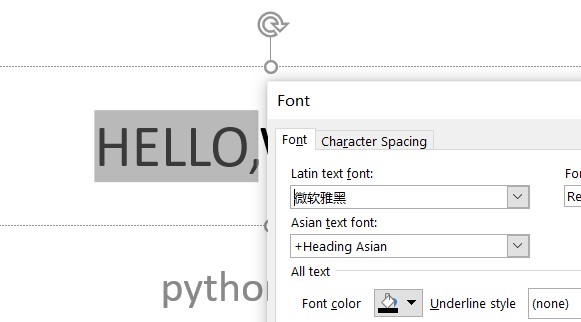 Okay~ let me change the question. For this picture, when i use 'paragraph.font.name = 'Microsoft YaHei'', this program can only define the item ‘Latin text font’ as ‘Microsoft Yahei’, but what I want to define is the font of Chinese characters, so I need to define the item ‘Asian text font’ as ‘Microsoft Yahei’.
So what should i do?
THANKS
Okay~ let me change the question. For this picture, when i use 'paragraph.font.name = 'Microsoft YaHei'', this program can only define the item ‘Latin text font’ as ‘Microsoft Yahei’, but what I want to define is the font of Chinese characters, so I need to define the item ‘Asian text font’ as ‘Microsoft Yahei’.
So what should i do?
THANKS
Ah, okay, I get it now. Unfortunately there's no API support for that.
If you want it bad enough and have the skills, you can modify the underlying XML directly. Have a search on "python-pptx workaround function" and you'll find some examples. I expect you'll find the element or attribute you need to change in the runproperties (rPr) element.
To find out where that goes, print out the XML from a small-as-you-can example paragraph that looks the way you want and compare that with one you generate with python-pptx.
https://zhuanlan.zhihu.com/p/548039429 I had solved this problem by edit XML

