
obsidian-omnisearch
 obsidian-omnisearch copied to clipboard
 scambier
[BUG] Obsidian UI freezes during cache operations
Problem description:
If you have many files modified outside of Obsidian and then Omnisearch triggers the cache diff, Obsidian UI just freezes for a while.
I opened the console then waited until UI freezes again and the last message in the console was
plugin:omnisearch:formatted:14652 Omnisearch - Checking index cache diff...
I waited for a few minutes and it unfroze
The it froze again with
plugin:omnisearch:formatted:14673 Omnisearch - Writing cache...
And unfoze in some minutes again with
app.js:1 Uncaught (in promise) DOMException: Transaction timed out due to inactivity. @ app.js:1
plugin:dataview:13718 Uncaught (in promise) DOMException: Transaction timed out due to inactivity.
storeFile @ plugin:dataview:13718
plugin:omnisearch:formatted:6407 Omnisearch - Search cache written
plugin:omnisearch:formatted:14675 Omnisearch - Indexing total time: 666118.7561035156 ms
So it seems to me that during those cache operations Omnisearch is doing UI blocking which makes a horrible UX, because you just want to kill Obsidian process and start over.
Ideally, those operations has to be made non-blocking.
If it is not possible, at least some visual progress indicator has to be added to the UI so the user knows the reason for the UI blocking.
Your environment:
- Omnisearch version: 1.8.1
- Obsidian version: 1.0.3
- Operating system: Windows 11 22H2 (OS Buld 22621.819)
- Number of notes in your vault (approx.): 49834
- Other plugins that may be related to the issue: DataView

Ideally, those operations has to be made non-blocking.
A few of them can, but most of the freezing is caused by minisearch removing/re-adding your notes, and that must be done on the main thread. It's supposed to be faster than a full reindex, but if most of your notes are modified, it will indeed take significantly longer :/
I can try to move the diff calculation in a worker, and at least force a full reindex if something like more than x notes (or x% of your vault) have been changed outside Obsidian.
Anyway, this is symptomatic of a more general problem with Omnisearch: it doesn't scale. Or, actually, the cache doesn't scale. Which is unfortunate, since it's only useful for bigger vaults 😩. The problem is that the most resource-intensive operations (indexing and (de)serialization) have to be done on the main thread, and there's not much I can do aside putting a few wait() instructions in loops.

(indexing and (de)serialization) have to be done on the main thread
@scambier I am not so sure about it. From what I see, at least Dataview managed to move their indexer into the separate workers

I'll have to take a look then.
I already thought about using minisearch from a web worker. I'm not sure if that's doable, but if it is that should alleviate a lot of issues.
Minisearch just released a new (beta) version, so I've updated Omnisearch beta to take advantage of the new features.
You'll still have a freeze of a few seconds when loading the cache at startup (~10 seconds on my vault of 1000 notes + 4000 pdfs), but everything else, like reindexing thousands of files, should at most cause stutters.
I've tried to do some indexing with a web worker, but I couldn't get it to work. The problemes are mostly related to bundling, even though I don't see what I'm doing differently than Dataview 🤷♂️ I'll try again later.
@scambier Unfortunately, it is still unusable. It freezes for few seconds during just scrolling in the file explorer. The console just has many Omnisearch - Search cache written messages, which is strange, because just scrolling should not trigger any cache updates. Even scrolling in settings frezees for seconds.
Got the warning Timer 'Omnisearch - Indexing total time. After this warning, freezes stopped
Testing on 1.9.0-beta.7
Not sure what's causing that much writes, since it's only called once (sometimes twice, actually) during onLayoutReady. I removed the 2nd useless call in 1.9.0-beta.8.
For me, the newest version completely freezes obsidian (it goes completely blank and I can't do anything, even collect the logs). Doesn't matter if PDF searching is turned on or off. I am getting notification 'Omnisearch - 617 files need to indexed. Obsidian may experience stutters and freezes during the process' and after 20 sec it goes blank (black screen). Unfortunately, I had to completely disable Omnisearch to be able to use obsidian and it wasn't an easy task as I had 3 sec to go to options before obsidian freezes :D Omnisearch is the only active plugin.

@wzajchow did you try to install beta? I had similar issue on the release version, but in beta I'm fine
The latest beta was published on the regular channel as 1.9.0 yesterday.
@wzajchow is it freezing on desktop or mobile?
Here is how it looks like
- Obsidian still responsive:
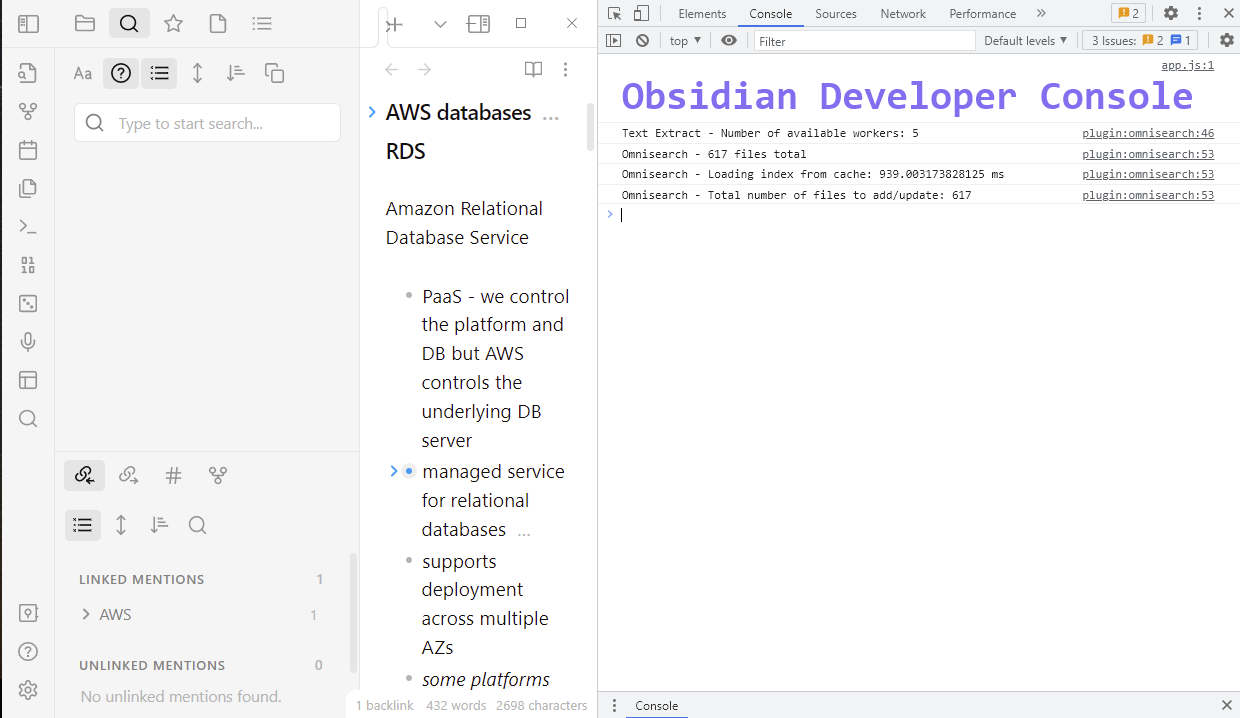
- Obsidian freezes

- Black screen

Can you double check that PDF and OCR are disabled? This error could be related to web workers when reading PDFs and images.
After disabling Omnisearch, you can check that all the cache is cleared. Press ctrl+shift+i to display the developer tools, than go into the "Application" tab and delete the databases that are named "Omnisearch" (if any is left):
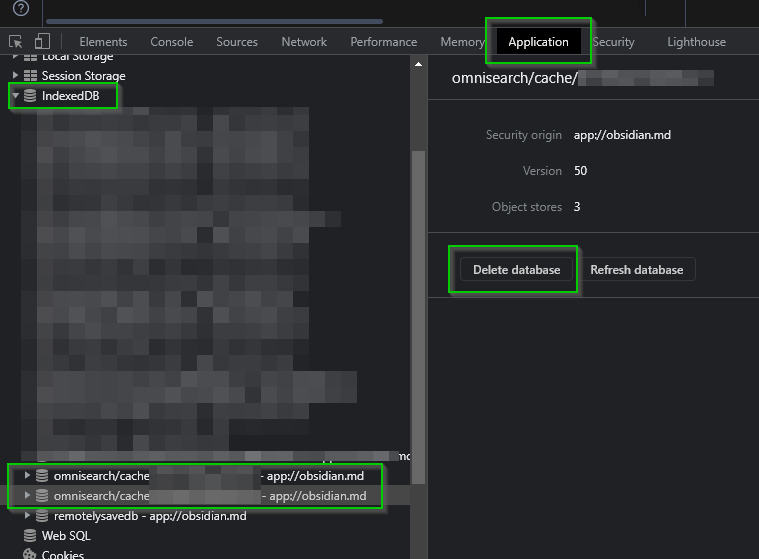
If it's still crashing, it could be linked to one of your files that is somehow locking Omnisearch. Maybe try removing all your files from your vault and add them folder by folder? I'll take a closer look asap, thank you.
I found the problem. PDF indexing was disabled but I had added additional file types (txt ppt pptx) some time ago and forgot about them. After I removed them from the list obsidian is not crashing anymore (even with PDF indexing enabled).
Android frequently kills Obsidian even when we tell it not to optimize the app for battery life. Reindexing and updating the cache makes Obsidian unresponsive for 10 seconds or so, and this ruins the users experience of taking quick notes.
I'm positive that I enabled "save to cache" before but I just checked and it was disabled. Maybe an update reset the config. This has happened before with another plugin. Anyways, I re-eanbled it so hopefully, this speeds things up.
