

 samvera
Links for requirements when creating new items
Descriptive summary
To improve accessibility, we turned the text for each required step for creating a new work into a link. Users with visual impairments would encounter the link and be able to activate it, which at that point, takes them to the relevant section that needs completion. This is also a benefit for users who aren't visually impaired because it directly "links" the message with what needs to be completed. The screen reader also announces the changes in status when they happen.
To get this to work, we needed to apply some additional javascript to activate/deactivate the respective tabs.
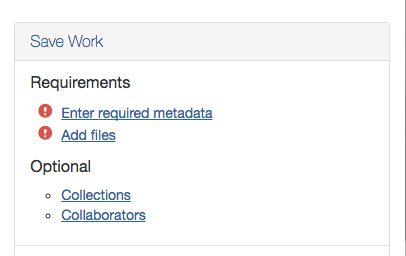
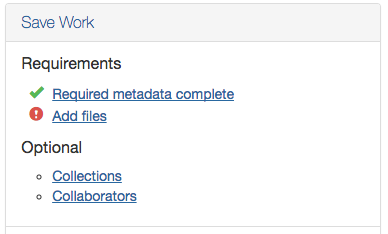
Note that the text of the link also changes when it's complete. This is mainly for the screen reader.
Related work
https://github.com/psu-stewardship/scholarsphere/commit/316b2b0e7


Seems to have potential and I just have questions about how it would work -
When required metadata is complete - is there utility in it remaining a link?
When required metadata is incomplete - the link would go to the first required field - then if other required fields were not completed, the same link would go to the next required field, etc.?
Does this require any coordination with https://github.com/samvera/hyrax/issues/1030 which is kind of in the same dialogue area?
At Cincinnati we will not be requiring attached files - I understand that this is a configuration option. The "Optional" section looks new to me - would 'Add Files' move to Optional for those of us configuring Hyrax not to require attached files?

