

 samhocevar
Feature request: Visual feedback that you are doing something
Something I feel WinCompose lacks compared to other IMEs is, in other IMEs, every keystroke results in something being displayed on the screen.
For instance, if I start typing some Japanese, I get partial input with a dashed underline.
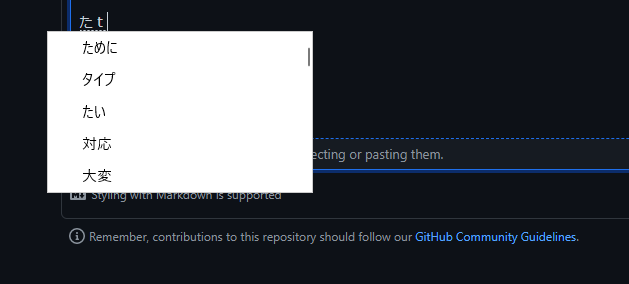
A latin equivalent example,
Scenario: Starting to type the character é
    Given that I have pressed the compose key
    When I press e
    Then I should see e with a dashed underline

Scenario: Typing the character é
    Given that I have pressed the compose key
    And pressed e
    When I press apostrophe
    Then I should see é without an underline

This is a difficult issue; I have started experimenting with it (see also #38 which is very similar) and I have two problems:
- some programs do not play well with the system and hide the caret position, so it is impossible to open a window at the right place using standard windows API
- handling multiple screen setups where one monitor is 4K (high-dpi) and one isn’t has proved challenging
Although this would be a wonderful addition, right now I am not putting much effort in this task due to the complexity.

Yeah, there is definitely some annoying stuff to handle for some applications which hide the caret (games spring immediately to mind) and in some cases I've had to open tickets against games saying please let IME position its window correctly in the chat box haha.
The workaround that existing IMEs seem to follow here is to pop up their own new window some distance from the bottom left corner of the screen and then render inside that.
It's sort of too bad that Microsoft can't give us a shared framework so that all IMEs can just work the same way.