

 sameersbn
Documentation typo: length shoulud be 64
https://github.com/sameersbn/docker-gitlab/blob/master/README.md#gitlab_secrets_db_key_base


It seems this should be /home/git/data/certs/gitlab.crt https://github.com/sameersbn/docker-gitlab/blob/master/README.md#gitlab_registry_generate_internal_certificates

Host system directory should be on left. No?
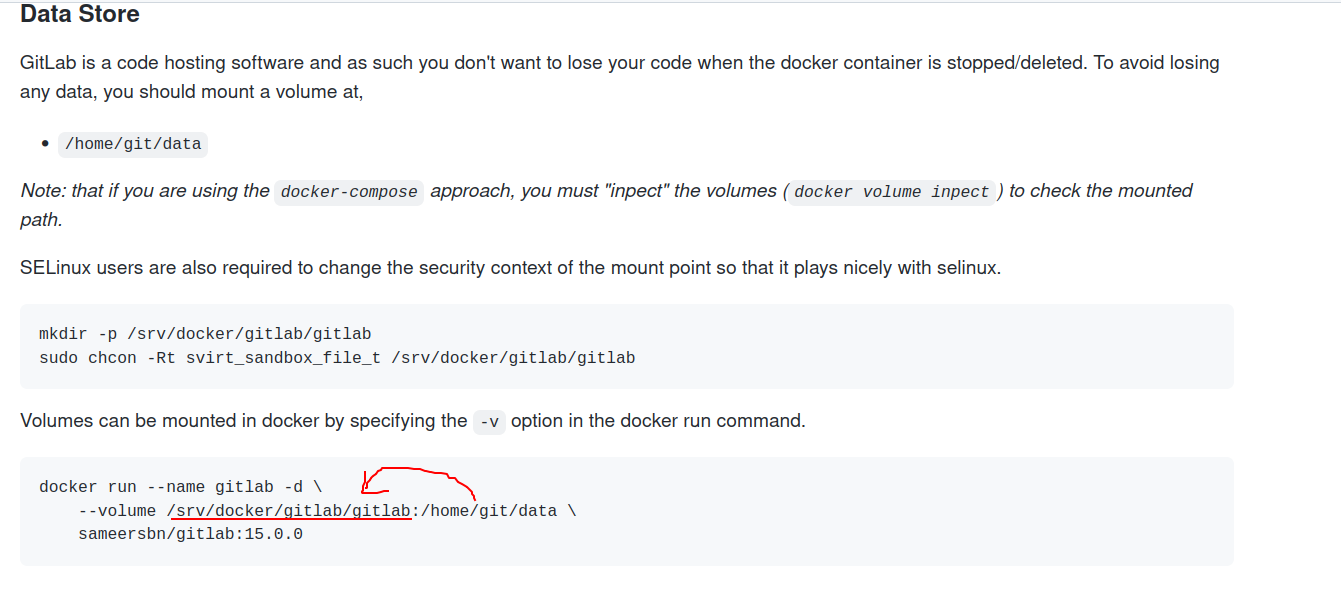
https://github.com/sameersbn/docker-gitlab/blob/master/README.md#data-store
https://github.com/sameersbn/docker-gitlab/blob/master/README.md#gitlab_secrets_db_key_base
Minimum requirement is 32 characters, so it is OK to have 64 chars length.
It seems this should be /home/git/data/certs/gitlab.crt https://github.com/sameersbn/docker-gitlab/blob/master/README.md#gitlab_registry_generate_internal_certificates
May I ask why?
This is just an example and default value, so the user can change this to /home/git/data/cert/registry.key as you wrote, to persist it. But I think we usually don't need to care internal cert between gitlab and registry.
(I have never used registry on this project so I simply interested in your opinion)
Host system directory should be on left. No?
https://github.com/sameersbn/docker-gitlab/blob/master/README.md#data-store
Yes sure, host system is on left side. /srv/docker/gitlab/gitlab is on host (off course you can change this to match to your environment), /home/git/data is in container. There no mistake.

- Here was wrote requirements of 64: https://github.com/sameersbn/docker-gitlab/blob/master/README.md#quick-start
- I thought that these certs are same thing thus should be pointed to same directory.
- That is ambiguous. When doc says
The default path image is configured to look for the trusted SSL certificates is at /home/git/data/certs/ca.crt, this can however be changed using the SSL_CA_CERTIFICATES_PATH configuration option.Does it mean path/home/git/data/on host system or container?
For example official Dockerfile has config at /etc/gitlab

So trying to mount unexisting /home/git/data to host system will surprise =(
Sorry for late.
- I have not get clear answer yet, but I can say something in our documentation is wrong. I will try to check later, of course contributions are welcome.
note 1: I have confirmed that gitlab works with no major issues even I set shorter value to
db_key_baseand so on (for example 10 characters length). note 2: As far as I researched, the length of newly-generated keys are 64 on latest release. note 3(edit): I have setdb_key_baseblank then I get 128 char length value for it. I will check more detail... - This repository provides source-installed gitlab as docker image, so there are many difference from official docker image.
/home/git/data(GITLAB_DATA_DIR) is exists on container ofsameersbn/gitlab. Please refer volume section in Dockerfile
Best,
Thank you for attention. I am newbie here. Trying to highlight typos or ambiguous places (in my opinion). Hope they help
@kkimurak I went through the thread here. Wanted to know if this issue is still open. Also, you mentioned that something in the documentation is wrong. Is it about the value of db_key_base? I can help with rectifying the docs if needed :)
