

 sameera-madushan
http 304 error fix
edit PosterPy.py
line 62 remove the old
and add this line ia = imdb.Cinemagoer()
this happen because the package imdb got updated
hope this help any one there

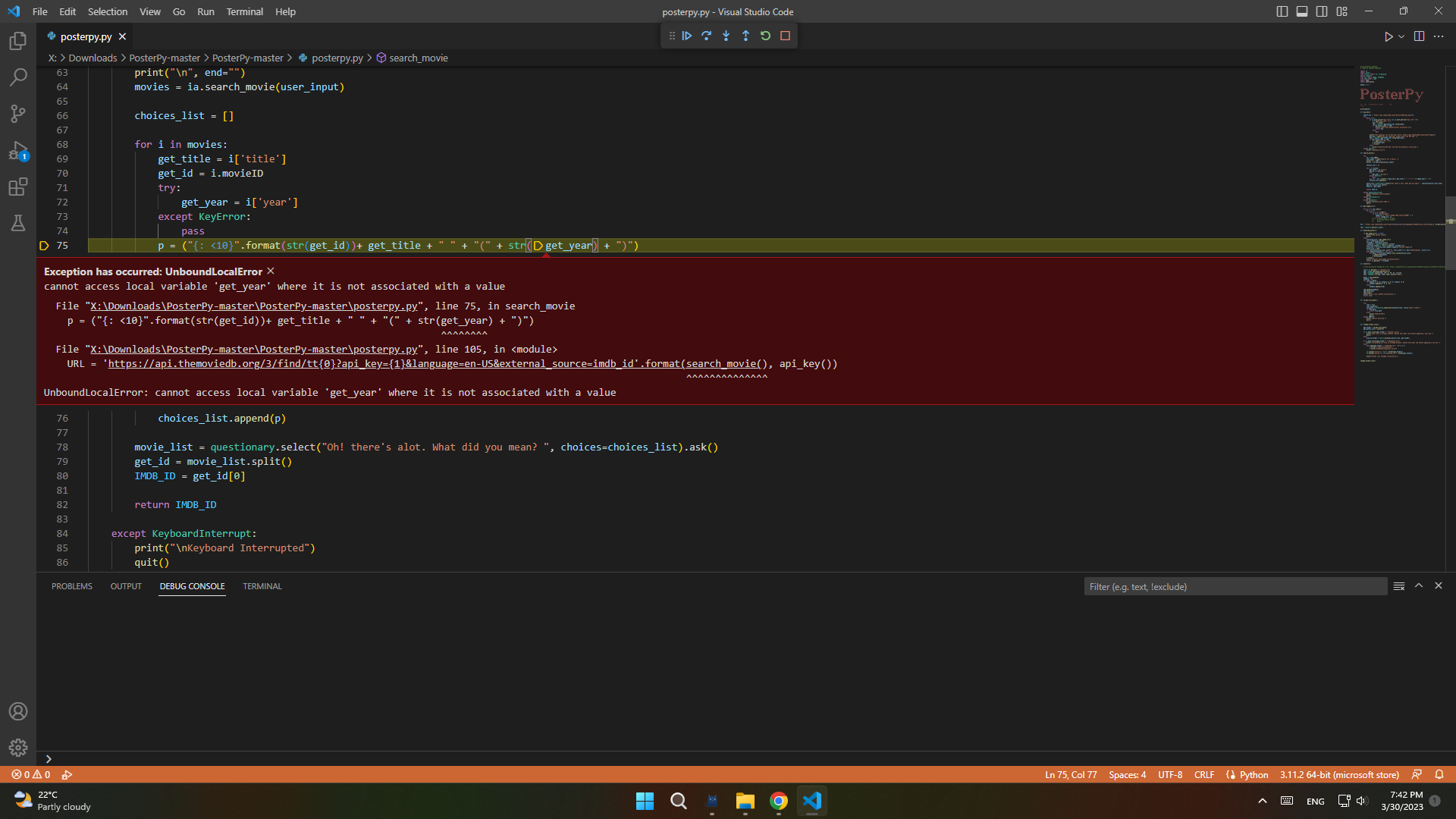

Do this make a venv folder activate the venv and install the requirements.txt by this command pip install -r requirements.txt this will download the package with the right version in a private container and git clone the project and it should run with no problem
i modified the source code to work with series or tv show if you are interseted read the code first before running it and if there is a bug or error ,plz tell https://drive.google.com/file/d/1PcUMXk76eqJOUFPwDV84-pyFx4nx5ZCH/view?usp=share_link dont forget to add the token
i modified the source code to work with series or tv show if you are interseted read the code first before running it and if there is a bug or error ,plz tell https://drive.google.com/file/d/1PcUMXk76eqJOUFPwDV84-pyFx4nx5ZCH/view?usp=share_link dont forget to add the token
Hello, I tested your code and wasn't able to solve the problem. here are the error:
Enter the name of the movie: Ant-man and the wasp (2023)
Error: No movies or TV series found
Traceback (most recent call last):
  File "C:\Users\Username\Python Library\Scripts\Movies_Series_Icons.py", line 114, in <module>
    if movie_details is not None:
       ^^^^^^^^^^^^^
NameError: name 'movie_details' is not defined. Did you mean: 'get_movie_details'?
EDIT: oh right, it would be great if you can comment each function for what are they used for.
EDIT 2: nvm. i figured out the problem. it's working. Strange. 🤔 the only thing I did is shut down cmd.exe and re-started cmd.exe

thx for testing the code , you don't need to say the full name of the movie example ant give the results
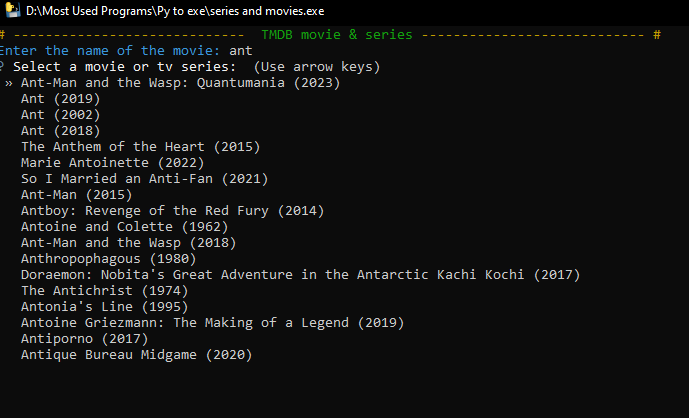 1- i will give you a short explain search_movie connect you to imdb by your api key show_movie_list_and_choose making empty list using your search word it check if the word is in movies if not it check for series and appending every result mostly top ten give you the results
2- there is a bug that is strange and i cant fix it some movie poster image are download in corrupt form tried all way to download it in other form and image extension but the problem still there my work around is trying the script 2 time and the folder will change
3- for easy use i suggest repackage the script as a .exe and make the .exe in the right click menu
1- i will give you a short explain search_movie connect you to imdb by your api key show_movie_list_and_choose making empty list using your search word it check if the word is in movies if not it check for series and appending every result mostly top ten give you the results
2- there is a bug that is strange and i cant fix it some movie poster image are download in corrupt form tried all way to download it in other form and image extension but the problem still there my work around is trying the script 2 time and the folder will change
3- for easy use i suggest repackage the script as a .exe and make the .exe in the right click menu
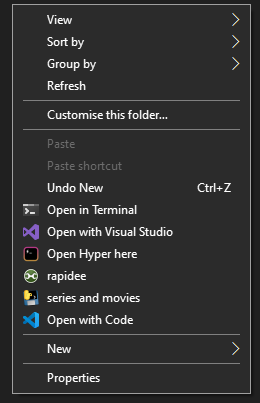 to repack the .py you can use auto py to exe and the right click you can use program called Right Click Enhancer Professional
4-here a full detailed explain of the code by chatgpt sorry im lazy and i forget what code i did XD This code is a Python script that allows a user to search for a movie or TV series using The Movie Database (TMDB) API and then download its poster as an icon to use for their desktop shortcut. It utilizes several Python libraries such as os, shutil, requests, PIL, questionary, termcolor, and uuid.
The script begins by importing the necessary libraries and setting up a variable to store the current working directory. It then sets the attribute of the working directory to "s" to enable the creation of hidden files.
Next, the user is prompted to enter the name of the movie or TV series they want to search for. The search_movie function is called, passing in the user's input as a parameter. If the search is successful and results are returned, the show_movie_list_and_choose function is called to display the search results to the user and allow them to select a movie or TV series. The function presents the results in a formatted list with the movie or TV series title, release year, and poster thumbnail image.
If the user selects a movie or TV series, the get_movie_details function is called, passing in the selected item ID and media type as parameters. The function retrieves the details of the selected movie or TV series and returns them as a JSON object.
The script then uses the details returned by get_movie_details to download the poster image using the download_image function. The function takes in the poster URL and the movie title as parameters and saves the image file with a unique identifier.
Once the image file is downloaded, the create_icon function is called to convert the image to an icon file. The function uses the PIL library to open the image file and convert it to RGBA format. It then expands the image with a black border and saves it as an .ico file.
Finally, the create_desktop_ini function is called to create a desktop.ini file in the working directory. The file contains information about the icon, such as its location and index. The function takes in the icon file name as a parameter.
The script ends by printing a success message to the console, indicating that the icon has been created. It also calls the clean_up function, which removes the image file and hides the icon file and desktop.ini file after 50 seconds to prevent cluttering of the working directory.
thx for testing the code , you don't need to say the full name of the movie example ant give the results
Ah, of course. I understand now. so "full name" is not necessary.
Edit: Forgot to mentioned this, you can use Double quote, and it works fine. "Ant-man and the wasp" will only get you two result... which is quite good.
As for (1), I have 75% understanding of how the code works. 👇
4-here a full detailed explain of the code by chatgpt sorry im lazy and i forget what code i did XD
lol! that's not what I meant. It took me a while to go through your code to get a full picture of what it do, i already added comments myself. Comments can be useful to explain what are they for. just simply what's their purpose. u know?
2- there is a bug that is strange and i cant fix it some movie poster image are download in corrupt form tried all way to download it in other form and image extension but the problem still there my work around is trying the script 2 time and the folder will change 3- for easy use i suggest repackage the script as a .exe and make the .exe in the right click menu
interesting. I'll keep that in mind.
And lastly, you may want to take a look at here: Latest PosterPy
it's the latest version of posterpy and it is using Cinemagoer and other latest version of packages. The latest version of Python will work fine.
- I didn't know they have another repo thx for telling me and the string search that is interesting
the reason I didn’t make comments because I change the code a lot and it was a mess ,I made it as side project because the main posterpy did have some problem the way it modifies the picture it takes all black pixels and made them transparent then expand the border this made the image broken many transparent areas in the middle and I wanted it to support series since imdb doc say it supports it
- I didn't know they have another repo thx for telling me and the string search that is interesting
np!
the reason I didn’t make comments because I change the code a lot and it was a mess ,I made it as side project because the main posterpy did have some problem the way it modifies the picture it takes all black pixels and made them transparent then expand the border this made the image broken many transparent areas in the middle and I wanted it to support series since imdb doc say it supports it
i never had a problem with Posterpy regarding how picture are modified. I'll pay attention to that next time i use it.
"main Posterpy", u meant the original one? 🤔
The only problem I have with it is that it cannot find the available picture to use for changing folder icon into that "poster". That's quite rare, tho.
I didn't try the new repo yet , the repo that had the problem sameera-madushan/PosterPy The only problem I have with it is that it cannot find the available picture to use for changing folder icon into that "poster". That's quite rare, tho. you mean it sometimes say there is no poster available