

 sam-ke
无法正常显示姓名和地址
大佬您好,我想请教一下,这里为啥姓名和地址这两个地方识别准确率低,甚至有时候直接是空的,不知道最终的输出是什么,期待您的回复,可否留个联系方式【wx:nvshenj125】
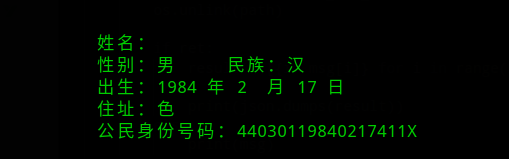

识别的流程如下: 1.把图片进行二值化, 2.粗略计算文字所在的区域位置 3.判断图片是否有旋转角度,如果是,则透视变换矫正重复1,否则4 4.裁图 5.二值化,根据水平投影确定文字行 6.遍历文字行,根据垂直投影确定文字行的左右边界,精确裁剪 7.对步骤6裁剪的图片ocr识别 8.重复5
在以上步骤中,对最终识别影响比较大的有如下几点: 1.图片倾斜比较严重。 会导致4步骤裁图时,把文字区域误裁掉 2.图片的背景和身份证颜色区分度不高或背景色比较花哨,导致二值化效果不好 3.ocr 识别不准确
解决: 首先开启debug模式(ocr.py中 DEBUG=true),利用pycharm IDE进行断点调试, 直观查看裁图情况。 如果裁图不正确,可以调整参数比如:二值化算法顺序等等 如果正确裁图,那么就是识别字库的问题了,这个只能靠自己训练字库来解决

请问如何使用,我使用./dist/ocr -h ./images/w22.jpg和./dist/ocr -h ’./images/w22.jpg‘,./dist/ocr ./images/w22.jpg,./dist/ocr ‘./images/w22.jpg’均报错。 usage: ocr [-h] image positional arguments: image path to image file

请问如何使用,我使用./dist/ocr -h ./images/w22.jpg和./dist/ocr -h ’./images/w22.jpg‘,./dist/ocr ./images/w22.jpg,./dist/ocr ‘./images/w22.jpg’均报错。 usage: ocr [-h] image positional arguments: image path to image file @DWCTOD
@DWCTOD 谢谢回复,我执行python ocr.py './images/w22.jpg' 报错:too many values to unpack 请问你执行python ocr.py './images/w22.jpg'能成功运行吗
我运行python ocr.py ./images/w1.jpg报下面得错误,不知道为啥 Error, unknown command line argument '-psm' [Errno 2] No such file or directory: 'D:\Junior\graduatesheji\code\chineseocr\useful\idCardOcr-master\idCardOcr-master\include/200c67d4-737c-460d-80bd-01895892c487.txt' 你们有遇到嘛
