
PySprint
 PySprint copied to clipboard
 salem-ok
Recreation of the Atari ST port of Super Sprint with Pygame
PySprint
Remake the Atari ST port of Super Sprint by Electric Dreams from 1985 in Python with Pygame
The idea is to:
- Get as close to the original as possible in terms of gameplay
- Fix the very few annoying things (mandatory wait of 5secs before each race for example)
- Add features like custom tracks and cars, custom music, and hopefully remote multiplayer...
- Learn Python and have fun!
Prerequisites:
- The game requires the pygame, loguru, pathlib and numpy packages to run if you download the source and want to run it interpreted
- Release v0.38 Notes
Installation
-
Windows:
Windows for 64bit Intel or AMD CPUs (built & tested on Windows 10) Installation:
- Download and launch the pysprint-v0.38-windows-amd64.exe setup program and follow instructions
- Double click on the PySprint shortcut on you desktop or in your Start menu to run
-
Mac OS
Mac OS for 64bit Intel CPUs (built & tested on MacOS Big Sur 11.6) Installation:
- Download and open the pysprint-v0.38-macos-amd64.dmg file
- Drag and drop the pysprint App int you Applications folder (or any other folder)
- Double click on the App to run
-
Linux
Linux for 64bit Intel or AMD CPUs (built & tested on Ubuntu 21.04) Installation:
- Download and unzip the pysprint-v0.38-linux-amd64.zip
- Open a terminal in the 'pysprint' folder
- run ./pysprint
-
Raspberry PI OS
Linux for ARM CPU (built & tested Raspbian GNU/Linux 10 (buster) on a Raspberry Pi 4) Installation:
- Download and unzip pysprint-v0.38-linux-arm.zip](https://github.com/salem-ok/PySprint/releases/download/v0.38/pysprint-v0.38-linux-arm.zip)
- Open a terminal in the 'pysprint' folder
- run ./pysprint
FAQ:
- Feel free to check existing questions and add you own: Q&A
Game navigation
The game starts in "Attract mode" cycling through several screens -Spash Screen, High Scores, best Laps, Credits etc.:
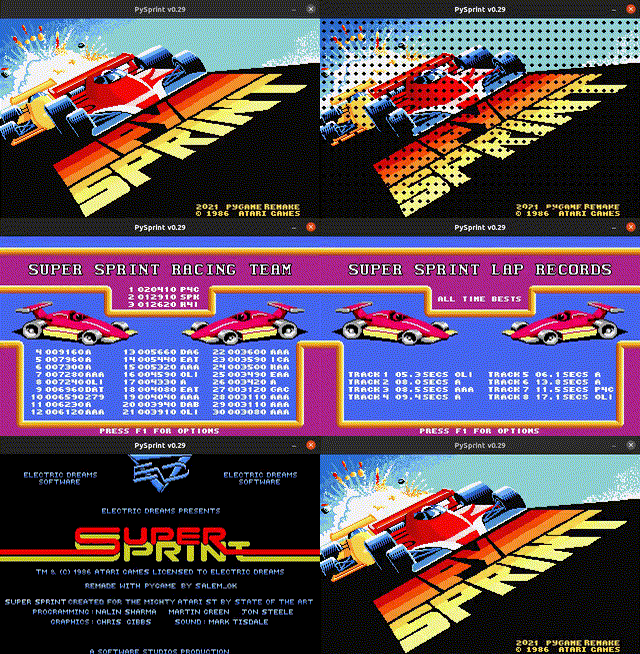
Attract mode commands:
- Hit F1 for Options:
- Re-mapping of keyboard controls for 2 players
- Re-assigning of Gamepads & keyboard controls to any car color
- Any Gamepad plugged and detected by your OS should be available (USB, Bluetooth or other)
- Up to 4 Gamepads or Joysticks can be assigned

- Hit F4 to toggle Scaled Window Mode (will not work on the Raspberry Pi)
- Hit ESC or close the Window to Quit the Game
- Hit acclerate for any player to start a game:
- The first player to hit accelerate selects the track (left-right to choose, accelerate to select).
- Other players can join during track selection

- Once the track is selected the start screen is displayed: - Before each race any player can join the game by hitting accelerate - You can skip the countdown to start racing right away by hitting space

In game Controls:
- Hit ESC or close the Window to Quit the Game
Default Car controls (can be adjusted in the Options screen)
Blue car:
- Accelerate: Right Ctrl
- Left: Left
- Right: Right
Green car:
- Accelerate: Left Ctrl
- Left: X
- Right: C
Yellow car:
- First Detected Joystick:
- Any D-PAD or Analog Pad or Stick for Left and Right
- Any button for accelerate
Red car:
- Second Detected Joystick
- Any D-PAD or Analog Pad or Stick for Left and Right
- Any button for accelerate
 salem-ok