

 sabrogden
number in 'quick paste keyboard' is too small, could you add its size?
Hello, though Ditto is a free and good software, but number in 'quick paste keyboard' is too small, it's inconvinient, could you add its size? Thanks very much.


Options - general - advanced - First ten hot keys font size, or if you just don't want to show them, Show Text for first ten copy hot keys
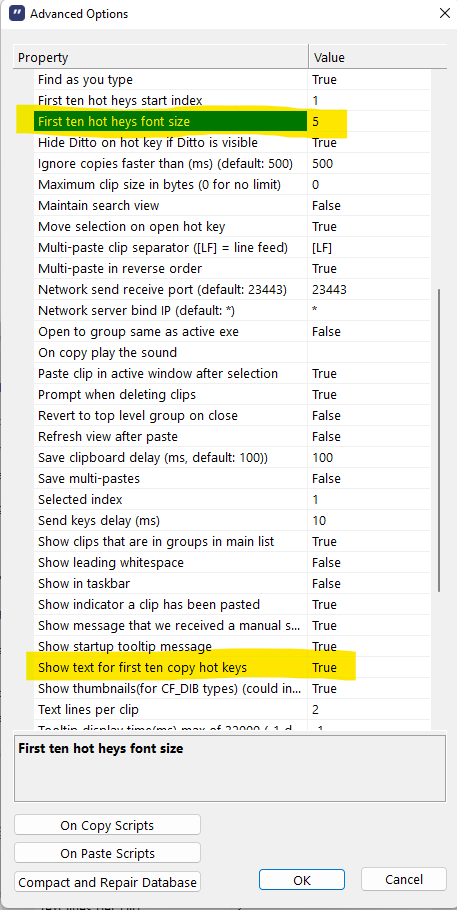

Thank you for reporting @tulei770415 Thank you for the workaround @sabrogden
I have been using Ditto for more than 5 years, but am not using these shortcuts most of the time. I suspect that is because of the difficulty reading, yet my vision must be better than average.
This issue is less bad in dark mode since there is no contrast issue, but I agree that the default size is too small. I just increased the size to 9 on my PC.
Ditto calls the clips in question "first ten copies" here, but "Last Ten Items" in the Keyboard Shortcuts tab. Please retitle this to something like:
Quick Paste: Keys (numbers) for last ten clips shortcuts lack legibility (should be enlarged by default)
Here are suggestions to improve legibility (without losing [much] space):
- Increase the default font size to 9
- Make the font black in light mode
- Make the border to the right of the numbers more subtle (perhaps dotted) or add 1 pixel of right padding.
- Align the number centered or down
