

 saadeghi
Drawer that opens from right side of page (double scrollbar bug)

This is the code I copied from the website:
<div class="drawer drawer-end">
  <input id="my-drawer-4" type="checkbox" class="drawer-toggle" />
  <div class="drawer-content">
    <!-- Page content here -->
    <label for="my-drawer-4" class="drawer-button btn btn-primary">Open drawer</label>
  </div>
  <div class="drawer-side">
    <label for="my-drawer-4" class="drawer-overlay"></label>
    <ul class="menu p-4 overflow-y-auto w-80 bg-base-100 text-base-content">
      <!-- Sidebar content here -->
      <li><a>Sidebar Item 1</a></li>
      <li><a>Sidebar Item 2</a></li>
    </ul>
  </div>
</div>
I did exactly as told and inserted where my content should be (inside div with class of drawer-content ). the drawer works but i notice a scrollbar appeared and it belongs to the SAME div with the class of drawer-content. I tried every possible way to disable the scrollbar but to no avail. i could only hide it but the functionality still remains. i only want my main scrollbar (html).

I've had a look at the drawer and It seems to me that the <div className='drawer-content'> takes has h-screen but the button is pushing it down. and it takes more space creating the 2nd scrollbar.
Add a div with max-h-screen and wrap it around the drawer.

Hi, try use this. Put this in your css file
/* Hide scrollbar for Chrome, Safari and Opera */
.drawer-side::-webkit-scrollbar {
    display: none;
}

I could not reproduce this.
Here I only see 1 scroll bar and when the drawer sidebar opens, I only see the sidebar scrollbar:
https://play.tailwindcss.com/qDEqG17DUq
Can you share a sample repo?

I'm dealing with the exact issue for some time now. At first I thought it's a bug within my setup than it exists on daistyUI official website. It might a safari thing (the browser I'm using). It's not about the display of the scroll bar but also the scroll lock.
https://user-images.githubusercontent.com/65782666/188478394-f662f8ce-2cf5-4be0-89f3-9570f892c8ae.mov
Tried to reproduce it in the play env but couldn't. @saadeghi I can invite you to the repo I'm facing the issue in

Adding h-screen tailwindcss with h-screen seems to fix it. But the scroll lock is still there as with the official website.
On safari I still have the issue of two scrolls. Stuff works well until I hit the bottom of the screen and then can't see the footer, in which case it gives me another scroll where if I scrolled, I no longer see the navbar
Weird, but this same situation was happening to me. Since the <div className="drawer"> is already a wrapper. Nothing worked but giving that wrapper the absolute class to eliminate the double scrollbars.

I have this issue too @ekqt s suggestion is the only one working for me , but we shouldnt have to use absolute

onHide: () => {
    document.body.classList.remove('overflow-y-hidden')
},
onShow: () => {
    document.body.classList.add('overflow-y-hidden')
}
In code open / hide drawer

I think this happens because you have your Header outside the drawer div.
you can see the scroll bar appears right after your Header, include Header inside your drawer-content, but your layout will change and it will look like this
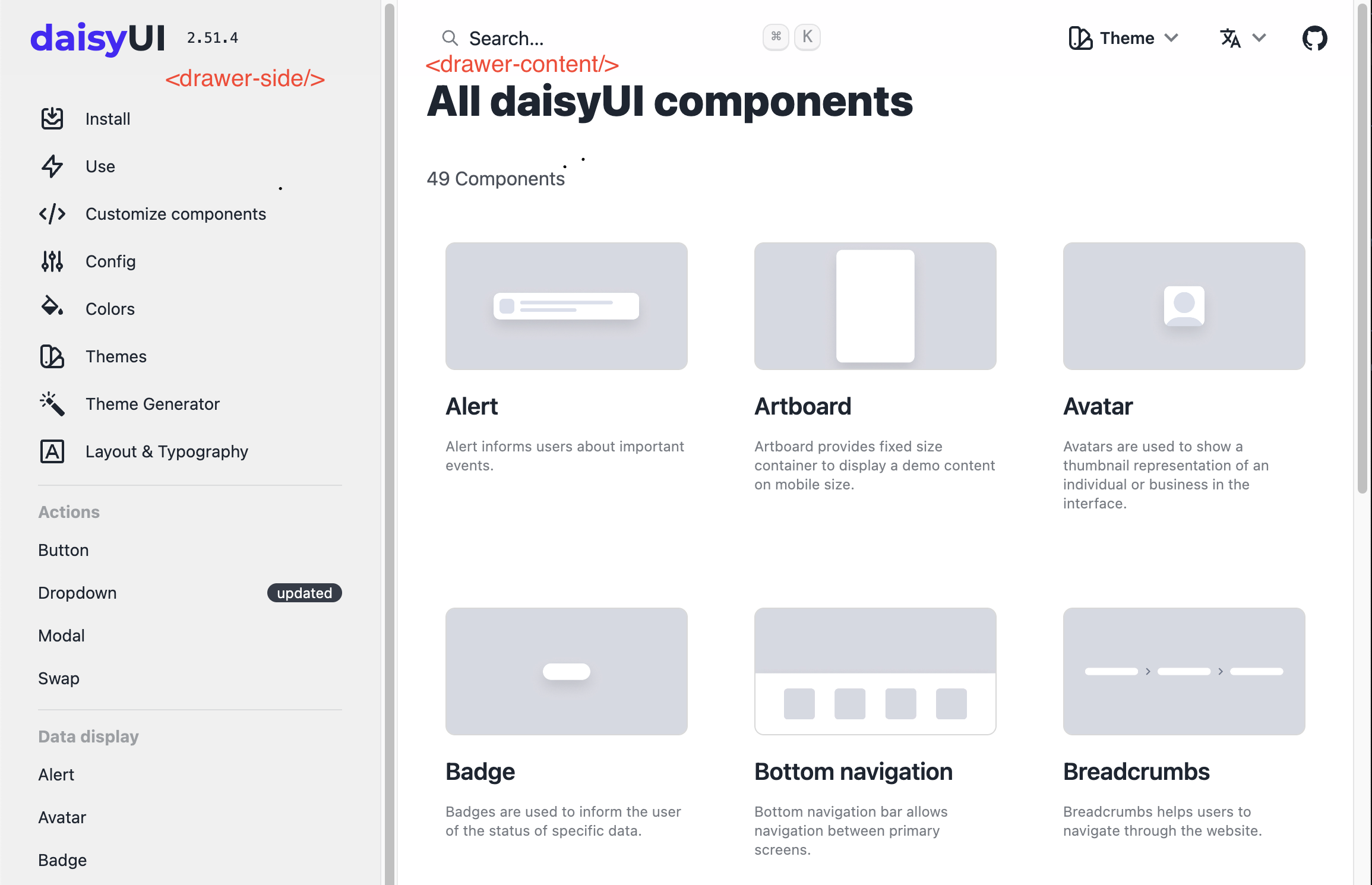

Make sure the div structure is the same as mentioned in the docs: https://daisyui.com/components/drawer/
.drawer // The root container
  ├── .drawer-toggle // A hidden checkbox to toggle the visibility of the sidebar
  ├── .drawer-content // All your page content goes here
  │    ├── // navbar
  │    ├── // content
  │    └── // footer
  └── .drawer-side // Sidebar wrapper
       ├── .drawer-overlay // A dark overlay that covers the whole page when the drawer is open
       └── // Sidebar content (menu or anything)
the drawer class is the container. And all your page content should be inside drawer-content
If your div structure is correct and you don't have other CSS styles (from other sources) that might modify styles, it will work correctly (like this example: https://play.tailwindcss.com/qDEqG17DUq)
If your structure is correct but you see double scrollbars, please share a minimal reproduction repo so we can see the issue. Otherwise it would be so hard to help because we should just guess 😅
@saadeghi Is it just me or does your example also have double scrollbars? Tested in Chrome Version 117.0.5938.132 (Official Build) (64-bit) and Firefox 121.0 (64-bit)
