

 saadeghi
Daisyui incompatible with tailwind >=3.2.2?
Hi,
I'm running into a strange error when bumping a working project with tailwind 3.2.1 to tailwind 3.2.2, with DaisyUI included at any version it fails the build. When removing DaisyUI from tailwind config, the build succeeds.
I did the whole wipe-cache/node_modules/... reset dance multiple times, tested different DaisyUI versions, changed order of the plugins. It seems to come down to daisyUI meets tailwind 3.2.2 or I'm doing something wrong.
rm -rf .parcel-cache && parcel build --log-level verbose --no-optimize --no-cache | cat
🚨 Build failed.

@parcel/transformer-css: Invalid empty selector

  ./src/main.css:2309:3
    2308 |   border-top-left-radius: 0.5rem;
  > 2309 | } {
  >      |   ^
    2310 |   border-top-left-radius: 0.5rem !important;
    2311 | }:where(.table *:first-child) :where(*:first-child) :where(th, td):last-child {
tailwind.config.js
/** @type {import('tailwindcss').Config} */
module.exports = {
  content: ["./src/**/*.{html,js,jsx,ts,tsx}"],
  plugins: [
    // require('@tailwindcss/typography'),
    // require("tailwindcss-animate"),
    require("daisyui"),
  ],
}
When injecting some console logging into @parcel/transformer-css I find this generated css and indeed, it is missing selectors:
}.\!table :where(thead, tfoot) :where(th, td) {
  --tw-bg-opacity: 1 !important;
  background-color: hsl(var(--b2, var(--b1)) / var(--tw-bg-opacity)) !important;
  font-size: 0.75rem !important;
  line-height: 1rem !important;
  font-weight: 700 !important;
  text-transform: uppercase !important;
}.table :where(tbody th, tbody td) {
  --tw-bg-opacity: 1;
  background-color: hsl(var(--b1) / var(--tw-bg-opacity));
}.\!table :where(tbody th, tbody td) {
  --tw-bg-opacity: 1 !important;
  background-color: hsl(var(--b1) / var(--tw-bg-opacity)) !important;
}:where(.table *:first-child) :where(*:first-child) :where(th, td):first-child {
  border-top-left-radius: 0.5rem;
} {
  border-top-left-radius: 0.5rem !important;
}:where(.table *:first-child) :where(*:first-child) :where(th, td):last-child {
  border-top-right-radius: 0.5rem;
} {
  border-top-right-radius: 0.5rem !important;
}:where(.table *:last-child) :where(*:last-child) :where(th, td):first-child {
  border-bottom-left-radius: 0.5rem;
} {
  border-bottom-left-radius: 0.5rem !important;
}:where(.table *:last-child) :where(*:last-child) :where(th, td):last-child {
  border-bottom-right-radius: 0.5rem;
} {
  border-bottom-right-radius: 0.5rem !important;
}.textarea-bordered {
Any ideas?

Can you please update every dependency (Parcel, daisyUI, Tailwind CSS, PostCSS) to the latest version and try again?
I could not reproduce the issue with tailwindcss 3.2.2 (or even latest version) and parcel 2.8.1
Here's an example repo: https://github.com/saadeghi/daisyui-parcel-table-issue

The issue remains with the latest versions.
I've also tried removing all extra packages used by parcel (except tsx) from parcel/babel/..., but no luck.
I've also tried porting all the project config (package.json, .parcelrc, .babelrc and tsx transform) to your example repo, but it doesn't reproduce there.
It seems something other than the table might be setting off the problem.
.babelrc
{
  "plugins": [
    ["@babel/plugin-transform-react-jsx", {
      "runtime": "automatic",
      "importSource": "shared/src"
    }]
  ],
  "comments": false
}
{
  "extends": ["@parcel/config-default"],
  "reporters":  ["...", "parcel-reporter-static-files-copy"]
}
.postcssrc
{
  "plugins": {
    "tailwindcss": {}
  }
}
package.json example repo everything added
{
  "scripts": {
    "dev": "parcel src/index.html --open",
    "build": "parcel build src/index.html"
  },
  "devDependencies": {
    "daisyui": "^2.43.0",
    "parcel": "^2.8.1",
    "postcss": "^8.4.20",
    "tailwindcss": "^3.2.2"
  },
  "dependencies": {
    "@babel/plugin-transform-react-jsx": "^7.19.0",
    "@parcel/transformer-inline-string": "^2.8.1",
    "autoprefixer": "^10.4.13",
    "parcel-reporter-static-files-copy": "^1.4.0",
    "typescript": "^4.9.4"
  },
  "browserslist": "> 0.5%, last 2 versions, not dead"
}
I have attempted to reproduce the issue, but have been unable to do so in a fresh repository. The repo where the error happens is still private and quite large. I have also tried removing all tables from the project, as it seems this may be what is causing the code to trigger the error, but this did not resolve the issue. Additionally, I have attempted to use cssnano and different build configurations, but the error persists. It appears to occur during the build step, not during CSS optimization. So far, I have not been able to find a solution.
It appears that there may be an incompatibility between parcel2, tailwind, and daisyui. Not sure. Due to the error blocking latest tailwind, I've started the process of removing daisyui from the project step by step, and will also try upgrading to tailwindcss 3.2.2 during the refactoring process. If the problem gets resolved when doing so, it may provide a clue as to where the issue is originating.
I'm sure with default config, Parcel, Tailwind and DaisyUI work together without issue. However, I think your build process is making some modifications to the CSS. For example, there are no !important rules in daisyUI or Tailwind by default but for some reason the code you mentioned is like this:
  ./src/main.css:2309:3
    2308 |   border-top-left-radius: 0.5rem;
  > 2309 | } {
  >      |   ^
    2310 |   border-top-left-radius: 0.5rem !important;
It is repeating the same line of CSS rule, once without !important and the second time with !important
That's weird.
I would like to help fixing this but I'm pretty sure the issue is not from daisyUI so I have to close this issue.
Feel free to continue the conversation. Or if you could provide a example reproduction repo, that would be helpful for finding the issue.
A clue might be found in the 2.23.0 version: I've done the reverse search, check with what daisyui version the build starts showing problems.
- With daisyui 2.22.0 and tailwind 3.2.4 it works.
- With daisyUI 2.23.0 and tailwind 3.2.4 it fails. No other changes. The issue lies somewhere in these changes: https://github.com/saadeghi/daisyui/compare/v2.22.0...v2.23.0
Updated with the correct version of failure: 2.23.0
I removed my previous comment. The root cause is not yet found. The issue remains.
The issue lies somewhere in these changes: v2.22.0...v2.23.0
This is the commit about table: https://github.com/saadeghi/daisyui/commit/4cedd563268847f01dfa8114ce0b1133e3b1e4b3 So basically I changed this:
.table {
  :where(:first-child) {
    /* style */
  }
}
to this
:where(.table *:first-child) {
  /* style */
}
and this is the only way to reduce the CSS specificity so the border radius of the table can be changed using utility classes (https://github.com/saadeghi/daisyui/issues/1001, https://github.com/saadeghi/daisyui/issues/848)
But nothing's wrong about this change. It's valid CSS and it works as expected.
I think the problem is from that part of your build process (I don't know what package or config is doing it) that is adding an !important rule.
Here:
🚨 Build failed.

@parcel/transformer-css: Invalid empty selector

  ./src/main.css:2309:3
    2308 |   border-top-left-radius: 0.5rem;
  > 2309 | } {
  >      |   ^
    2310 |   border-top-left-radius: 0.5rem !important;
    2311 | }:where(.table *:first-child) :where(*:first-child) :where(th, td):last-child {
That !important rule on line 2310 should not exist at all. It's the same rule from line 2308 but it's repeated again with an !important and of course it's not a valid line because this new unwanted rule has no selector.
I think you should find that which package or which config is adding that !important and disable it
Yes, thanks for joining in the search, it's an annoying problem.
I've checked for that, the problem is that I cannot find anything that sets it off. I've disabled and remove anything so that it becomes a vanilla setup with pure tailwind, daisyUI, JSX transformer and utility classes and components used. And the JSX transformer is not adding new classes. And Parcel build is quite a mess to debug.
While it is a big project (that used almost all daisyUI components), it is not a complex project. In the codebase there are no css overrides active, no plugins anymore and !utility classes are never used.
Let's close this and stop the search, while not my preferred choice, I've started removing Daisy from the project to be able to move on. I'll keep on trying to bump the version and see if it compiles at some point.
I'm running into this exact issue on a repo created yesterday Default tailwindcss and parcel installation, only with this configuration:
# .parcelrc
 {
"extends": ["@parcel/config-webextension"],
}
I can try getting a reproducible repo tomorrow

I take this back. went to sleep, woke up, cloned the repo to a second computer, and it now compiles correctly
not even sure if it's something wrong with my laptop setup, or if it was just a random heisenbug
@naps62 I'm glad the issue is gone. I still have no idea about the cause of issue but i'm sure it's not from daisyUI. daisyUI and Tailwind CSS do not apply !imporant rules by default and CSS build tools should not do that automatically either.
It's dangerous to use !important in CSS generally because it's the highest CSS specificity and it prevents style overriding.
@saadeghi I have encountered similar issues that the generated CSS have wierd !important rules. And finally I found it's from Tailwind CSS Important modifier.
The problem is, I did not intend to use this feature. But when my code has a same variable name with daisyUI's class name, for example:
const collapse = false
if (!collapse) {
  console.log('not collapse')
}
When building, Tailwind CSS will detect !collapse pattern and apply !important modifier. The generated CSS will be:
.\!collapse {
  display: grid !important;
  overflow: hidden !important;
  position: relative !important
}
.\!collapse>input[type=checkbox],
.collapse-content,
.collapse-title {
  grid-column-start: 1 !important;
  grid-row-start: 1 !important
}
.\!collapse>input[type=checkbox] {
  -webkit-appearance: none !important;
  -moz-appearance: none !important;
  appearance: none !important;
  opacity: 0 !important
}
.\!collapse:focus:not(.collapse-close) .collapse-content,
.\!collapse:not(.collapse-close) input[type=checkbox]:checked~.collapse-content,
.collapse-open .collapse-content {
  max-height: 9000px !important
}
.\!collapse:focus-visible {
  outline: 2px solid hsl(var(--nf)) !important;
  outline-offset: 2px !important
}
.\!collapse:not(.collapse-open):not(.collapse-close) .collapse-title,
.\!collapse:not(.collapse-open):not(.collapse-close) input[type=checkbox] {
  cursor: pointer !important
}
.\!collapse:focus:not(.collapse-open):not(.collapse-close) .collapse-title {
  cursor: unset !important
}
:where(.\!collapse>input[type=checkbox]) {
  z-index: 1 !important
}
.collapse-title,
:where(.\!collapse>input[type=checkbox]) {
  min-height: 3.75rem !important;
  padding: 1rem 3rem 1rem 1rem !important;
  transition: background-color .2s ease-in-out !important;
  width: 100% !important
}
.\!collapse:focus:not(.collapse-close) :where(.collapse-content),
.\!collapse:not(.collapse-close) :where(input[type=checkbox]:checked~.collapse-content),
.collapse-open :where(.collapse-content) {
  padding-bottom: 1rem !important;
  transition: padding .2s ease-in-out, background-color .2s ease-in-out !important
}
I'm not sure whether it's the same problem with this issue. In my case it didn't break the build, most times it influences nothing(except increase the bundle size). But when I apply additional styles to daisyUI's collapse component, it will break the styles.
And I cannot find a configuration in Tailwind's document to disable the Important modifier feature. Finally I renamed these variables to avoid this case.

When building, Tailwind CSS will detect
!collapsepattern and apply!importantmodifier.
@maliut Good catch! This is the reason.
This happens when we use !anything string in our markup and there is style for that using CSS :where() Tailwind generates invalid CSS for it:
https://play.tailwindcss.com/Oy7NHRkftL?file=config (look at Generated CSS)
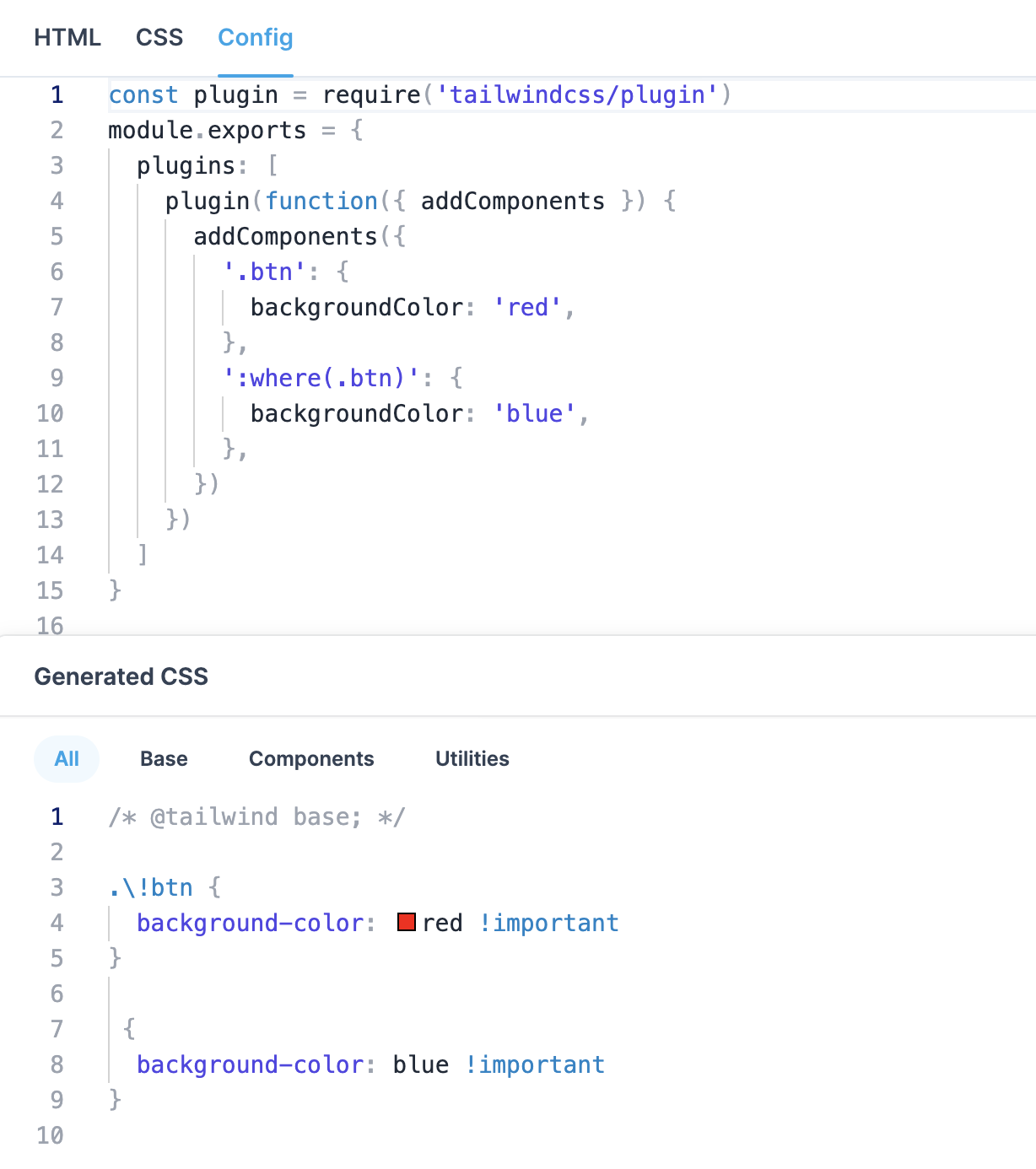
I created an issue on Tailwind CSS repo: https://github.com/tailwindlabs/tailwindcss/issues/10582
I encountered this exact very frustrating problem too. I am on [email protected].
this single line of code breaks everything 😅, maybe I picked the worst variable names.
I think this behavior is worth to be mentioned in common issues in discussion.

@arily it shouldn't be an issue. It must be fixed if it still exists. Which style is broken for you exactly? Which variable name is causing the issue?
@arily it shouldn't be an issue. It must be fixed if it still exists. Which style is broken for you exactly? Which variable name is causing the issue?
names causing issues:active and disabled, affecting all .active and .disabled classes. For me it was nav and menu.
:active got "!important'd" by :hover, so anything with :active class will lose their visual cues when clicking.
here are some affected css'
@media (hover: hover)
:where(.menu li:not(.menu-title):not(.\!disabled) > *:not(ul):not(details):not(.menu-title)):not(.active):hover, :where(.menu li:not(.menu-title):not(.\!disabled) > details > summary:not(.menu-title)):not(.active):hover {
    cursor: pointer !important;
    background-color: hsl(var(--bc) / 0.1) !important;
    --tw-text-opacity: 1 !important;
    color: hsl(var(--bc) / 1) !important;
    color: hsl(var(--bc) / var(--tw-text-opacity)) !important;
    outline: 2px solid transparent !important;
    outline-offset: 2px !important;
}
@media (hover: hover)
:where(.menu li:not(.menu-title):not(.disabled) > *:not(ul):not(details):not(.menu-title)):not(.\!active):hover, :where(.menu li:not(.menu-title):not(.disabled) > details > summary:not(.menu-title)):not(.\!active):hover {
    cursor: pointer !important;
    background-color: hsl(var(--bc) / 0.1) !important;
    --tw-text-opacity: 1 !important;
    color: hsl(var(--bc) / 1) !important;
    color: hsl(var(--bc) / var(--tw-text-opacity)) !important;
    outline: 2px solid transparent !important;
    outline-offset: 2px !important;
}
there are more similar reults, please let me know if you want a full report.