

 s-yadav
How to use currency format to fill decimal/cents first?
Consider the following input value:
12345
The output would be:
$ 123.45 instead of $ 1,2345.00.
How to achieve the first output using this library?
This is how I am using right now, unfortunately I couldn't make it work as desired:
<NumberFormat
  customInput={Input}
  decimalScale={2}
  decimalSeparator=","
  fixedDecimalScale
  onKeyDown={onEnter(handleEnter)}
  onValueChange={handleValueChange}
  placeholder="$ 0,00"
  prefix="$ "
  thousandSeparator="."
  value={value}
/>


Both outputs you mentioned seems incorrect. It should be $ 12.345.00 as you have mentioned fixedDecimalScale. Also, don't forget to pass the isNumericString prop. If you are passing a numeric string as value.

@s-yadav It depends on which locale you are referring. It is correct when using, for instance, pt-BR.
@felri I've found out how to format the number properly - using a formatter. The trick is to divide value by 100.
export default function currencyFormatter(value) {
  if (!Number(value)) return "";

  const amount = new Intl.NumberFormat("pt-BR", {
    style: "currency",
    currency: "BRL"
  }).format(value / 100);

  return `${amount}`;
}
Then you must use this format into your component:
<NumberFormat {...allOtherRequiredProps} format={currencyFormatter} />

@richardaum I tried with this approach, but the values object returns float value wrongly.
For example, if I type 12345, the field shows R$ 123,45, but the values object returns {formattedValue: "R$ 123,45", value: "12345", floatValue: 12345}
Did this happen to you?

Yeah. This is expected because the approach is based on a formatter only. So it will only change how the number is displayed. You must handle the float number and divide it by 100 before persisting it or whatever you do with this number.
An alternative could be if a implementation is made to make this feature native, then we could expect float number also be divide by 100 automatically.
You could also implement your own wrapper to this component and expose a float number already divided by 100.
@felri I've found out how to format the number properly - using a formatter. The trick is to divide value by 100.
export default function currencyFormatter(value) {
  if (!Number(value)) return "";

  const amount = new Intl.NumberFormat("pt-BR", {
    style: "currency",
    currency: "BRL"
  }).format(value / 100);

  return `${amount}`;
}
Then you must use this format into your component:
<NumberFormat {...allOtherRequiredProps} format={currencyFormatter} />
Please number formatter ?


To clarify, format only transforms the value in the UI.
To make sure I get the right value in onValueChange I used:
onValueChange={values => {
	if(!onValueChange) { return; }
	const val = (parseFloat(values.value) / 100).toFixed(2)
	const floatVal = values.floatValue && values.floatValue / 100
	onValueChange({value: val, floatValue: floatVal, formattedValue, values.formattedValue})
}}
So if I type 900, val === "9.00" and floatVal === 9, while values.value === "900" and values.floatValue === 900.
I also had to fix the initial value
value={String(parseFloat(value + "" ?? "0") * 100)}
+ "" is to coerce number to string, ?? "0" is to default to "0" if value is undefined.
With these changes, internally the value is still 900 but on the consumer side the value is 9.00
Additionally, I had to fix the caret positioning with
onFocus={e => {
  if (inputRef.current && value) {
    const positionLastDigit = inputRef.current.value.length - suffix.length;
    setCaretPosition(inputRef.current, positionLastDigit);
  }
  props.onFocus && props.onFocus(e);
}}
with setCaretPosition being a rip-off of https://github.com/s-yadav/react-number-format/blob/8af37958c69ff1e0252282d37e922a913e52e046/lib/utils.js#L146

Yeah. This is expected because the approach is based on a formatter only. So it will only change how the number is displayed. You must handle the float number and divide it by 100 before persisting it or whatever you do with this number. An alternative could be if a implementation is made to make this feature native, then we could expect float number also be divide by 100 automatically. You could also implement your own wrapper to this component and expose a float number already divided by 100.
Thats works perfectly for me, also the other solution. Many thanks.
Also you need to fix setting the value externally and returning the right value as said here:
To clarify,
formatonly transforms the value in the UI.To make sure I get the right value in
onValueChangeI used:onValueChange={values => { if(!onValueChange) { return; } const val = (parseFloat(values.value) / 100).toFixed(2) const floatVal = values.floatValue && values.floatValue / 100 onValueChange({value: val, floatValue: floatVal, formattedValue, values.formattedValue}) }}So if I type 900,
val === "9.00"andfloatVal === 9, whilevalues.value === "900"andvalues.floatValue === 900.I also had to fix the initial value
value={String(parseFloat(value + "" ?? "0") * 100)}
+ ""is to coerce number to string,?? "0"is to default to "0" if value is undefined.With these changes, internally the value is still 900 but on the consumer side the value is 9.00
Additionally, I had to fix the caret positioning with
onFocus={e => {
  if (inputRef.current && value) {
    const positionLastDigit = inputRef.current.value.length - suffix.length;
    setCaretPosition(inputRef.current, positionLastDigit);
  }
  props.onFocus && props.onFocus(e);
}}
with setCaretPosition being a rip-off of
https://github.com/s-yadav/react-number-format/blob/8af37958c69ff1e0252282d37e922a913e52e046/lib/utils.js#L146

I came up with another (simpler?) solution
<NumberFormat
  fixedDecimalScale
  decimalScale={2}
  allowNegative={false}
  value={Number(value) / 100}
  // dividing by 100 to avoid an infinite loop;
  // value cannot be changed by onValueChange because it would trigger onValueChange which would trigger onValueChange which would trigger onValueChange which would trigger onValueChange...
  onValueChange={(e) => {
    if (e.value === '') onChangeHandler(0)
    else onChangeHandler(parseFloat(e.value) * 100)
  }}
/>
I'm multiplying by 100 inside onValueChange to save cents, and also dividing the linked value by 100. Not battle tested yet, but no infinite loops so far + the formatting I want.

Appreciate all the info on this issue guys. I've managed to create my own solution.
I didn't have time yet to optimize this code, but I think it can help someone.
I'm using Material UI + Typescript, and I created this InputCurrency component:
import React from 'react';
import NumberFormat from 'react-number-format';

import { TextField, TextFieldProps } from '@material-ui/core';

function currencyFormatter(value: any) {
  if (!Number(value)) return '';

  const amount = new Intl.NumberFormat('pt-BR', {
    style: 'currency',
    currency: 'BRL',
  }).format(value / 100);

  return `${amount}`;
}

// eslint-disable-next-line unused-imports/no-unused-vars, @typescript-eslint/no-unused-vars
function NumberFormatCustom({ inputRef, onChange, value, ...props }: any) {
  const [internalValue, setInternalValue] = React.useState('');

  return (
    <NumberFormat
      value={internalValue}
      onValueChange={(values) => {
        setInternalValue(values.value);
        onChange({
          target: {
            name: props.name,
            value: String(Number(values.value) / 100),
          },
        });
      }}
      getInputRef={inputRef}
      format={currencyFormatter}
      thousandSeparator="."
      decimalSeparator=","
      isNumericString
      {...props}
    />
  );
}

const InputCurrencyBase: React.ForwardRefRenderFunction<any, TextFieldProps> = (
  props,
  ref
) => {
  const intl = useIntl();

  return (
      <TextField
        variant="outlined"
        color="primary"
        InputProps={{
          inputComponent: NumberFormatCustom as any,
        }}
        autoComplete="off"
        inputRef={ref}
        {...props}
      />
  );
};

const InputCurrency = React.forwardRef(InputCurrencyBase);

export default InputCurrency;
You can use it like a normal TextField of Material UI:
const [inputValue, setInputValue] = useState('');

const handleChange = (event: React.ChangeEvent<HTMLInputElement>) => {
  const { value } = event.target; // value comes like "1475.85", number parseable
  setInputValue(value);
};

return <InputCurrency value={inputValue} onChange={handleChange} />;

I found a way with a workaround. Maybe it can help somebody: https://codesandbox.io/s/number-format-input-ey95k

adding fixedDecimalScale to my code worked for me, Thank you @richardaum
<NumericFormat {...field} variant="outlined" label="Amount" fullWidth error={invalid} customInput={TextField} prefix={'£ '} decimalScale={2} thousandSeparator=" " fixedDecimalScale />
Consider the following input value:
12345The output would be:
$ 123.45instead of$ 1,2345.00.How to achieve the first output using this library?
This is how I am using right now, unfortunately I couldn't make it work as desired:
<NumberFormat
  customInput={Input}
  decimalScale={2}
  decimalSeparator=","
  fixedDecimalScale
  onKeyDown={onEnter(handleEnter)}
  onValueChange={handleValueChange}
  placeholder="$ 0,00"
  prefix="$ "
  thousandSeparator="."
  value={value}
/>

 Hi all, please I have a problem solving this issue using the CurrencyFormat. Unwanted input appeared showing the total price of items inside. please how can i prevent the input from appearing.

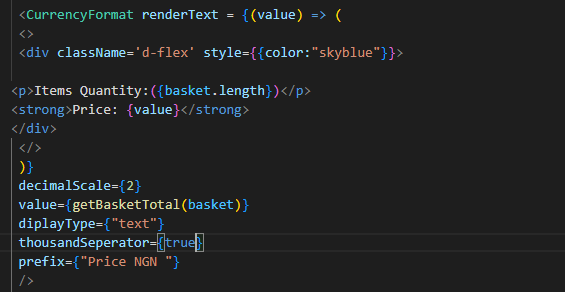 here is the code pls can any one help?
I came across same problem and have found that the solution proposed by @richardaum does not work with latest version of the library. Probably it could work with some code changes, but also I have found that it would introduce some complexity to the project. Then I found a way to accomplish the task with plain JavaScript/React:
<input
  value={value}
  onChange={(event) => {
    let value = event.target.value.replace(/[^0-9]/g, '');
    value = "R$ " + (Number(value) / 100).toFixed(2);
    setValue(value);
  }}
/>

After some time, this library has changed its interfaces. Here's is the update code using NumberFormatBase:
import { NumberFormatBase } from "react-number-format";

function currencyFormatter(value: string) {
  if (!value) return "";

  const number = Number(value);
  const amount = new Intl.NumberFormat("pt-BR", {
    style: "currency",
    currency: "BRL",
  }).format(number / 100);

  return `${amount}`;
}

<NumberFormatBase format={currencyFormatter} prefix={"R$ "} />
Thank you @richardaum. Do you know if there is a way to allow negative numbers in your approach?

Thank you @richardaum. Do you know if there is a way to allow negative numbers in your approach?
I did it this way
const [negative, setNegative] = useState(false);

function currencyFormatter(value) {
if (!Number(value)) return '';

if (negative) {
  value = -parseFloat(value);
}
const amount = new Intl.NumberFormat('pt-BR', {
  style: 'currency',
  currency: 'BRL',
}).format(value / 100);

return `${amount}`;
}

<NumberFormatBase
        format={currencyFormatter}
        onKeyDown={(e) => {
          const el = e.target;
          const {key} = e;
          if (key === '-') {
            setNegative(!negative);
            e.preventDefault();
            return;
          }
        }}
      />
