

 ryanvm
Ctrl+Shift+0 doesn't work
I've tried this on two different machines with Win7/x64, where Ctrl+Shift+0 doesn't work to disable transparency. I ran Spy++, and it seems like the WM_KEYDOWN message is never sent, but only WM_KEYUP. I thought I'd try changing KbHookProc to change transparency on KEYUP instead of KEYDOWN, but then the shift and control states can't be reliably detected. Is anyone else having this problem?

I believe that's a known problem with Windows 7 because Windows 7 uses that key combo for something.
On Fri, Jul 12, 2013 at 10:08 AM, joshdoe [email protected] wrote:
I've tried this on two different machines with Win7/x64, where Ctrl+Shift+0 doesn't work to disable transparency. I ran Spy++, and it seems like the WM_KEYDOWN message is never sent, but only WM_KEYUP. I thought I'd try changing KbHookProc to change transparency on KEYUP instead of KEYDOWN, but then the shift and control states can't be reliably detected. Is anyone else having this problem?
— Reply to this email directly or view it on GitHubhttps://github.com/ryanvm/vitrite/issues/1 .

Ah, so it is, in Vista, Win7, and presumably Win8 and all future versions: http://support.microsoft.com/kb/967893
That KB article has steps to disable the key combo from being intercepted by the lnput Method Editor.
I've pretty much abandoned all development on Vitrite. If you want to fix it and send me a pull request I'll be glad to put it in and list you as a contributor.
Ryan On Jul 12, 2013 4:00 PM, "joshdoe" [email protected] wrote:
Ah, so it is, in Vista, Win7, and presumably Win8 and all future versions: http://support.microsoft.com/kb/967893
That KB article has steps to disable the key combo from being intercepted by the lnput Method Editor.
— Reply to this email directly or view it on GitHubhttps://github.com/ryanvm/vitrite/issues/1#issuecomment-20900690 .
unassign the input switch hotkey combo "ctrl+shift", inside control panel, and then "ctrl+shift+0" will work. vitrite is such a powerful tool. thanks ryan

I suppose no program uses Windows Key + Page Up and Page Down as shortcuts?


@SHREDDED-WHEAT You could post what worked for you before enough time passes that you forget (hopefully you haven't yet) so others can see it in the future.

I think I followed something like this https://www.tenforums.com/general-support/71140-removing-windows-control-shift-shortcut.html I can't really remember.
ctrl+shift+[1~9] and 0 work fine on my other software, but only Ctrl+Shift+0 doesn't work on my evernote 6.25.3.9348 (309348)(link), what is the possible reason?
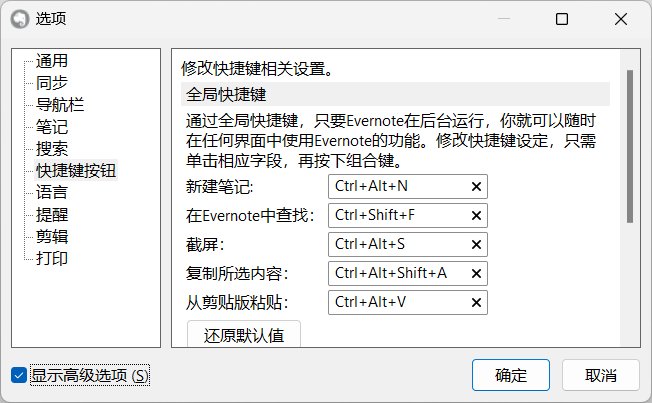 I checked the shortcuts for the software and there are no conflicting options
