

 ryanoasis
Backtick character overlaps with the next character in patched font
Hello,
🗹 Requirements
- [x] I have searched the issues for my issue and found nothing related and/or helpful
- [x] I have searched the FAQ for help
- [x] I have searched the Wiki for help
🎯 Subject of the issue
Experienced behavior:
The backtick (`) character overlaps with the next character in the following patched fonts.
- Monolisa (paid)
- Inconsolata (open-source)
(There was already an issue #582 on this topic. However, it was closed and I could not find any solution there.)
Expected behavior:
The backtick (`) character should not overlap with the next character like the original font.
Example symbols:
`i (or backtick with any other alphabet should also work)
🔧 Setup
| Font | Font Version | Format | Font File Name | Font Source |
|---|---|---|---|---|
| MonoLisa | v1.808 | TTF/OTF | MonoLisa Regular Nerd Font Complete.ttf | Self Patched - using Nerd Fonts Docker image with --complete option |
| Inconsolata | v2.012 | TTF/OTF | Inconsolata Regular Nerd Font Complete Windows Compatible.ttf | https://github.com/ryanoasis/nerd-fonts/releases/download/v2.1.0/Inconsolata.zip |
System Information
| Applications | VS Code v1.68.1, Windows Terminal v1.13.11432.0 |
| OS | Windows 11, Linux (Ubuntu) |
★ Screenshots
| Font | Original Font | Patched Font |
|---|---|---|
| MonoLisa | 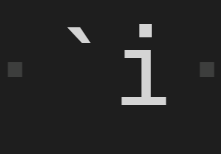 |
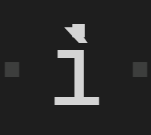 |
| Inconsolata | 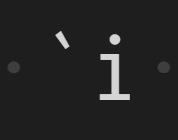 |
 |
Thanks!

Remindes me of https://github.com/adam7/delugia-code/pull/11.
The workaround is not needed there anymore, because upstream fixed it: https://github.com/adam7/delugia-code/commit/6c0ee94d7601091ee042c98e66ec91b9832de389
I'm not sure if this is the same (underlying) issue.

Can reproduce on Linux with the non-windows font variant.
Using the 2.1.0 font (as detailed in the report above (great report with all needed information! :tada: ))
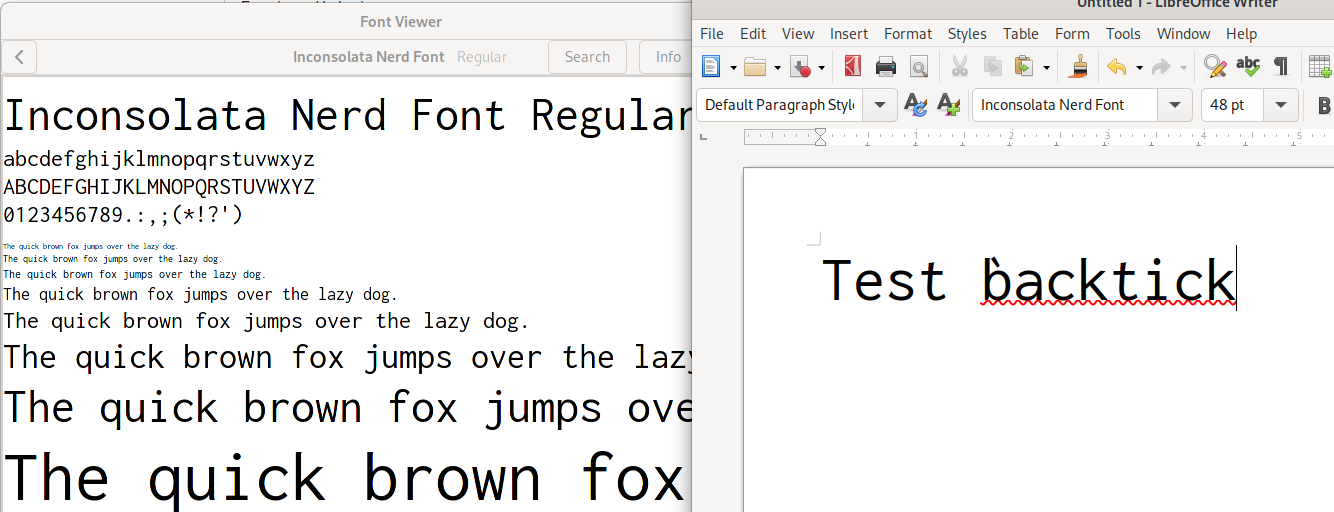
Testing 2.2.0 version ... same.
Testing otf ... same.
Reason is the same as formerly Cascadia-Delugia:

This is a ~~bug~~ peculiar behavior of fontforge, the original glyph is auto and not the zero-width mark:
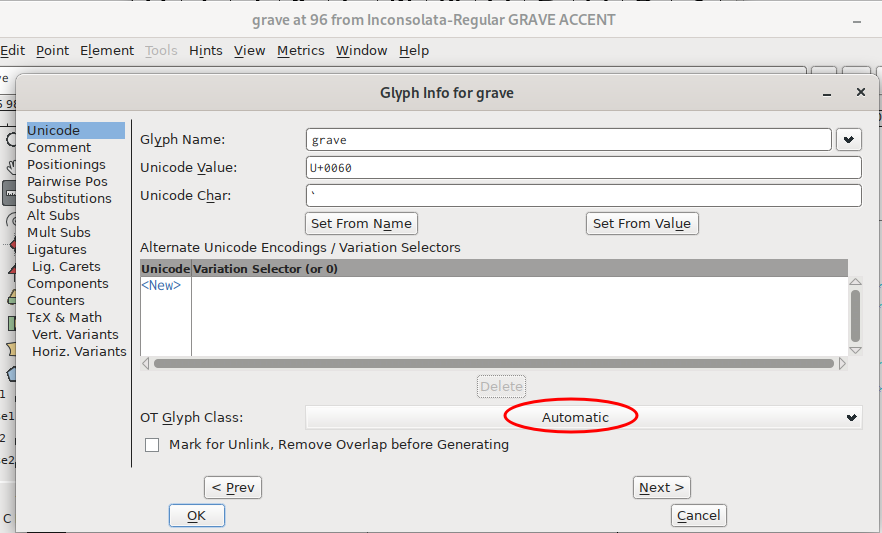
I will employ the Delugia solution here and add a MR. "Pull Request", they call it PR here, dummy!
Thanks for the good report.
Until this gets pulled, and then a new container generated etc etc, you might want to self-patch directly on the command line with a) a recent fontforge (i.e. March 2022 Release), or b) use the simple modification in the font-patcher script and any fontforge.
Maybe #847 can help you to use the command line rather than the container. Sorry I did not come round to pour 847 into the actual docs, yet.
Thanks for the detailed analysis and PR.
Sure, I'll follow the instructions and try patching the font via command line.
Thanks @Finii, I was able to patch the fonts from the command line using the latest fontforge appimage by following your instructions in #847 and the backtick (`) character is now displayed correctly.
I was getting errors when using relative path in the command line (I believe that's due to appimage), so I had to use absolute path everywhere.
I also had to update "font-patcher" to use the absolute path of the output directory as argument instead of self.args.outputdir during font generation in self.sourceFont.generate method. (The make_sure_path_exists(self.args.outputdir) line did not throw any error though.)
I was getting errors when using relative path in the command line (I believe that's due to appimage)
I guess that is documented, no?
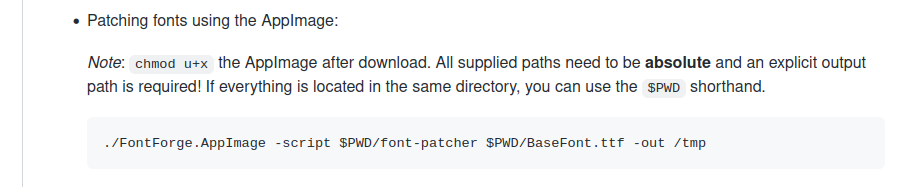
So your problems are all 'expected' (after reading the docs).
But it is unexpected for a casual user. I use other appimages (like neovim), and they do NOT behave this way, of course, because that borders on unusable. So you are right, the actual issue should probably be addressed (documented but unexpected).
ah! my bad. I just look into your instructions, but missed to check the documentation. 😞
This issue has been automatically locked since there has not been any recent activity (i.e. last half year) after it was closed. It helps our maintainers focus on the active issues. If you have found a problem that seems similar, please open a new issue, complete the issue template with all the details necessary to reproduce, and mention this issue as reference.
![github-actions[bot] avatar](https://avatars.githubusercontent.com/in/15368?v=4 "Published by a pub.dev verified publisher")