
nerd-fonts
 nerd-fonts copied to clipboard
 ryanoasis
Symbols-1000-em Nerd Font Complete.ttf has broken letter 'E'
🎯 Subject of the issue
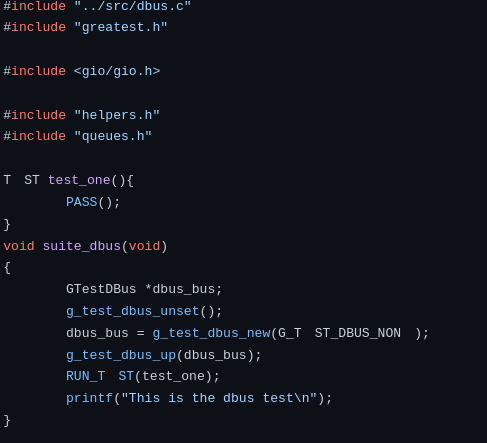
The capital letter 'E' from 'Symbols-1000-em Nerd Font Complete.ttf' is not working correctly. It seems like either it only contains that letter, or that letter is prioritized over other fonts. Anyhow, this leads to the letter 'E' not showing up in mono fonts in firefox. See below for an example.
Arch bug report: https://bugs.archlinux.org/task/69568?project=5&string=ttf-nerd-fonts-symbols-mono Forum post: https://bbs.archlinux.org/viewtopic.php?pid=1955896
🔧 Your Setup
- 'Symbols-1000-em Nerd Font Complete.ttf'
- Program: firefox
- OS: Arch linux.
- Package: ttf-nerd-fonts-symbols-mono 2.1.0+36+gd0bf73a1-2
★ Screenshot


In the meantime you could use a more tailored font configuration file, eg.: https://github.com/polyzen/dotfiles/blob/master/workstation/.config/fontconfig/fonts.conf
I haven't used 10-nerd-font-symbols.conf and don't have this issue.

It also seems as if capital "E" is represented by blank space only in "1000 em" version and not in "2048 em" version (previews by fontpreview):


I think I have a workaround. I am using Artix Linux (which is just Arch with non-systemd init), and previously I had manually installed both "1000 em" and "2048 em" versions of the font. After removing all the manually installed files and running:
$ pacman -S ttf-nerd-fonts-symbols
I can see the capital letter "E" in the example:
 Of course, the issue still persists in the "1000 em" version of the font, which is included in the package
 ttf-nerd-fonts-symbols-mono.
I also have this issue with the 1000 em variant of the font (also Arch, ttf-nerd-fonts-symbols-mono-2.1.0+36+gd0bf73a1-4). Looking at the ttf in fontforge
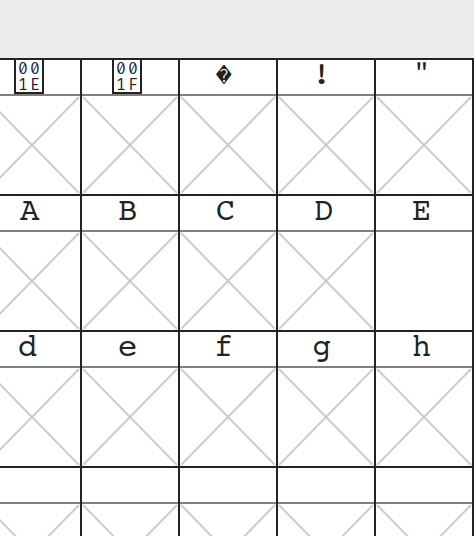 an empty glyph seems to be included for U+0045.
I'd like to be able to use fontconfig to prefer this font over my monospace font of choice, so that I get the symbols, but that is not possible while this font contains symbols in ranges in which it should not.
Note that I don't really know my way around fontforge and that this being an empty but nonetheless included glyph is just what I guessed this is, as it would also explain the missing
an empty glyph seems to be included for U+0045.
I'd like to be able to use fontconfig to prefer this font over my monospace font of choice, so that I get the symbols, but that is not possible while this font contains symbols in ranges in which it should not.
Note that I don't really know my way around fontforge and that this being an empty but nonetheless included glyph is just what I guessed this is, as it would also explain the missing Es in Firefox and other fontconfig capable programs.

I managed to use fontconfig to exclude E to the point that
fc-list "Symbols Nerd Font":charset=0x45
shows empty. But Firefox still uses the blank E from this font. :shrug:

I can't quite figure out how the Symbols-1000-em Nerd Font Complete.ttf is built. The contributing instructions mostly cover updating or adding other fonts, but not that particular one. Can't find any script that generates it or alike.
Any pointers here?

They are created by
fontforge font-patcher 'src/glyphs/NerdFontsSymbols 1000 EM Nerd Font Complete Blank.sfd' --complete --ext ttf
and as far as I can see they contain no E.
Well, there are two variants of that font in the repo, unfortunately:
src/glyphs/Symbols-1000-em Nerd Font Complete.ttfpatched-fonts/NerdFontsSymbolsOnly/complete/Symbols-1000-em Nerd Font Complete.ttf
The one in src/ is obsolete. It's not clear to me why it is still there, maybe 'keep old links valid' reasons.
Edit: Improve readability of links to fonts

and as far as I can see they contain no E.

It took me a while to figure out what you meant :joy:
The one in src/ is obsolete. It's not clear to me why it is still there, maybe 'keep old links valid' reasons.
The README clearly indicates that one should not use master or point to master. I think it's sensible to drop one to avoid any confusion.
Creating PR.
Many thanks, I clearly have little idea on this one.
Regarding 'keep paths', compare this https://github.com/ryanoasis/nerd-fonts/issues/495#issuecomment-1030712701
This issue has been automatically locked since there has not been any recent activity (i.e. last half year) after it was closed. It helps our maintainers focus on the active issues. If you have found a problem that seems similar, please open a new issue, complete the issue template with all the details necessary to reproduce, and mention this issue as reference.
![github-actions[bot] avatar](https://avatars.githubusercontent.com/in/15368?v=4 "Published by a pub.dev verified publisher")