

 ryanoasis
The patcher isn't adding glyphs to Hack font
🎯 Subject of the issue
I wanted to get an icon that doesn't exist in the font, so I got it added into the font-logos upstream.
I then ran the patcher on my ttf, with the flag --fontlinux.
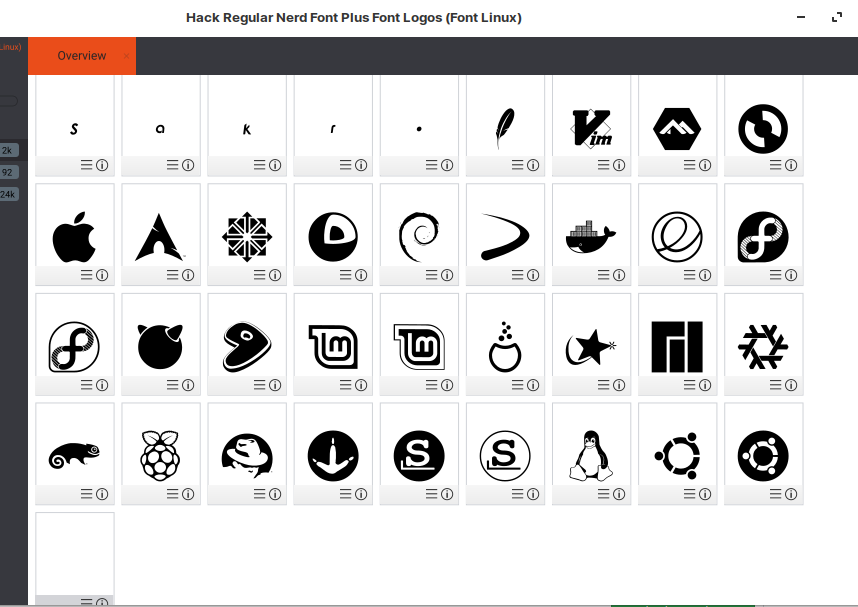
Upon inspecting the generated ttf with birdfont, I can't find the icon among the other glyphs that exist in the upstream and the patched font.
The commands I ran:
git clone https://github.com/betaboon/nerd-fonts-patcher.git
sudo apt install python-fontforge
sudo pip install configparser
./font-patcher ~/Dev/git/Hack\ Regular\ Nerd\ Font\ Complete.ttf --fontlinux

# SOME OF OUTPUT:
Adding 29 Glyphs from Font Logos (Font Linux) Set
╢████████████████████████████████████████╟ 100%

Done with Patch Sets, generating font...

Generated: HackNerdFontCompleteNerdFontL-Regular
At this point a new ttf file is created in the font-patcher repo root directory, but this file does not have the "Zorin OS" glyph that I expected running the patcher to add. I then tried on an unpatched font, thinking that maybe I can't patch an already patched font, but scrolling to the verry end of the glyphs in birdfont I still see other fontlinux glyphs but not this new one.
Lastly, I copied the fontlinux ttf containing only the linux logo icons (which I got from upstream) and put it into the fonts-patcher/src/glyphs directory along with the other ttf files. Still no good. It seems that the patcher is using a cached version of the upstream repo, but I still would have thought that swapping to the new ttf from upstream would have solved that, which unfortunately it did not.
🔧 Your Setup
- I am using Hack nerdfont Complete/Hack regular
- XFCE Terminal
- Linux, ubuntu 18.04 based Zorin OS
Screenshot of asset file including new glyph (in bottom right corner)

Screenshot of generated font file, without some of the font-logo glyphs, including the new one

Hey sorry for the very delayed response but you probably needed to adjust/extend the glyph range: https://github.com/ryanoasis/nerd-fonts/blob/877887cac2d6ccc7354a8d95e8c39fff10bf120b/font-patcher#L577
OR you'd make use of the --custom option

This issue has been automatically locked since there has not been any recent activity (i.e. last half year) after it was closed. It helps our maintainers focus on the active issues. If you have found a problem that seems similar, please open a new issue, complete the issue template with all the details necessary to reproduce, and mention this issue as reference.
![github-actions[bot] avatar](https://avatars.githubusercontent.com/in/15368?v=4 "Published by a pub.dev verified publisher")