

 ryanluker
Start watching on workspace open
I have a setup for a Python project where I'm using coverage gutters + save and run to get a fairly automated unit test coverage experience for Python. It's helping a lot. One of the last bits i need to automate though is watching the cov.xml file when I open my folder.
I'd like a settings.json setting to have coverage gutters start watching on workspace start up, please.
This is a quality of life thing more than anything. I'm loving the tool and loving the setup I seem to have going here, this would round it off nicely.

@craigbrett17 thanks for the feature suggestion! Just so I understand completely, you are saying that the extension should automatically "try" to start watching when a workspace is opened. Where "try" would mean looking for coverage files and if none are found it would not activate coverage watch, while if some coverage is found it would start watching?

@ryanluker: I think you've hit it on the head. Sort of an on activation trigger (at least I think that's what the VS extension event is). I know it only really saves me doing one shortcut key, but it makes it feel more embedded then. Obviously best to keep it optional, as not everyone might want this behaviour, but I'd be keeping it on myself.
I like the idea :) I was searching for that. In my case, I use this extension for C/C++ projects with gcovr.
~Can be an issue to check all directories for the coverage file - all the time - if there is no one yet.~
~Could be maybe solved by listening for directory change, then if found - save the path to it and listen for the specific file change in a specific workspace. In that way, we could see coverage in "real-time" :D~
~Then just listening on events like file opened, tab switched to fetch the coverage.~
~I'm not a guy sitting deeply in VSCode extension development :)~
~WAIT.~
There is something like Coverage Gutters: Watch option which can be activated through ?"omnibox"? that SHIFT-CTRL-P thingy
What about adding it to the configuration like coverage-gutters.watch ?

@TheAifam5 you can use the command palette (maybe that's the "omnibox" thing you mentioned?). I have attached a screen share showing that but the other feature that was discussed here will be added in version 3. Screencast from 2019-10-14 02:25:09 PM.zip

@DevilXD Thanks for the +1, helps me understand how to prioritize the feature for the next release.
Just to add to this, I notice that I must start Watch every time I start Visual Studio Code. It really would be nice if Watch would attempt to start automatically. In my opinion, I would rather it runs all the time, and waits until it finds an lcov..info file (even if one doesn't exist already). This will just make it transparent and active all the time which is what I would personally love.
I'm not sure if others agree with this though 😄

That's pretty much what this whole issue is about. If the file exists - start watching automatically. If it doesn't, do nothing.
@ryanluker Is there any ETA on when this is going to be released, by chance?
@fgimian @DevilXD Thanks for the input and bringing this back up to my attention! Currently it is scheduled for the next major release 3.0.0.
Although, seeming it could be added as a opt in feature it can go in any upcoming minor release if someone finds time to work on it 😁 . If we wanted it to be on by default then we would need to include it in 3.0.0 probably as that might require folks to adjust their setups 🤔 .
I'd like to, but unfortunately I'm not familiar with Typescript / JS / whatever this is written in, so can't really help myself. Maybe someone else can.
I'm fine with it being an opt-in feature, as long as it becomes a thing eventually.
@DevilXD No need to worry about doing the work yourself, I am just glad people contribute by submitting issues and feature requests! We will get to this eventually 🤔 .


Thanks for the +1's and comments @srfrnk , @Fran314 and @davidwallis3101.
No plans for v3 yet, the project hasn't gotten a lot of contributions lately from myself or other folks in the repo, but this ticket can be pushed up into 2.11 or other pre v3 releases if there is interest or someone champions doing the work.
+1 would really love a way to set in the configuration for it to just always be on and watching.

+1 would really love a way to set in the configuration for it to just always be on and watching.
Thanks for the ping @grantwest hopefully we can get to this soon!
I think that the situation is even bit worse as settings do not seem to be configurable at workspace level, see popup from vscode while editing in-repo .vscode/settings.json file:
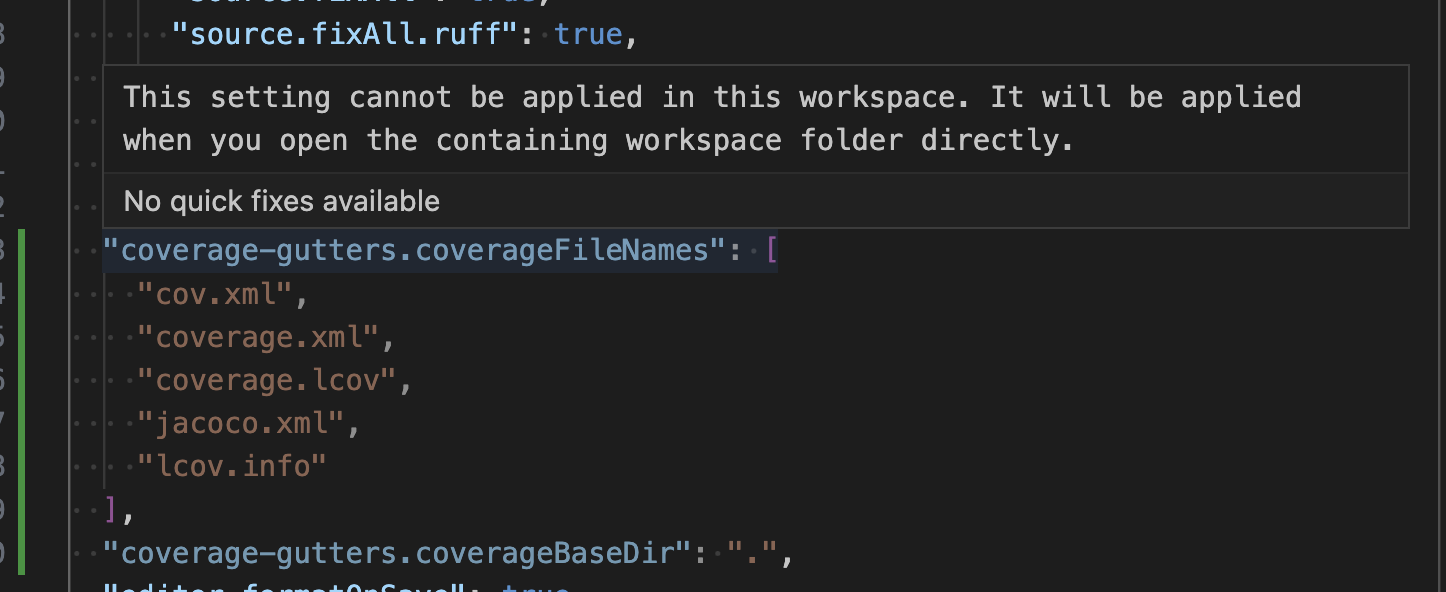
I suspect that this is related to https://github.com/microsoft/vscode/issues/82117 which also means that this extension might not be able to deal with multiple workspaces, something extremely common these days, as is it quite uncommon to have to open a single project at a time. -- Filed bug for that one at https://github.com/ryanluker/vscode-coverage-gutters/issues/408

I think that the situation is even bit worse as settings do not seem to be configurable at workspace level, see popup from vscode while editing in-repo
.vscode/settings.jsonfile:
I suspect that this is related to microsoft/vscode#82117 which also means that this extension might not be able to deal with multiple workspaces, something extremely common these days, as is it quite uncommon to have to open a single project at a time. -- Filed bug for that one at #408
@ssbarnea Thanks for the ping! Multi workspace support was added a very long time ago within this extension, so it might have issues now with the latest version of VS Code. I vaguely remember adding tests for this, but I can double-check to confirm that the examples folder is still openable in a workspace.
If you haven't seen it already, maybe take a look at the workspaces config file below that is in the examples folder 🤔. https://github.com/ryanluker/vscode-coverage-gutters/blob/master/example/example.code-workspace

The option for automatically watching on workspace open would be very nice. However, clicking the coverage icon inside the status bar is also easy. But you know, we as developers always want minimal effort to be productive :)

@m-roberts @HelmerBarcos Thanks for the input! Hopefully myself or another contributor can get to this soon.