

 rxhanson
Update to "Version 0.44 (49)" removed keyboard shortcuts
- [x] This is a new bug that hasn't been documented in a closed issue or in the Readme. (As far as I could see, at least.)
macOS version: Catalina 10.15.7 Rectangle version: (not sure what the version was before the update, unfortunately) Logs if applicable (In Rectangle menu, hold option, "View Logging..."): (none)
I opened the Rectangle menu to edit a couple of keyboard shortcuts, and got a notification about a new version being available. I chose to install and relaunch which happened without any errors being reported.
After relaunch I noticed that most of my keyboard shortcuts were gone.
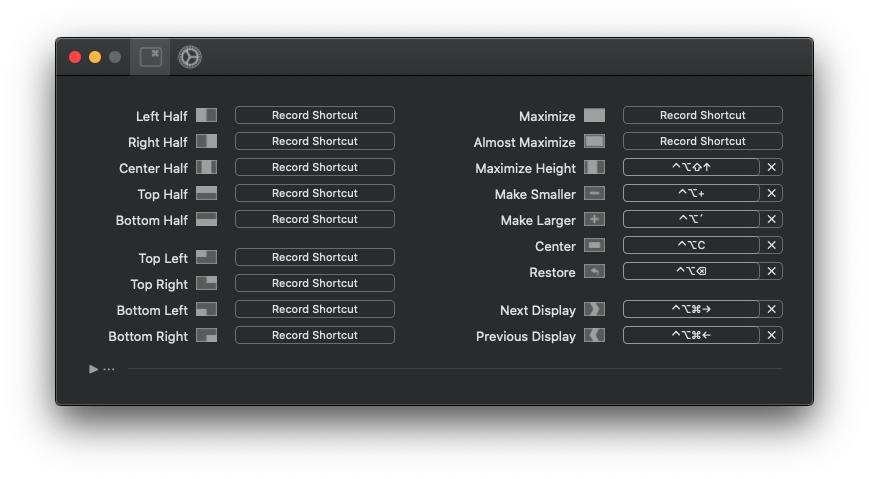
I don't know if it makes a difference but I had customized all of those (except for "Almost maximize" which may or may not have been set).

Ok, actually missed this part of the readme before reporting… 🙄
The configuration for Rectangle is stored using NSUserDefaults, meaning it is stored in the following location: ~/Library/Preferences/com.knollsoft.Rectangle.plist Note that shortcuts in v0.41+ are stored in a different format and will not load in prior versions.
That file can be backed up or transferred to other machines.
I guess this is expected behaviour if I had a version older than v0.41 running? (I have automatic checks enabled so I'd imagine I had a newer version already but perhaps not…)
Going from a release prior to 0.41 to a current release should perform a migration of your shortcuts. If you were to go back to a version prior to 0.41 after being on 0.44, then you would see missing shortcuts.
Without looking deep into this, it would appear that your shortcuts did not get migrated or did not get migrated properly. There's potentially a way to recover what you have, but at this point for your case I'm sure it's far simpler to just manually enter your shortcuts again (sorry!)
I'll dig through it and see if this can be avoided for future scenarios like this.

(also, there was a fix for auto-updates so that you should get notified properly for each new update instead of going a long time without updating)
Yeah, I already re-created my shortcuts manually (as well as adding those new ones I was going to add before this happened), so it's not a big deal. 🙂 And the part of the readme I quoted above was actually helpful as knowing about the right config file it's now easier to keep my shortcuts in sync between my machines. So this was probably more helpful than harmful in the end. 😄
But it's good if you can find the cause and this won't happen again (or to others). Thanks for the app, I love it!