
livewire-devtools
 livewire-devtools copied to clipboard
 rw4lll
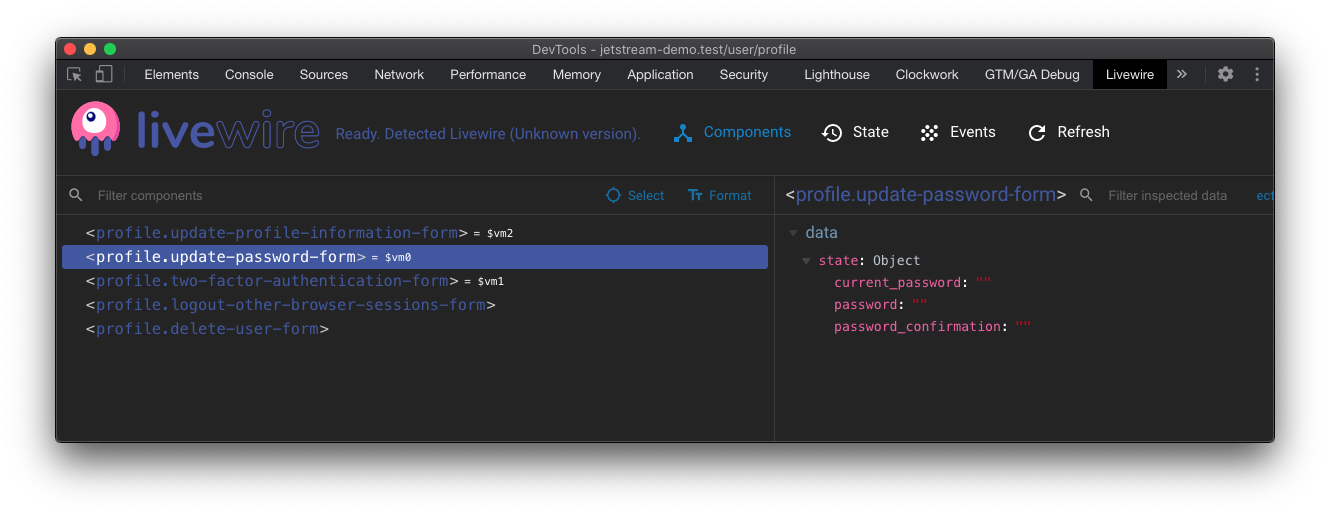
Chrome and Firefox DevTools extension for debugging Livewire applications
Livewire Devtools
Debug your Livewire component state from within your browser.
Upd.: there was added support for Livewire v3. Please, report any issues you may have.
Roadmap
- ~~Chrome Manifest V3 support~~
- ~~Check FF extension~~
- ~~Add Livewire v3 support~~
- Rewrite tool from scratch with modern stuff (ts, vite, vue3 etc.)
Installation
- For Chromium-based browsers (Chrome, Edge, Chromium etc.): https://chrome.google.com/webstore/detail/livewire-devtools/dnociedgpnpfnbkafoiilldfhpcjmikd
- For Firefox: https://addons.mozilla.org/ru/firefox/addon/livewire-devtools/
Manual Installation (Chrome)
- Clone this repo
npm install(Oryarn installif you are using yarn as the package manager)npm run build- Open Chrome extension page (chrome://extensions)
- Check "developer mode"
- Click "load unpacked extension", and choose
shells/chrome.
Hacking
- Clone this repo
npm installnpm run dev- A plain shell with a test app will be available at
localhost:8100.
Manual Installation (Firefox)
-
Install
web-ext$ npm install --global web-extOr, for Yarn:
$ yarn global add web-extAlso, make sure
PATHis set up. Something like this in~/.bash_profile:$ PATH=$PATH:$(yarn global bin) -
Build and run in Firefox
$ npm run build:ff
$ npm run zip:ff
When using Yarn, just replace
npmwithyarn. -
Open "about:addons" in Firefox browser, then click "Install from file" and select built zip-folder.
License
Thanks goes out to Vue devtools, which were used as a starting point for this.
 rw4lll