

 rustdesk
Username and password for rustdesk-server (Or even an SSL certificate) request.
I have been trying out RustDesk-Server and i find it very stable, fast and well created.
However i am running my own RustDesk-Server and i feel like i dont want to open up ports on my router to allow acces from outside my LAN. Since that (except for the key part) there is nothing preventing anyone from connecting to the server if they find the port it's connected to.
Currently i have to VPN in to get acces to the server.
If it would be possible on top of the "key" part to have a Username and Password option to allow connection to the RustDesk-Server. So one would have to know the IP/Port and a "Username and Password" before being allowed to connect to the server would be usefull feature. If a certificate could be made to accompany the Username and Password that would also be great.
So one could allow the server to be reached outside of LAN but with some extra steps of security.
Ty for reading and best regards, Darkyere

Added generic TOTP as an option for managed devices. If the password is passed but the TOTP is wrong, the controlled terminal should be prompted to change the password.

I have been trying out RustDesk-Server and i find it very stable, fast and well created.
However i am running my own RustDesk-Server and i feel like i dont want to open up ports on my router to allow acces from outside my LAN. Since that (except for the key part) there is nothing preventing anyone from connecting to the server if they find the port it's connected to.
Currently i have to VPN in to get acces to the server.
If it would be possible on top of the "key" part to have a Username and Password option to allow connection to the RustDesk-Server. So one would have to know the IP/Port and a "Username and Password" before being allowed to connect to the server would be usefull feature. If a certificate could be made to accompany the Username and Password that would also be great.
So one could allow the server to be reached outside of LAN but with some extra steps of security.
Ty for reading and best regards, Darkyere
So as it is written currently, there is really no gain for this. While someone could choose to use your relay server for their own clients, all you're really risking is the bandwidth. If you want to fix this, the better option is to do IP restrictions on the relay server. You should be able to do this on your router, or on the fw of the relay server itself. Without this, if your clients are using your own relay server, then they could access them. but they would still need the ID and password. Lastly, you can configure your relay server to require encryption, which will require you specify the key used on all your clients. This also, indirectly, prevents anyone from using your relay without some effort. A password to connect to your relay server is kinda pointless IMPO.

need to make server to able start initial connection to client thru server require password, so special password that only used for outgoing connections thru server, for signal part, so then connecting client to server without know password useless, need to open feature request
#1436

@simeononsecurity
I'm used to remote with TightVNC and TeamViewer, they both has username/id and password to connect.
My viewpoint is that, the client need to know the public key, which is long randomized characters and isn't practical to memorize. Every time you want to create/change the key, perhaps you need take a picture of it with your phone to type it manually or copy the keyfile manually with usb flash disk, or pass it through the internet with your social media private content, and so on.
Instead of server and long key, I'd like to just enter server + password.
TightVNC does this, so easy to setup and to memorize.
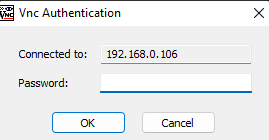
Perhaps there is a way to abstract the password within the key? So at the front-end, the client gui we just enter ip/port + password. But at the back-end, the client gui convert it to hashed key and send it to the server. Any better idea?
We could extrapolate the idea even further, with one server machine + password, you could only have one rustdesk-server configuration. But if we have server machine + user + password, we could have multiple configurations. For example, one guest user only allowed to monitor, so we disable mouse and keyboard and disable file transfer. The other one is admin, so he has full access. It's similar like group policy of Windows, we have configuration for default machine and for each user.
But that is still too far I think. For now, server ip/port + password shall suffice for me.

I apologize if the question is not exactly what was asked here. But the problem is similar, and the suggestion is much simpler. Maybe add a simple check on the relay server of the key which is used for encryption, if the key is correct - welcome, if not - rejection? This check is simple and does not require any dramatic changes, while it will be possible not to let everyone connect if such a check is involved.
And also, if the key is correct, and automatically provide access to the settings in the client...

I just wanted to bump up this thread again.
Even if people would need my ID and Password for a RustDesk client.
I still find it rather uncomfortable that people would be able to acces my RustDesk server. This should logically be possible to lock down.
Even if only with a "username/password/max attempts" combo it would heighten the security and comfort of having ones own server alot.
Certificates can allways come later. But seems to be an important part of a remote desktop software/server giving acces to ones devices in the end.
I really appreciate alot the work put in to this project. And with the arm64 and DK keyboard support it is really becoming a viable option compared to all of these VNC options out there.
I just wanted to bump up this thread again.
Even if people would need my ID and Password for a RustDesk client.
I still find it rather uncomfortable that people would be able to acces my RustDesk server. This should logically be possible to lock down.
Even if only with a "username/password/max attempts" combo it would heighten the security and comfort of having ones own server alot.
Certificates can allways come later. But seems to be an important part of a remote desktop software/server giving acces to ones devices in the end.
I really appreciate alot the work put in to this project. And with the arm64 and DK keyboard support it is really becoming a viable option compared to all of these VNC options out there.
Hole heartily agree. Great software, definitely functional. But as far as remote access, there is way too much lack of security currently.