

 rust-lang
how to generate the files from the summary.md without including them in the summary viewer list
I have many .md files in src, my summary is too long
$ ls src/*.md | wc -l
245
- how i can use a file that is not shown in the
summary
foo.md is hidden from the summary viewer list
- if can
mdBookgeneratefoo.mdi can use it,
some text [foo](./foo.md) , some other text
More detail
SUMMARY.md
# Summary
- [bar1](./bar1.md)
    - [bar1_1](./bar1_1.md)
    - bar1_2](./bar1_2.md)
- [bar2](./bar2.md)
    - [bar2_1](./bar2_1.md)
# Hiddem
- [](./foo.md)
- [](./foo001.md)
- [](./foo002.md)
- [](./foo003.md)
- [](./foo004.md)
- [](./foo005.md)
- [](./foo006.md)
- ...........
- [](./foo198.md)
- [](./foo199.md)
- [](./foo200.md)
- I want only to be shown the
barsfiles

It is sometimes extremely useful to have "hidden" or "secret" sub-trees that are not shown in the nav list.
Those content are only accessible when provided a url link.

I am new to mdbook, but found if I omit a file from SUMMARY.md it does not show in the menu, so it is hidden.
So if you do this:
# Summary
- [bar1](./bar1.md)
    - [bar1_1](./bar1_1.md)
    - bar1_2](./bar1_2.md)
- [bar2](./bar2.md)
    - [bar2_1](./bar2_1.md)
It will not show the foo(s) in the menu.

I am new to mdbook, but found if I omit a file from SUMMARY.md it does not show in the menu, so it is hidden.
So if you do this:
Summary
bar1
- bar1_1
- bar1_2](./bar1_2.md)
bar2
- bar2_1
It will not show the foo(s) in the menu.
@dfcsoftware can you explain more? plz because, the problem, is if the foo(s) if not shown, is not rendered to HTML!
Here are my files:
.
├── SUMMARY.md
├── chapter_1
│   ├── README.md
│   └── chapter_1.md
├── chapter_1.md
├── chapter_2.md
├── chapter_3.md
└── suffix.md
Here is my SUMMARY.md:
# Summary

- [Chapter 1](./chapter_1/chapter_1.md)
- [Chapter 2](./chapter_2.md)
- [Chapter 3](./chapter_3.md)

--------

[Suffix](./suffix.md)
And now the chapter_1/README.md does NOT show in the menu.

- yeah is true, it's not shown
- but you can not access it, from the browser
http://.../chapter_1/README.html
- Instead, all included in
SUMMARY.mdis accessible by the browser like
http://.../chapter_3.md
Oh, I see. Let me try again:
.
├── SUMMARY.md
├── chapter_1
│   ├── README.html
│   └── chapter_1.md
├── chapter_1.md
├── chapter_2.md
├── chapter_3.md
└── suffix.md
Chapter_1.md file:
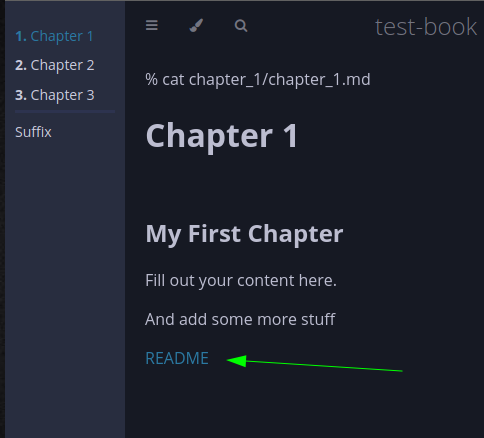
% cat chapter_1/chapter_1.md
# Chapter 1

## My First Chapter

Fill out your content here.

And add some more stuff

[README](README.html)
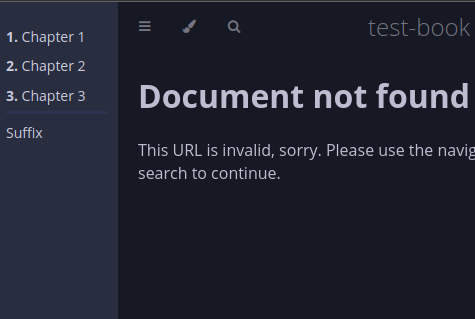
Hmm, works for me. ¯_(ツ)_/¯
Just had to make sure the README is a valid README.html file and used 'mdbook serve'. I got the 404 when it was a README.md. Also it is a standalone web page, not embedded into the mdbook framework with menu and css. Tested with 'http://localhost:3000/chapter_1/README.html' in the browser.
Fooling around a little bit more, I found a (bulky) way to have a hidden page with mdbook menu/css.
% cat src/chapter_1/hidden.md
# This is the intro page

And some more README
% mdbook build
% cp book/chapter_1/hidden.html src/chapter_1/hidden.html
% cat src/SUMMARY.md
# Summary

- [Chapter 1](./chapter_1/chapter_1.md)
- [Chapter 2](./chapter_2.md)
- [Chapter 3](./chapter_3.md)

--------

[Suffix](./suffix.md)
% cat src/chapter_1/chapter_1.md
# Chapter 1

## My First Chapter

Fill out your content here.

And add some more stuff

[Hidden](hidden.html)
% mdbook serve
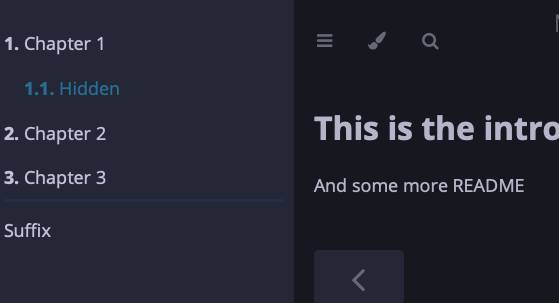
Now, clicking on any other menu item will make the Hidden menu item disappear.
that's work, but not perfect, it does not support search and keeps showing full SUMMARY
It would be really nice to be able to support this. Either an explicit section in SUMMARY.md ("hidden chapters") or just automatically take any .md file and convert it to html in the build step
