
runelite

runelite copied to clipboard
 runelite
Nearest Neighbor not applying on exp globes
Describe the bug When enabling the GPU plugin, exp globes aren't rendered using the nearest neighbor UI scaling mode.
To Reproduce Steps to reproduce the behavior:
- Go to GPU Plugin
- Select UI scaling mode : "Nearest Neighbor"
- compare Exp globe vs Runescape exp tracker
Expected behavior RuneLite's exp globe should render more crisp and less blurry.
Screenshots
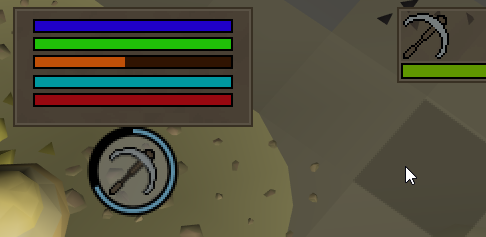
Environment (please complete the following information):
- OS: Windows
- RuneLite version: 1.7.6
- Launcher version: 2.1.6

While we do scale overlays with the game's UI, XP globes are drawn anti-aliased before the GPU ever touches it, so there's not really a good way to handle that.
