

 rundeck
MOTD/readme not displayed in projects list after upgrade to 3.4.10
Describe the bug
After upgrading to rundeck 3.4.10 from 3.3.4 and migrating to db-based configuration, the MOTD file is no longer displayed in the projects list.
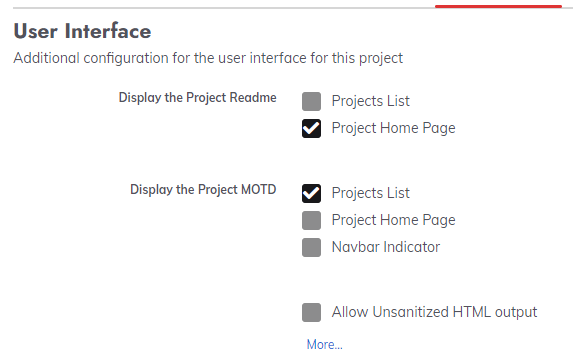
The options are loaded using rd projects configure update -p <project> --file <previousl project.properties> file and when viewed in the UI, the MOTD is set to display in the project list:
However, the MOTD is not displayed:
My Rundeck detail
- Rundeck version: 3.4.10
- install type: rpm
- OS Name/version: RHEL7
- DB Type/version: mariadb
To Reproduce
- IN rundeck 3.3.4 put a motd.md file in the project diretory using filesystem based configuration
- Ensure that the project.properties sets
project.gui.motd.display=projectList - upgrade to rundeck 3.4.10 and allow automatic project migration
- Reload the configuration with
rd projects configure -p <project> --file <path to prevous project.properties> - Reload the motd with
rd projects readme put --motd -p <project> --file <path to previous motd.md> - Natigate to
/menu/homeprojects list.
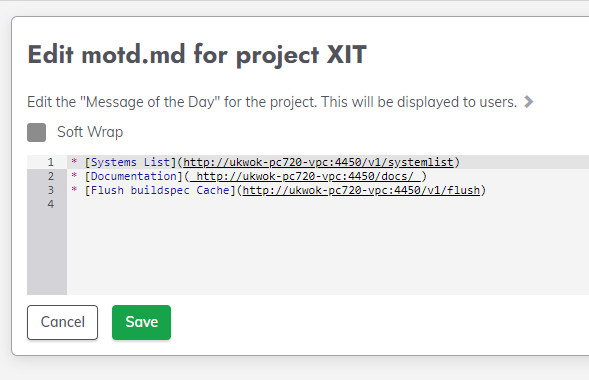
Contents of motd.md:
* [Systems List](http://ukwok-pc720-vpc:4450/v1/systemlist)
* [Documentation]( http://ukwok-pc720-vpc:4450/docs/ )
* [Flush buildspec Cache](http://ukwok-pc720-vpc:4450/v1/flush)
Expected behavior
Expect to see the motd in the projects list, like before:
Previous behavour:

New behaviour:

Here is the configuration from the UI:
And the project.properties used (snippet)
project.gui.readme.display=projectHome
project.gui.motd.display=projectList
And the MOTD in the gui:
Desktop (please complete the following information):
- OS: Windows 10
- Browser chrome
- Version 98.0.4758.102

At some point in the 3.4 series we changed how the MOTD was displayed. Do you see the icon highlighted here?
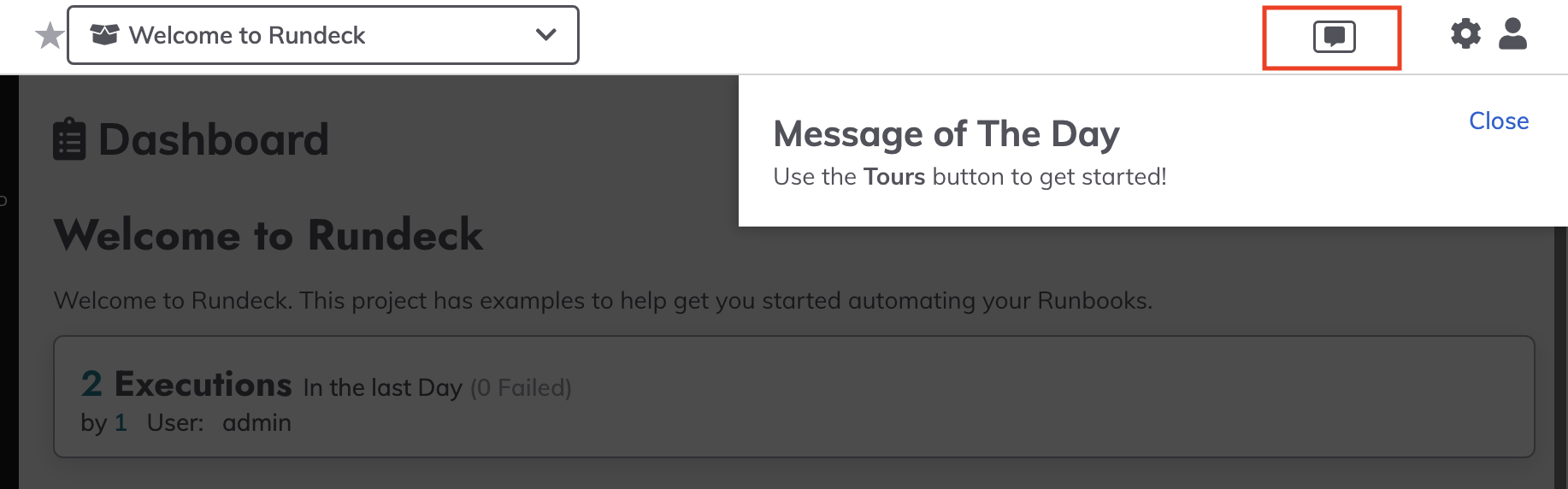
Once the MOTD has been seen it won't show again without clicking on the icon.

Was this feature removed?
project.gui.motd.display=projectList
As you can see from the screenshots, we're using it to display project-specific links and info.
I haven't tested that specific option since the release of 3.4. Some of the GUI customization options no longer work as expected in the new UI.
FWIW, I updated from 3.3.18 to 3.4.10 and MOTD still shows in my project list and project home. The property is the same as yours:
project.gui.motd.display=projectList,projectHome
project.gui.readme.display=projectList,projectHome
When I removed projectHome, the resume and MOTD remained visible in projectList.
On Fri, Apr 1, 2022 at 8:02 AM Ben Jackson @.***> wrote:
Was this feature removed?
project.gui.motd.display=projectList
As you can see from the screenshots, we're using it to display project-specific links and info.
— Reply to this email directly, view it on GitHub https://github.com/rundeck/rundeck/issues/7563#issuecomment-1085507463, or unsubscribe https://github.com/notifications/unsubscribe-auth/AEHDCCYEESXOFFFPS3AAKULVC2NQ7ANCNFSM5PXQ364Q . You are receiving this because you are subscribed to this thread.Message ID: @.***>
-- Yours, Niall.

At some point in the 3.4 series we changed how the MOTD was displayed. Do you see the icon highlighted here?
Once the MOTD has been seen it won't show again without clicking on the icon.
I release i didn't answer the question. The box you highlight is not visible:

Having run:
rd projects readme put -p $PROJECT --file $motd
rd projects readme put -p $PROJECT --motd --file  $motd
I have tried all of the following options:
- project.gui.motd.display=projectList
- project.gui.motd.display=projectHome
- project.gui.motd.display=projectList,projectHome
- project.gui.readme.display=projectList
- project.gui.readme.display=projectHome
- project.gui.readme.display=projectList,projectHome
The 'projectHome' parts seem to work:
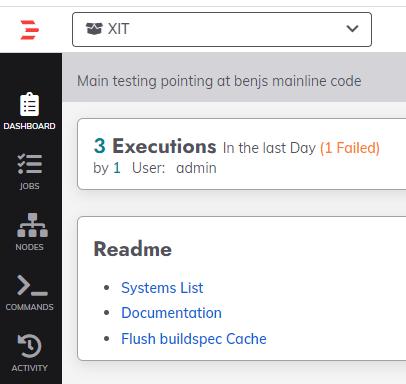
But the projectList options never seem to show anything in the project list:
I don't know if it's relevant or not, but the "Could not build valid moment object from input" warning appears after loading the projects list:

Seeing this in rundeck 3.4.8 as well.
My Rundeck detail
Rundeck version: 3.4.8
install type: rpm
OS Name/version: RHEL6
DB Type/version: mysql
MOTD messages are no longer displayed on the project list page after upgrading from rundeck 3.3.8.
MOTD is displayed in project home pages and in the navbar but not in the project list page.

Same issue in v4.2.1-20220511 Project readme is no longer displayed on the project list page as well, it is available through "dashboard"

In an effort to focus on bugs and issues that impact currently supported versions of Rundeck, we have elected to notify GitHub issue creators if their issue is classified as stale and close the issue. An issue is identified as stale when there have been no new comments, responses or other activity within the last 12 months. If a closed issue is still present please feel free to open a new Issue against the current version and we will review it. If you are an enterprise customer, please contact your Rundeck Support to assist in your request. Thank you, The Rundeck Team
![stale[bot] avatar](https://avatars.githubusercontent.com/in/1724?v=4 "Published by a pub.dev verified publisher")