

 runbox
#Mail: Customizable message list column headers
Allow adding column headers in the message list, especially To which would be useful with several aliases.
Ref: https://community.runbox.com/t/product-suggestion-additional-column-headings-for-emails/687

In addition to being able to add columns, the user should be able to remove them as well (e.g. I personally don't really care about seeing the size of a message) and rearrange them.

Initial thoughts.. some dialog box thing or... edit mode?
- Suspend all other drag/drop targets on canvastable
- Store current state (column list) in case of user getting into a mess
- Add blindingly obvious "you are in edit mode" indicator / button to turn it off
- Maybe as a overlay on bottom half of columns?
- Have an X on the top right of all columns for remove
- Have each col name turn into a dropdown listing all possible columns to choose from (do we reload content after one is chosen?)
- Have each col have a drag/drop ability which moves a "picked up" column in front of whichever one its dropped on? (have a "line" indicator for where it wil land?)
- Add a "+" button at the end which creates a new column (with some default/unused header as a content, that can then be changed?)
- Add "Save" / "Revert" (Cancel?) buttons
Crappy sketch: https://s1.whiteboardfox.com/s/e3f7722861c56e14.png

I would think just right-click the column headers and show a pop-up showing the list of available ones, with the active ones checked, and check/uncheck as desired. Essentially, just like a typical file explorer. If that doesn't work well, considering web design isn't quite the same as an app, then maybe a dialog. And dragging columns to rearrange, or dragging them in a dialog or clicking up/down buttons. As long as it's easy to do, both minimal steps and an intuitive interface, but not so easy it happens accidentally.
Alternatively something like this:
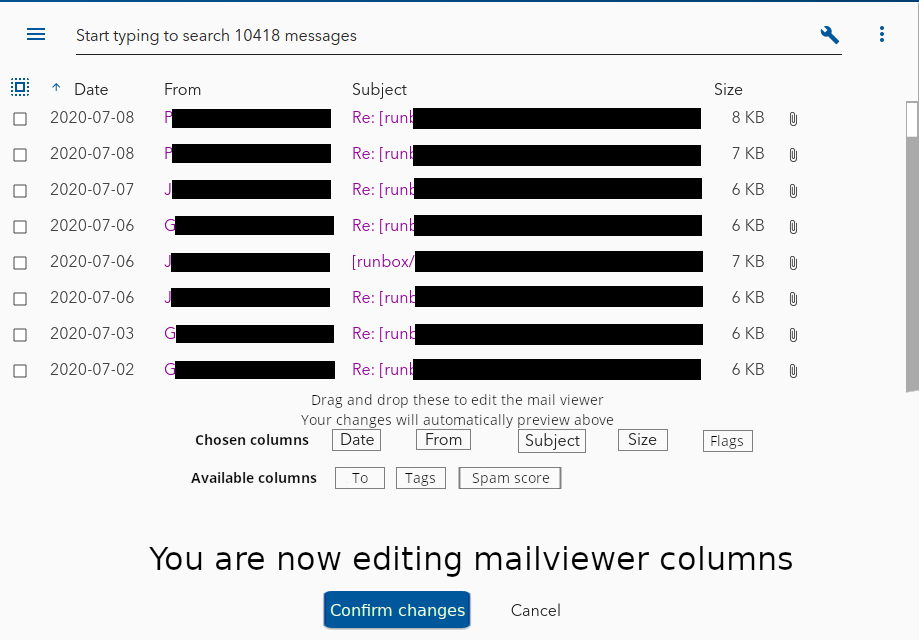
An overlay on top of half the mailviewer, with two rows of available columns, enabling drag and drop between the Enabled and the Available row, with changes previewing live.

Good suggestions!
@vertigo220's might be easier to implement and more familiar to some users, while @tadzik's allows more control and predictability.
What do you think, @castaway?
Ultimately, I would say the best choice is going to be the one that's a) easiest to implement, so less time is spent on it, allowing more time to be spent elsewhere, and b) provides the most customization. I wouldn't consider speed or even ease of use to be much of a priority here, since this is generally going to be something each user will use once and then be done with.
Huh, thats not what I thought @tadzik was suggesting when he mentioned it to me the other day...
I think I'd prefer:
- some sort of editing mode / status - which is either on or off, so its UI isn't in the way of general use (and doesn't complicate the normal use code) - this part is fairly easy to do anyways
- Beyond that I'm not sure what's easiest - I was thinking drag&drop to pick up columns and move them about.
I'm not sure I agree that everyone will do it once, but yes, it likely won't be a thing used very often per user.
Worth thinking about also: do we save it per browser, per user, or per type of device?
If possible, I'd say save it per user the first time, but then if changed on another device/browser, ask the user whether to apply changes everywhere or only on the current device/browser.
Just to add to this issue. This is an important feature for people who sort incoming and outgoing mail in to the same folder so that "conversations" are kept together in the same place. Ideally it would also be customisable on a per folder basis.
