

 rubyforgood
Clean up TileList css
For the TileList and TileListItems components, clean up the one-off CSS adjustments that are currently in use. Be systemic by replacing them with some custom spacing classes that currently live in custom-spacing.scss. There may also be ways to better leverage existing Vue and Buefy components. See the discussions in #75 for more info on how this has failed so far.
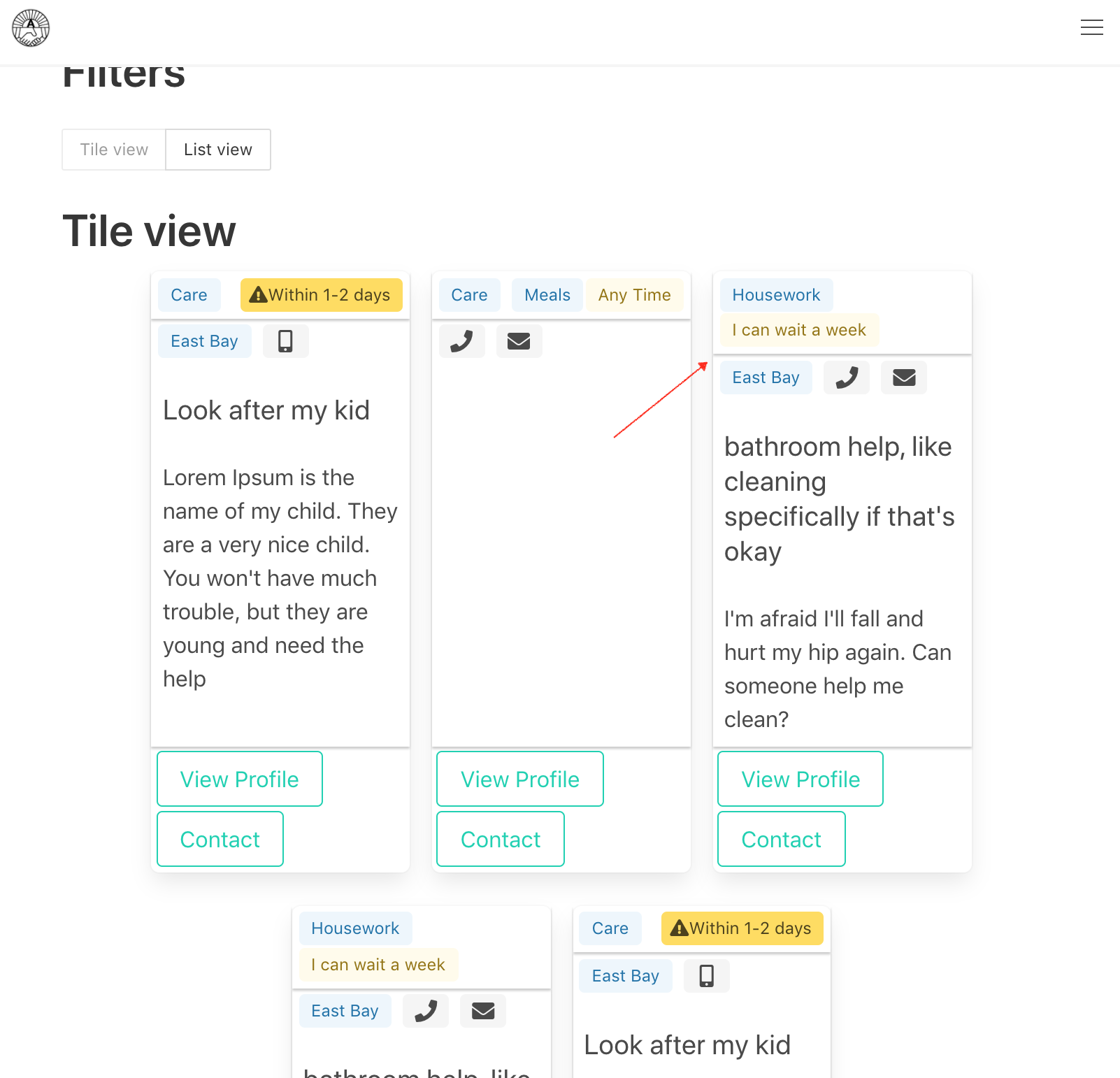
Also, if this cleanup can address the inconsistency noted in this screenshot from #82
that would be great:
 If anyone feels this is better addressed in a separate issue, that's fine, too.

I'm flagging this as a good first issue because I think it would be a good first issue for someone who already has a good amount of CSS knowledge. Also, people regularly search for "good first issue" items in active open source projects, so we may meet someone new this way
Howdy ! I can definitely help you with CSS. My concern is Ruby, so I need a proper guide for setting up this project on local server.

Hello @adsingh14 👋🏾 , we appreciate your interest!
We have a detailed setup guide, including a development Docker setup that is self contained (so no need to install ruby or any other dependencies on your machine). Please let us know if that seems doable or if you run into any trouble.
The screeshot in this issue is a bit out of date; the page at /contributions has changed somewhat since it was taken. That said, the issue with tags wrapping still exists.
Moreover, we'd love some css/design review of the one-off styling in TileListItem.vue:
- Are there ways to make better use of Bulma components so that we can minimize the custom css necessary?
- Ideas for alternative layouts for the information presented in tiles?
- Any other thoughts welcome as well!
LMK if there's any other context/info we can provide. Feel free to 'Assign' yourself if you'd like to look into it further. Thanks!

Thanks @exbinary for the info. I'm using Windows Home version. Can you please highlight what step should I follow from guide ?
Sure @adsingh14! Our docker instructions start here.
I haven't tried it myself but i've heard that Docker Desktop for Windows works pretty well. You'll then need docker-compose, installation instructions here.
I believe those are the only windows-specific steps, you should be able to follow the guide from there.
Before doing all that though, i'd look over the styles in this file and the other links in my previous comment, just to make sure you have some ideas for what you might experiment with or change. I'm mentioning that because this particular story is more of a question and doesn't have a well defined outcome yet. I wouldn't want you to go through all the setup and then discover there's not much to do on the issue! 😅