

 rstudio
Inline CSS within UI doesn't run in Rstudio Console completely
Output of sessionInfo():
R version 4.2.0 (2022-04-22 ucrt)
Platform: x86_64-w64-mingw32/x64 (64-bit)
Running under: Windows 10 x64 (build 22000)

Matrix products: default

locale:
[1] LC_COLLATE=English_India.utf8
[2] LC_CTYPE=English_India.utf8
[3] LC_MONETARY=English_India.utf8
[4] LC_NUMERIC=C
[5] LC_TIME=English_India.utf8

attached base packages:
[1] stats     graphics  grDevices utils     datasets
[6] methods   base

other attached packages:
 [1] shinyWidgets_0.7.0 MetBrewer_0.2.0    glue_1.6.2
 [4] ggtext_0.1.1       shiny_1.7.2        forcats_0.5.1
 [7] stringr_1.4.0      dplyr_1.0.9        purrr_0.3.4
[10] readr_2.1.2        tidyr_1.2.0        tibble_3.1.7
[13] ggplot2_3.3.6      tidyverse_1.3.1

loaded via a namespace (and not attached):
 [1] tidyselect_1.1.2 bslib_0.3.1      haven_2.5.0
 [4] colorspace_2.0-3 vctrs_0.4.1      generics_0.1.2
 [7] htmltools_0.5.2  utf8_1.2.2       rlang_1.0.2
[10] gridtext_0.1.4   later_1.3.0      jquerylib_0.1.4
[13] pillar_1.7.0     withr_2.5.0      DBI_1.1.2
[16] dbplyr_2.2.0     modelr_0.1.8     readxl_1.4.0
[19] lifecycle_1.0.1  munsell_0.5.0    gtable_0.3.0
[22] cellranger_1.1.0 rvest_1.0.2      tzdb_0.3.0
[25] fastmap_1.1.0    httpuv_1.6.5     fansi_1.0.3
[28] Rcpp_1.0.8.3     broom_0.8.0      xtable_1.8-4
[31] promises_1.2.0.1 scales_1.2.0     backports_1.4.1
[34] jsonlite_1.8.0   mime_0.12        fs_1.5.2
[37] hms_1.1.1        digest_0.6.29    stringi_1.7.6
[40] grid_4.2.0       cli_3.3.0        tools_4.2.0
[43] magrittr_2.0.3   sass_0.4.1       crayon_1.5.1
[46] pkgconfig_2.0.3  ellipsis_0.3.2   xml2_1.3.3
[49] reprex_2.0.1     lubridate_1.8.0  assertthat_0.2.1
[52] httr_1.4.3       rstudioapi_0.13  R6_2.5.1
[55] compiler_4.2.0
>
Example application or steps to reproduce the problem
Using the same example from the official shiny website, the inline CSS example doesn't run the entire way through in the Rstudio Console, simply stopping at the point after the tags$style function with (+) in the console indicating that the function has not run completely, instead of the (>)
...

# Define UI for application that draws a histogram
ui <- fluidPage(
  tags$head(
    # Note the wrapping of the string in HTML()
    tags$style(HTML("
      @import url('https://fonts.googleapis.com/css2?family=Yusei+Magic&display=swap');
      body {
        background-color: black;
        color: white;
      }
      h2 {
        font-family: 'Yusei Magic', sans-serif;
      }
      .shiny-input-container {
        color: #474747;
      }"))
  ),
  titlePanel("Old Faithful Geyser Data"),
  ...
)
...
Any help in this matter is greatly appreciated!

Can you provide the exact code that you're running, and point us to the page you're referring to?

FWIW, when I run this code, it works fine:
ui <- fluidPage(
  tags$head(
    # Note the wrapping of the string in HTML()
    tags$style(HTML("
      @import url('https://fonts.googleapis.com/css2?family=Yusei+Magic&display=swap');
      body {
        background-color: black;
        color: white;
      }
      h2 {
        font-family: 'Yusei Magic', sans-serif;
      }
      .shiny-input-container {
        color: #474747;
      }"))
  ),
  titlePanel("Old Faithful Geyser Data"),
)
The code I am running is the following
ui <- fluidPage(
  tags$head(
    tags$style(HTML("
      body {
        background-color: #101313;
        color: white;
      }

      .set1 form.well {
      background: transparent;
      border: 0px;
      }"))
    ),
  titlePanel("", windowTitle = "Squad Composition App"),
  sidebarLayout(
    div(class = "set1",
        sidebarPanel(
          selectInput("squad", "Squad:", choices = data$squad, selected = "Arsenal"),
          prettyRadioButtons("theme", "Background Theme:", choices = c("Dark", "Light"),
                             selected = "Dark", shape = "curve", animation = "smooth",
                             status = "success"),
          downloadBttn("download", "Download Plot",
                       color = "success", style = "gradient", size = "sm")
          )),
    mainPanel(h2("European Squad's Composition", style = "color:#2ECC71"),
              h4("This easy to use Shiny app allows you to create visualizations depicting the composition of squads in the Top 5 European leagues.", style = "color:white"),
              h5("Created by Harsh Krishna (@veryharshtakes)", style = "color:white"),
              plotOutput("plot"))
    )
)
Also, the code that seems to run okay for you still doesn't seem to work for me.
I can't run your code verbatim since I don't have data$squad, but I replaced that with a vector, and it runs fine in my RStudio IDE:
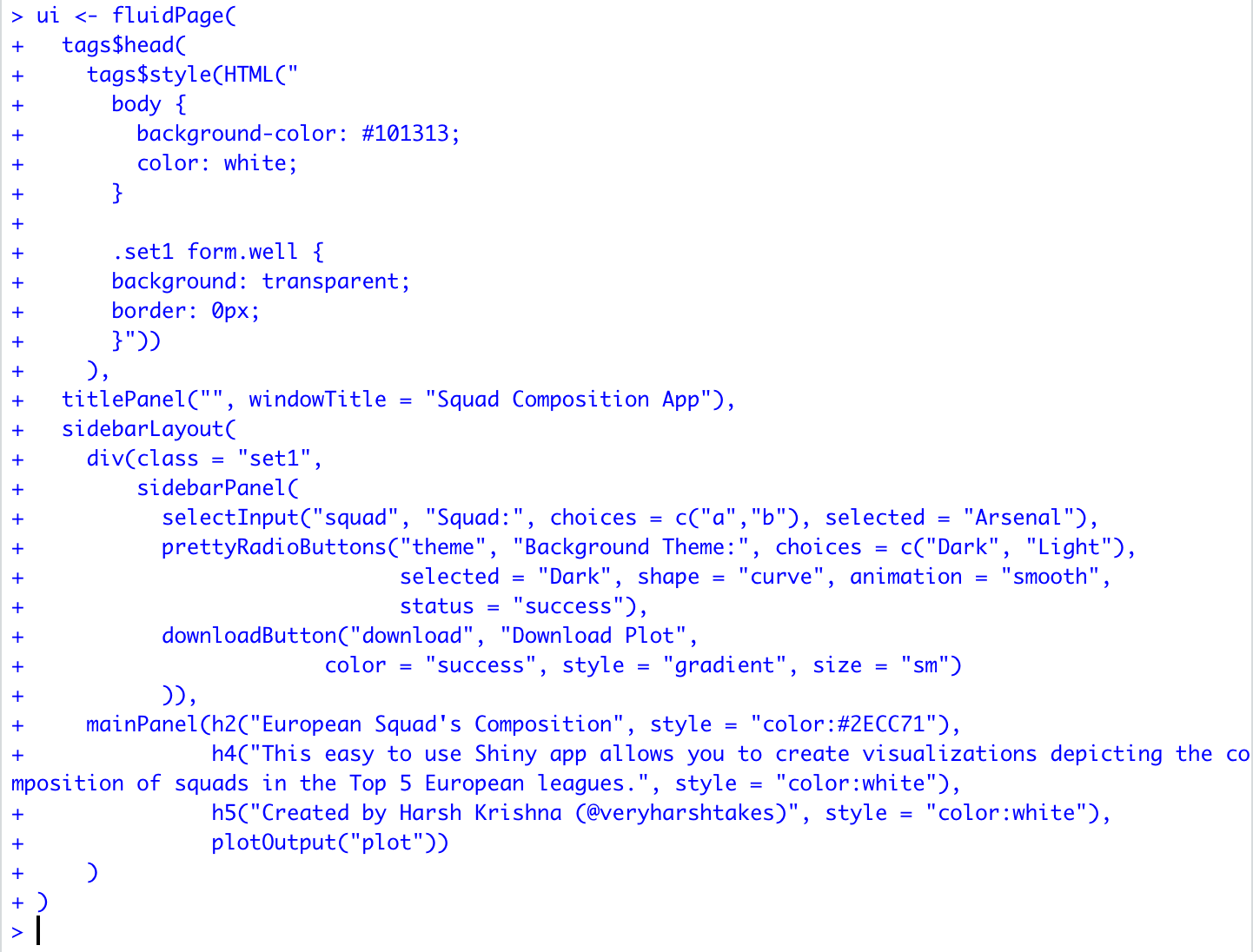
I'd suggest running it in a different environment, like the R GUI, or R in a terminal, and see if that works.
Also, I suggest trying to make a minimal reproducible example to try to isolate where the problem is.
Running it on the console seemed to work. Thanks! Though it is weird how it didn't work for me before.