

 rstudio
All shiny apps run in Chrome die on computer sleep
For any shiny app, including the default "Old Faithful" template in Rstudio, greys-out/dies on computer sleep when using Chrome on macOS. Doesn't happen in Safari or Firefox. Error message shown below. I started noticing this about a month ago.
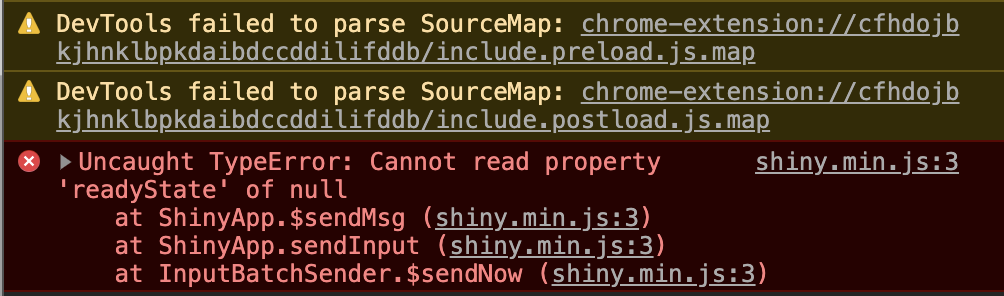


Yes. Running on Mac OS or Windows laptop from Rstudio. Close the laptop (or sleep) and the app is grayed out when the laptop wakes up again
I've been able to reproduce it on my Mac. I believe that Chrome is closing the WebSocket on sleep.
If you open a new browser window, open the JS console, run this code, then put your computer to sleep, it shows that the browser closes the websocket connection when the computer goes to sleep.
var ws = new WebSocket("ws://echo.websocket.org");
ws.onopen = function(event) {
  console.log(new Date() + ": WebSocket is open");
};
ws.onclose = function(event) {
 console.log(new Date() + ": WebSocket is closed");
};
Output:
Thu Mar 05 2020 13:04:30 GMT-0600 (Central Standard Time): WebSocket is open
Thu Mar 05 2020 13:04:32 GMT-0600 (Central Standard Time): WebSocket is closed
The timing indicates that it closed when the computer went to sleep (as opposed to when it woke up).
@wch I can confirm this result. Is this something that can only be addressed in Chrome or is there a work-around you can think of that would work from R/shiny?
A bit more info: This version of the code prints out the event object when the connection is closed.
var ws = new WebSocket("ws://echo.websocket.org");
ws.onopen = function(event) {
  console.log(new Date() + ": WebSocket is open");
};
ws.onclose = function(event) {
  console.log(new Date() + ": WebSocket is closed");
  console.log(event);
};
ws.onmessage = function(msg, binary) {
  console.log(new Date() + ": Received message: " + msg.data);
};
ws.onerror = function(event) {
  console.log(new Date() + ": WebSocket error");
  console.log(event);
};
The closing code is 1006, which indicates that the websocket was closed locally, from the web browser. https://stackoverflow.com/a/19305172/412655
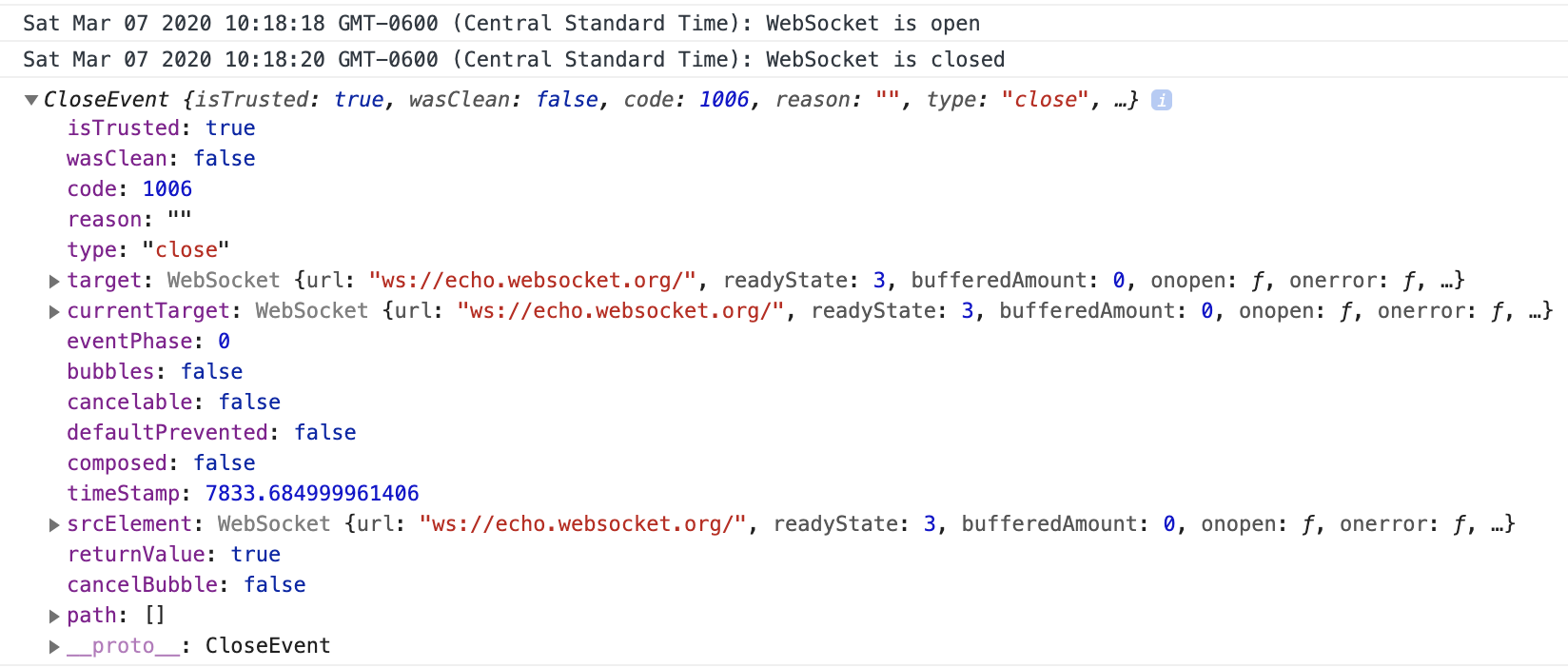
Running the same code on Firefox doesn't result in a closed websocket. After going to sleep and waking up, ws.send('abc') still works in Firefox.
With this test app, it shows that the server side knows when the connection is closed. The R side onClose function doesn't have a way to show the code or reason, but with some work, it would be possible to get that information.
Show code
# Web REPL/console
web_repl <- function(host = "127.0.0.1", port = 7000) {
library(httpuv)
app <- list(
call = function(req) {
page(req)
},
onWSOpen = function(ws) {
message(Sys.time(), ": Websocket open")
ws$onMessage(function(binary, message) {
on_message(ws, binary, message)
})
ws$onClose(function() {
message(Sys.time(), ": Websocket closed")
})
}
)
page <- function(req) {
wsUrl = paste(sep='',
'"',
"ws://",
ifelse(is.null(req$HTTP_HOST), req$SERVER_NAME, req$HTTP_HOST),
'"')
list(
status = 200L,
headers = list(
'Content-Type' = 'text/html'
),
body = sprintf('
<html>
<head>
<style type="text/css">
body {
font-size: 14px;
}
pre {
margin: 0
}
.user-input {
color: blue;
margin-top: 4px;
}
.user-input textarea {
color: blue;
vertical-align: top;
font-family: Courier;
font-size: 14px;
margin: 0;
border: 0;
padding: 0;
outline: none;
height: 5em;
}
#overlay{
position: absolute;
background: #bbb;
opacity: 0.6;
visibility: hidden;
left: 0;
right: 0;
top: 0;
bottom: 0;
z-index: 1;
}
</style>
<script>
var ws = new WebSocket("ws://localhost:%s");
ws.onmessage = function(msg) {
var msgDiv = document.createElement("pre");
msgDiv.innerHTML = msg.data.replace(/&/g, "&").replace(/\\</g, "<");
document.getElementById("output").appendChild(msgDiv);
document.documentElement.scrollIntoView({behavior: "smooth", block: "end"});
};
ws.onclose = function() {
document.getElementById("overlay").style.visibility = "visible";
console.log(new Date() + ": WebSocket is closed");
console.log(event);
};
ws.onopen = function(event) {
console.log(new Date() + ": WebSocket is open");
};
ws.onerror = function(event) {
console.log(new Date() + ": WebSocket error");
console.log(event);
};
function sendInput() {
var input = document.getElementById("input");
// Append the text
var msgDiv = document.createElement("pre");
msgDiv.setAttribute("class", "user-input");
msgDiv.innerHTML = "> " + input.value.replace(/&/g, "&").replace(/\\</g, "<");
document.getElementById("output").appendChild(msgDiv);
if (input.value == "") {
// Don\'t try to eval empty line
return;
}
ws.send(input.value);
input.value = "";
}
</script>
</head>
<body>
<div id="overlay"></div>
<div id="output">
<pre>%s
</pre>
</div>
<pre class="user-input">> <textarea rows=1 cols=100 id="input" autofocus></textarea>
</pre>
<script>
document.getElementById("input").addEventListener("keydown", function(event) {
if (event.key === "Enter") {
if (event.shiftKey) {
// Don\'t send if Shift is down. Only increase number of rows.
input.rows = input.rows + 1;
} else {
sendInput();
event.preventDefault();
}
}
});
</script>
</body>
</html>
', port, R.version.string
)
)
}
on_message <- function(ws, binary, message) {
result_txt <- capture.output({
tryCatch(
{
expr <- parse(text = message)
result <- withVisible(eval(expr, envir = .GlobalEnv))
if (result$visible == TRUE) {
print(result$value)
}
},
error = function(e) {
cat("Error: ", e$message)
}
)
})
result_txt <- paste(result_txt, collapse = "\n")
ws$send(result_txt)
}
startServer(host, port, app)
}
web_repl()
browseURL('http://127.0.0.1:7000')
I don't know right now if there is a way to tell Chrome to not close WebSockets on sleep. If it turns out that this isn't possible, then we may need to try to get Shiny to detect when this happens, and (1) not close the session on the R side, and (2) reconnect automatically.

Hi. Any potential updates or workarounds on the problem? Company policies have changed such that a computer will go to sleep after a few minutes. This makes this a rather inconvenient problem.
