

 rsmudge
Armitage not working , could not connect to database
hey there things to know :
- im new to linux in general .
- metasploit is working fine
things I've tried :
- every solution i found in the internet .
- reinstall .
still the problem's there , " could not connect to database" .
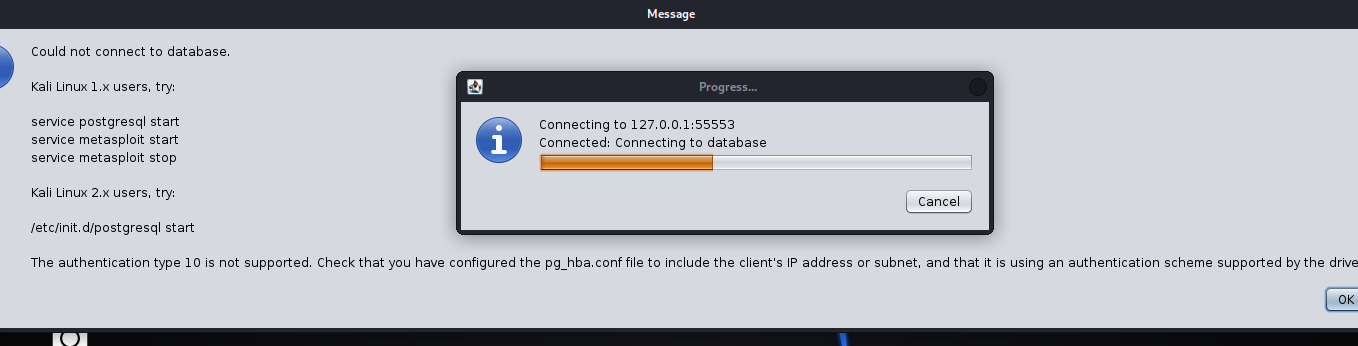

yeahh same problem here "type 10 not supported" but.. on postgresql-13 still working

This works for postgres14 too.
https://stackoverflow.com/a/64336274/449303
then, probably you have started msfconsole, so you have to restart the previous database with new encryption: ──(kali㉿kali)-[~] └─$ sudo msfdb delete [i] Database already started [+] Dropping databases 'msf' dropdb: error: database removal failed: ERROR: database "msf" is being accessed by other users DETAIL: There are 2 other sessions using the database. [+] Dropping databases 'msf_test' [+] Dropping database user 'msf' dropuser: error: removal of role "msf" failed: ERROR: role "msf" cannot be dropped because some objects depend on it DETAIL: owner of database msf 137 objects in database msf [+] Deleting configuration file /usr/share/metasploit-framework/config/database.yml [+] Stopping database
┌──(kali㉿kali)-[~]
└─$ sudo msfdb init
[+] Starting database
[+] Resetting password of database user 'msf'
[+] Creating databases 'msf_test'
[+] Creating configuration file '/usr/share/metasploit-framework/config/database.yml'
[+] Creating initial database schema
┌──(kali㉿kali)-[~] └─$ armitage Picked up _JAVA_OPTIONS: -Dawt.useSystemAAFontSettings=on -Dswing.aatext=true [] I will use /home/kali/armitage-tmp as a working directory [] Starting msfrpcd for you. WARNING: An illegal reflective access operation has occurred WARNING: Illegal reflective access by sleep.engine.atoms.ObjectAccess (file:/usr/share/armitage/armitage.jar) to method java.lang.ProcessImpl.getErrorStream() WARNING: Please consider reporting this to the maintainers of sleep.engine.atoms.ObjectAccess WARNING: Use --illegal-access=warn to enable warnings of further illegal reflective access operations WARNING: All illegal access operations will be denied in a future release [] MSGRPC starting on 127.0.0.1:55553 (NO SSL):Msg... [] MSGRPC ready at 2022-03-29 12:08:59 +0200. [*] Warning: @(armitage.ConsoleQueue@33ca35c4, 'x', '[-] Connection already established. Only one connection is allowed at a time. [-] Run db_disconnect first if you wish to connect to a different data service.
Current connection information: [] Connected to msf. Connection type: postgresql. ') at preferences.sl:425 [-] Timed out while executing 'use windows/meterpreter/reverse_tcp' last read = {data=, busy=false, prompt=msf6 > }; current prompt = 'msf6 > ' [] Used the tab method: [] Starting Cortana on [] Creating a default reverse handler... 0.0.0.0:28785 [-] Timed out while executing 'show exploits' last read = {data=, busy=false, prompt=msf6 > }; current prompt = 'msf6 > ' [*] Remote Exploits Synced
you should be seeing the armitage interface.
Yes, probably is not the best solution, but it is working.
