

 romgrk
Modified icon without close button
Attempts to solve #217, but still not working perfectly. :slightly_frowning_face: I guess I need some help.
So, I'm not very experienced with nvim plugins (almost never really looked at the codes), but I'm trying to solve the issue I opened myself, since you said a PR is welcome.
I added a show_modified_icon option that is used in some checks to verify if the modified icon should be shown or not.
I also tried to make a way where the close icon would not show if closeable is false, but show_modified_icon is true (or if the buffer is pinned). What I wanted is to not show the close button, only the modified icon.
It also works the other way around, so we can have only the close button even if the file is modified by setting closeable to true and show_modified_icon to false, if that is desired.
I also made the default value of show_modified_icon to be true.
The name of option, show_modified_icon, is just an ideia, it could be just modifiable to match closeable, dunno.
I did not change the name of the option icon_close_tab_modified, since that could be a breaking change and people would have to update their config file. At first I thought the name made less sense now, but it does work as a close button when the file is modified, so it is not wrong. In the end I think the name should stay the same. What do you think?
But most importantly, I could not make it work correctly yet... Right now, if you set one of the options to false and the other to true, the filenames may overlap. In this example, my changed icon is [+], and it looks like this with closeable set to false and show_modified_icon to true:
Unmodified files:

Modified files:

It is worth noting that when I move to the second file, it stays on top, hiding some of the first file's name and icons:

And if I set closeable to true and show_modifiable_icon to false, the filenames also move a little when the file is modified. In this example, I used xxxxx as my close icon just to show the situation more clearly:
Unmodified files:

Modified files:

Current file on top, hiding some of the "x"s:

When both options are set to true, everything plays out nicely, as far as I could tell
Unmodified files:

Modified files:



Okay, I had to change the calculate_buffers_width function inside the layout.lua file to also consider the possibility of opts.show_modified_icon being truthy. Makes sense. No more overlapping.
The only thing now is this rather weird spacing between the buffer names:

This happens when closable is set to false and show_modified_icons is set to true and no icon is showing. If I modify or pin the file to make some icon appear, this space goes away:
Pinned:
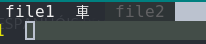
Modified:

If closeable is set to true, then the space never appears because in this case there is always at least the close icon, and the space apparently does not appear when there is some icon.
It seems like the buffer layout calculation doesn't take into account that buffers are narrower with the new configuration.
You can use print(vim.inspect(...)) to see the calculated widths to find where the calculation is wrong.

Oh, yes, you're right. I realized this part here was calculating this spacing between buffers, right?
layout.lua file, inside the for loop of the calculate_buffers_width function
width = width
  + strwidth(icon)
  + 1 -- space-after-close-icon
I thought that instead of always summing 1 at the end, we had to now only sum with 1 if there is an icon to be shown. Since in last commit I made a logic so that the icon is either empty string or one of the three possible icons (normal close, modified close or pinned), I made this change:
-- This is from the last commit
local icon =
  (is_pinned and opts.icon_pinned) or
  (opts.show_modified_icon and is_modified and opts.icon_close_tab_modified) or
  (opts.closable and opts.icon_close_tab) or
  ''

-- This is my idea for now
width = width
  + strwidth(icon)
  + (icon == '' and 0 or 1) -- space-after-close-icon but only if icon is not empty string
I hope I have not misunderstood things.
It looks like it is working now:




Sounds good. Can you use nil as the empty value rather than the empty string?
Have you also tested that the other configuration options are still working as they were?
For the option name, I prefer always_show_modified, the name explains the option clearly.
Okay, changed the name like you suggested. It indeed is a much better name.
I set nil explicitly like this:
local icon =
  (is_pinned and opts.icon_pinned) or
  (opts.always_show_modified and is_modified and opts.icon_close_tab_modified) or
  (opts.closable and opts.icon_close_tab) or
  nil

width = width
  + strwidth(icon or '')
  + (icon and 1 or 0) -- space-after-close-icon but only if icon is not nil
Otherwise, the icon variable would hold false when everything fails, but it doesn't really matter, actually... Everything would work the same with false instead of nil. So I think it could eventually be just
local icon =
  (is_pinned and opts.icon_pinned) or
  (opts.always_show_modified and is_modified and opts.icon_close_tab_modified) or
  (opts.closable and opts.icon_close_tab)
Also, the strwidth function raises when receiving nil, so I had to make that check and pass an empty string when icon is falsy.
I tested pretty much everything I could think of:
- only numbers
- only icons
- both icons and numbers
- none of numbers and icons
- only the modified icon
- only the normal close icon
- both icons
- pinned
- animations
- jump to buffer
- reordering buffers
And combinations of those. It seems like everything is working.
Also, would you like me to squash all the commits, eventually?
I think this issue was pretty much solved with this commit: https://github.com/romgrk/barbar.nvim/commit/7a61c82f79d63a7ca3263c88ac00788593e81d3c
I'm closing this PR then as well as the issue it mentions. Many thanks for all your work on this very cool plugin! I really appreciate it :heart: