
barbar.nvim
 barbar.nvim copied to clipboard
 romgrk
Modified icon without close button
Good day. First thing, I'm enjoying this plugin so far, very nice! :grin: :+1:
But right now, when I activate the close button (using lua, vim.g.bufferline = { closable = true }), the modified icon appears besides the file name, like this:
No modifications
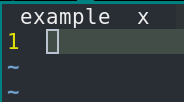
With modifications
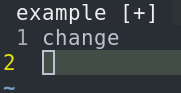
But when I turn it off (vim.g.bufferline = { closable = false }), the modified icon also disappears:
No modifications
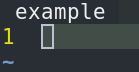
With modifications
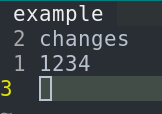
I know I can easily make it have a different color, make it bold etc, but I think the modified icon is very nice.
Is it possible to make the close button disappear but keep the modified icon? Would it be hard to implement?
Thanks!

It might be easily doable, but I don't have much time these days. PR welcome.

I tried to do something, but I've got a problem. I opened a PR with what I got until now.
I guess this was solved with this: https://github.com/romgrk/barbar.nvim/commit/7a61c82f79d63a7ca3263c88ac00788593e81d3c
Thank you so much for your work on this plugin!
I appreciate the kind words! I'm curious though— what config did you use to produce the behavior you desired?

Actually it now just works without any config, all I wanted was to not necessarly always have a space between the filename and the modified icon. But I think the relevant config is closable set to true.
Edit: Actually I need minimum_padding set to zero and both icon_separator_active and icon_separator_inactive set to ' ' (a space) to have it looking like what I want.
all I wanted was to not necessarly always have a space between the filename and the modified icon
Ah, gotcha. I was playing around with configs trying to get the modified icon to show 😅
Okay, I was just reviewing my config, I use minimum_padding and maximum_padding both set to zero, closable set to true and both icon_separator_active and icon_separator_inactive set to ' ' (a space).
- The closable makes the modified icon show up
- The paddings set to 0 make no space between filename and modified icon
- The separators set to a space make the tab have a padding around the combo (filename+icon), but not between the filename AND the icon. Without this space, the tab has the same size as the filename, so it feels kinda crowded/cluttered when there are many files opened.
That's it. Thanks! (: