

 roipeker
Add support for dashed line
Hi @roipeker,
Would there be an easy way to add support to draw dashed lines with Graphx ?
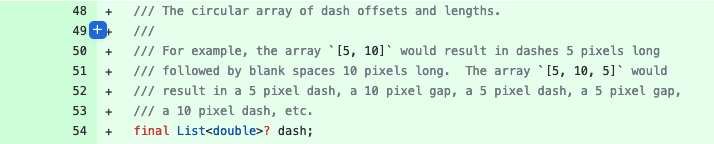
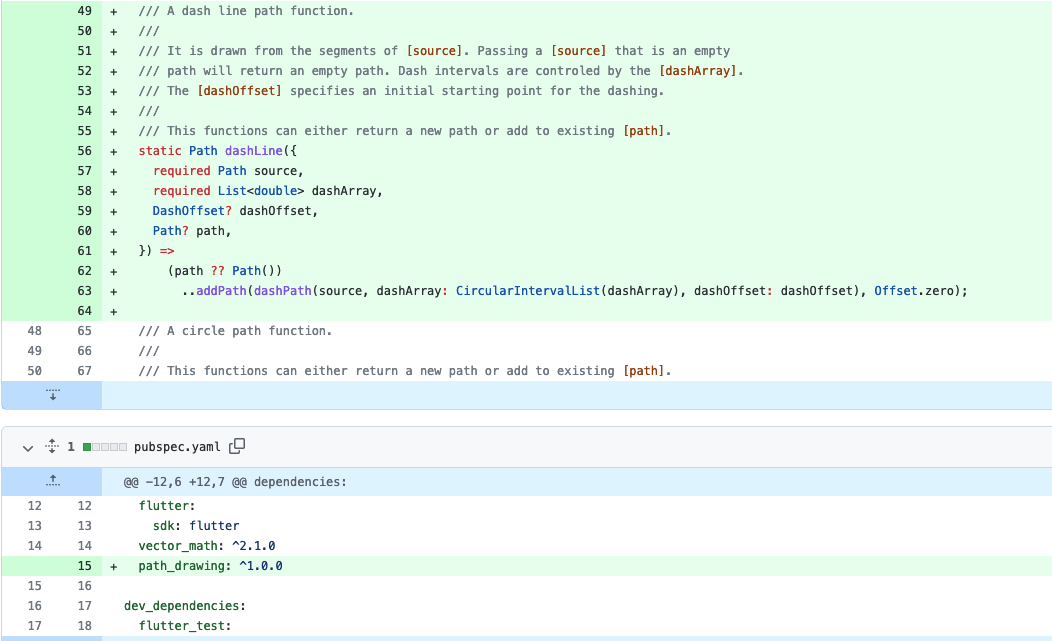
I remember having a similar ask when I was working with Graphic and the PR addressing it might give some pointers on how to implement it relatively easily.
https://github.com/entronad/graphic/commit/33385a917c676f66c1521f5f317213ac145dabeb
The gist of it being:

Hi @tlvenn, I forgot to reply earlier today, sorry.
You can totally use that library.
Graphics class has getPaths() and drawPath() as input/output for raw Paths.
source:

Output:

Good luck!

Hi @roipeker ,
Thanks a lot for the example, that is super useful !
The implementation for this within Graphics is simply a wrapper leveraging path_drawing lib. Could we do something similar so that we could draw dashed paths without importing an entire graph lib ? I might be able to contribute this given the example you provided.
Do you have a preference on how we should provide this within Graphx ?
Probably as a lineStyle parameter?, although flash had no support for it i believe (api wise).
Anyway, depending on the level of complexity that u need, for straight dashed lines is much more performant to use shaders i think (gradients or image) than compute path segmentation.
Ya computing path segmentations seems pretty painful and expensive.. And yes while looking at it, I also discovered that Flash had no native support for this and people came with some pretty crazy stuff to do path segmentations on their own.
Right now my use cases is all around very simple straight lines so probably the path segmentation is relatively simple but would be curious to see how you would approach it using shaders if you can spare a little time.
Thanks in advance.
Btw, by shaders i meant the classic Gradient or Image Shaders from flutter. Not the experimental GLSL (that will be probably removed with Impeller).
Give me a few mins and i will prepare a sample.
Thanks a lot @roipeker !
Speaking of which, what is the impact of Impeller on Graphx roughly ?
No clue, never tried Impeller myself... but I mostly heard good things about it.
(This code uses the latest from master channel, generic Type for the addChild<T>) ;
Image shader example:
import 'package:graphx/graphx.dart';

import 'commons.dart';

class DashShaderScene extends GSprite {
  @override
  void addedToStage() {
    stage!.color = Colors.white;
    drawImageLine();
    super.addedToStage();
  }

  Future<void> drawImageLine() async {
    // create a temporal shape to draw as Image texture.
    var drawer = GShape()
      ..graphics
          .beginFill(Colors.redAccent)
          .drawRect(0, 0, 4, 2)
          .endFill()
          .beginFill(Colors.transparent)
          .drawRect(4, 0, 4, 2)
          .endFill();
    final dashTexture = await drawer.createImageTexture();

    var lines = addChild(GShape());
    lines.setPosition(100, 100);

    lines.graphics.lineStyle(2).lineBitmapStyle(dashTexture);
    lines.graphics.moveTo(0, 0).lineTo(100, 0);
    lines.graphics.endFill();
    // diagonal line
    var matrix = GMatrix();
    matrix.rotate(deg2rad(45));
    lines.graphics
        .lineStyle(4)
        .lineBitmapStyle(dashTexture, matrix)
        .moveTo(0, 0)
        .lineTo(100, 100)
        .endFill();

    // vertical line
    matrix.identity();
    matrix.rotate(deg2rad(90));

    lines.graphics
        .lineStyle(0)
        .lineBitmapStyle(dashTexture, matrix)
        .moveTo(0, 0)
        .lineTo(0, 80)
        .endFill();

    /// For other rotations, you should take the angle of the line.
    var from = GPoint(60, 30);
    var to = GPoint(180, 18);
    var angle = Math.atan2(to.y - from.y, to.x - from.x);

    matrix.identity();
    matrix.rotate(angle);
    lines.graphics
        .lineStyle(2)
        .lineBitmapStyle(dashTexture, matrix, true, true)
        .moveTo(from.x, from.y)
        .lineTo(to.x, to.y)
        .endFill();

    /// animation example
    var lines2 = addChild(GShape());
    lines2.setPosition(50, 20);
    matrix.identity();
    stage!.onEnterFrame.add((time) {
      matrix.tx += .8;
      lines2.graphics
          .clear()
          .lineStyle(4)
          .lineBitmapStyle(dashTexture, matrix, true, true)
          .lineTo(120, 0)
          .endFill();
    });
  }
}
Example video:
https://user-images.githubusercontent.com/33768711/203899461-2289f649-5f70-4ff4-ba3e-0f898db25ece.mov
Hey @tlvenn , here's the updated example code with shaders for Image and Gradient. Maybe not the prettiest solution as it is, but might be easy to get some "helper" class to simplify the usage. Anyway, is just another simplified option to the Path.
import 'package:graphx/graphx.dart';

import 'commons.dart';

class DashShaderScene extends GSprite {
  @override
  void addedToStage() {
    stage!.color = Colors.white;
    drawImageLine();
    drawGradientLine();
    super.addedToStage();
  }

  Future<void> drawGradientLine() async {
    var dash = addChild(GShape());
    dash.graphics.lineStyle(2);

    /// Gradient is "tricky" for rotations, there's no Matrix on the Flutter API side.
    /// unless we use Gradient.linear(), which lineGradientStyle() doesn't support.
    /// So the bounding box and the Alignment defines the gradient transformation.
    /// You have to workaround the math to figure the "dash" spacing and rotation.
    dash.graphics.lineGradientStyle(
      GradientType.linear,
      [Colors.blue, Colors.transparent],
      ratios: [0.5, 0.5],
      begin: const Alignment(0, 0),
      end: const Alignment(.2, 0),
      tileMode: TileMode.repeated,
    );
    dash.graphics.moveTo(0, 0).lineTo(100, 0).endFill();

    dash.graphics.lineStyle(2);
    dash.graphics.lineGradientStyle(
      GradientType.linear,
      [Colors.blue, Colors.transparent],
      ratios: [0.5, 0.5],
      begin: const Alignment(0, 0),
      end: const Alignment(0, .2),
      tileMode: TileMode.repeated,
    );
    dash.graphics.moveTo(0, 0).lineTo(0, 100).endFill();

    dash.setPosition(50, 130);
  }

  Future<void> drawImageLine() async {
    // create a temporal shape to draw as Image texture.
    var drawer = GShape()
      ..graphics
          .beginFill(Colors.redAccent)
          .drawRect(0, 0, 4, 2)
          .endFill()
          .beginFill(Colors.transparent)
          .drawRect(4, 0, 4, 2)
          .endFill();
    final dashTexture = await drawer.createImageTexture();

    var lines = addChild(GShape());
    lines.setPosition(30, 30);

    lines.graphics.lineStyle(2).lineBitmapStyle(dashTexture);
    lines.graphics.moveTo(0, 0).lineTo(100, 0);
    lines.graphics.endFill();
    // diagonal line
    var matrix = GMatrix();
    matrix.rotate(deg2rad(45));
    lines.graphics
        .lineStyle(4)
        .lineBitmapStyle(dashTexture, matrix)
        .moveTo(0, 0)
        .lineTo(50, 50)
        .endFill();

    // vertical line
    matrix.identity();
    matrix.rotate(deg2rad(90));

    lines.graphics
        .lineStyle(0)
        .lineBitmapStyle(dashTexture, matrix)
        .moveTo(0, 0)
        .lineTo(0, 80)
        .endFill();

    /// For other rotations, you should take the angle of the line.
    var from = GPoint(60, 30);
    var to = GPoint(180, 18);
    var angle = Math.atan2(to.y - from.y, to.x - from.x);

    matrix.identity();
    matrix.rotate(angle);
    lines.graphics
        .lineStyle(2)
        .lineBitmapStyle(dashTexture, matrix, true, true)
        .moveTo(from.x, from.y)
        .lineTo(to.x, to.y)
        .endFill();

    /// animation example
    var lines2 = addChild(GShape());
    lines2.setPosition(150, 10);
    matrix.identity();
    stage!.onEnterFrame.add((time) {
      matrix.tx += .8;
      lines2.graphics
          .clear()
          .lineStyle(4)
          .lineBitmapStyle(dashTexture, matrix, true, true)
          .lineTo(80, 0)
          .endFill();
    });
  }
}
Video (red lines = texture, blue lines = gradient)
https://user-images.githubusercontent.com/33768711/203900888-f9da4bf0-c146-4079-845b-ad8539ab9c2e.mov