

 rocksdanister
Better wallpaper pause algorithm
I've recently noticed that the wallpapers pause only when you're focused on a fullscreen application, and not when there just is a fullscreen application running. So when I'm using a windowed application on top of a fullscreen one, the wallpaper keeps running although I can't see it at all. I have a pretty decent pc so this doesn't cause much of a problem, but it's just a little uncomfortable to know that lively is just eating up unnecessary resources. It would be better if lively just detects if there is a fullscreen window on the screen and pauses the wallpaper based on that.

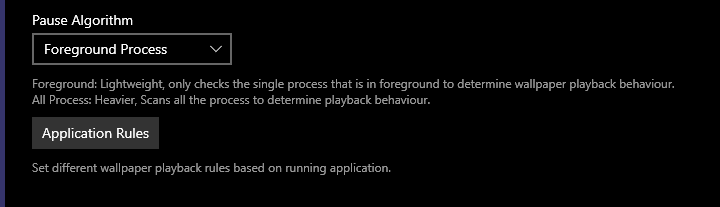
It is hinted in the description, foreground algorithm checks the foreground app and since there can only be one foreground app at one time this is its limitation..
All process algorithm is meant to resolve this, Its not implemented yet currently.
For the time being you can set Application Focused -> Pause

I just had an idea, I am going to keep track of last foreground program that was fullscreen and check to see if its still fullscreen before proceeding with the new foreground program checks.
Its simple enough, so should not affect performance much.
I hope the wallpaper pause when any application maximized.
In another word, I hope the wallpaper not pause when I can see it, even just a bit.

Currently, with these settings above, lively only pause when a full screen app is focused, but if any none-full-screen app bought to top, like the task manager or lively window above, lively would start to run, while in background, can't be seen.
Is this still a planned feature? REALLY could use it.
Even though I have an RTX 4090, Lively uses 25% of it apparently, which interferes with Auto Dark Mode's GPU %-based theme-switching pausing.
When I have a fullscreen application focused, my GPU use goes down to almost 0. But if I'm playing a video game, it could also still be even below 25% usage. Meaning I can't calibrate Auto Dark Mode's pause function in such a way that will actually work when I'm playing a video game. B/c, if the threshold is <25%, it won't switch themes when I'm not playing a game (b/c of Lively); and if it's >25%, it won't pause the switch when I AM playing a game unless it's a really intense one (b/c my GPU use will be <25%). My best bet is to either allow Auto Dark Mode to switch even when I'm playing a video game (for a momentary performance hit), or to set the switch-pausing threshold to something under like 7%, and just get lucky and be using a fullscreen app or a game at the time my theme switch would occur (30 minutes after sunset), where my GPU usage will be <7%.

@weirdalsuperfan I don't really get the exact issue from your comment, when running other apps Lively will pause the wallpaper. Only in some cases it will fail to do so. (window side by side or foreground window thats small.)
Even though I have an RTX 4090, Lively uses 25% of it apparently, which interferes with Auto Dark Mode's GPU %-based theme-switching pausing.
% based switching is unreliable since the value will depend on the clockspeed of the GPU, your 4090 is likely running at lower clocks so it will show high %.
https://github.com/rocksdanister/lively/wiki/Performance#understanding-task-manager-readings
Usage will also depend on the running wallpaper at the time.
If you want to shedule Lively to pause wallpaper for few hours a day commandline-control can be used: https://github.com/rocksdanister/lively/wiki/Command-Line-Controls
As for timeline this is marked for v2.3 Milestone release.
Lively has no strict release schedule and I do other updates in-between, so there is no date.. the difficulty in this issue is the testing involved with this new code.
I don't really get the exact issue from your comment, when running other apps Lively will pause the wallpaper. Only in some cases it will fail to do so. (window side by side or foreground window thats small.)
I'm just trying to say that, because Lively doesn't pause the wallpaper despite the wallpaper not being visible, my GPU can be doing unnecessary work. I only noticed it was doing all this work after doing some investigtion b/c Auto Dark Mode wasn't working as expected. So I definitely want this new feature.
Thx for telling me about the clockspeed, though. Will look into it
As for timeline this is marked for v2.1 Milestone release.
Thanks for the timeline. I just wanted to know if this feature was still in development. 🙏
This still seems to be an issue even today, even tho it has an option to stop when a full screen app is running it seems to only work on one mintor, and doesn't stop the wallpaper on the other monitors if i drag a browser full screen once i switch over to another monitor.

Not sure if the menu translated properly in other languages:
Although when clicking on the desktop it becomes foreground, so wallpaper will resume.
With 2.1 beta, when firefox browser is maximized, the wallpaper still running, as before.
This is moved to different release, v2.1 has no change in algorithm.
If there is change in algorithm it will be listed in the release changelog and this issue will be closed.
This is moved to different release, v2.1 has no change in algorithm.
If there is change in algorithm it will be listed in the release changelog and this issue will be closed.
Thanks, I see it's working in progress, got it.
https://github.com/rocksdanister/lively/wiki/Performance#all-process