
CrossLine
 CrossLine copied to clipboard
 rochus-keller
CrossLine is an outliner with sophisticated cross-link capabilities in the tradition of the well-respected Ecco Pro
Welcome to CrossLine
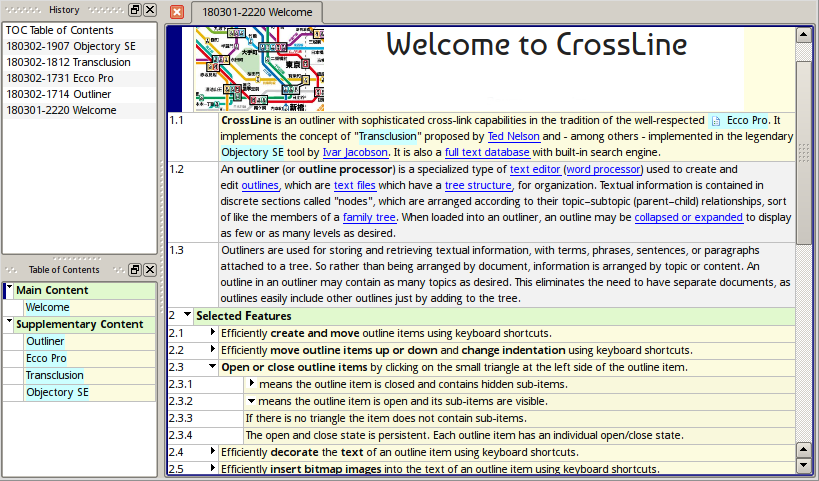
CrossLine is an outliner with sophisticated cross-link capabilities in the tradition of the well-respected  Ecco Pro. It implements the concept of "Transclusion" proposed by Ted Nelson and - among others - implemented in the legendary Objectory SE tool by Ivar Jacobson. It is also a full text database with built-in search engine.
An outliner (or outline processor) is a specialized type of text editor (word processor) used to create and edit outlines, which are text files which have a tree structure, for organization. Textual information is contained in discrete sections called "nodes", which are arranged according to their topic–subtopic (parent–child) relationships, sort of like the members of a family tree. When loaded into an outliner, an outline may be collapsed or expanded to display as few or as many levels as desired (see https://en.wikipedia.org/wiki/Outliner).
Download and Installation
You can either compile CrossLine yourself or download the pre-compiled version from here:
http://software.rochus-keller.ch/CrossLine_win32.zip
http://software.rochus-keller.ch/CrossLine_linux_x86.tar.gz
This is a compressed single-file executable which was built using the source code from here. Of course you can build the executable yourself if you want (see below for instructions). Since it is a single executable, it can just be downloaded and unpacked. No installation is necessary. You therefore need no special privileges to run CrossLine on your machine.
Here is a demo file with some instructions on how to use CrossLine: http://software.rochus-keller.ch/CrossLineDemo.cldb
How to Build CrossLine
Preconditions
CrossLine was originally developed using Qt4.x. The single-file executables are static builds based on Qt 4.4.3. But it compiles also well with the Qt 4.8 series; the current version is not compatible with Qt 5.x.
You can download the Qt 4.4.3 source tree from here: http://download.qt.io/archive/qt/4.4/qt-all-opensource-src-4.4.3.tar.gz
The source tree also includes documentation and build instructions.
If you intend to do static builds on Windows without dependency on C++ runtime libs and manifest complications, follow the recommendations in this post: http://www.archivum.ch/[email protected]/2007-02/00039/Fed-up-with-Windows-runtime-DLLs-and-manifest-files-Here's-a-solution.html
Here is the summary on how to do implement Qt Win32 static builds:
- in Qt/mkspecs/win32-msvc2005/qmake.conf replace MD with MT and MDd with MTd
- in Qt/mkspecs/features clear the content of the two embed_manifest_*.prf files (but don't delete the files)
- run configure -release -static -platform win32-msvc2005
To use Qt with CrossLine you have to make the following modification: QTreeView::indexRowSizeHint has to be virtual; the correspondig line in qtreeview.h should look like: virtual int indexRowSizeHint(const QModelIndex &index) const;
Build Steps
Follow these steps if you inted to build CrossLine yourself (don't forget to meet the preconditions before you start):
- Create a directory; let's call it BUILD_DIR
- Download the CrossLine source code from https://github.com/rochus-keller/CrossLine/archive/master.zip and unpack it to the BUILD_DIR; rename the subdirectory to "CrossLine".
- Download the Stream source code from https://github.com/rochus-keller/Stream/archive/github.zip and unpack it to the BUILD_DIR; rename "Stream-github" to "Stream".
- Download the Udb source code from https://github.com/rochus-keller/Udb and unpack it to the BUILD_DIR; rename "Udb-github" to "Udb".
- Create the subdirectory "Sqlite3" in BUILD_DIR; download the Sqlite source from http://software.rochus-keller.ch/Sqlite3.tar.gz and unpack it to the subdirectory.
- Download the Txt source code from https://github.com/rochus-keller/Txt and unpack it to the BUILD_DIR; rename "Txt-github" to "Txt".
- Download the Oln2 source code from https://github.com/rochus-keller/Oln2 and unpack it to the BUILD_DIR; rename "Oln2-github" to "Oln2".
- Download the NAF source code from https://github.com/rochus-keller/NAF/archive/master.zip and unpack it to the BUILD_DIR; rename "NAF-Master" to "NAF". We only need the Gui2 subdirectory so you can delete all other stuff in the NAF directory.
- Download the Fts source code from https://github.com/rochus-keller/Fts and unpack it to the BUILD_DIR; rename "Fts-github" to "Fts".
- Download the QtSingleApplication source files from https://github.com/qtproject/qt-solutions/tree/master/qtsingleapplication/src and copy them to BUILD_DIR/QtApp directory together with this file: http://software.rochus-keller.ch/QtApp.pri
- Goto the BUILD_DIR/CrossLine subdirectory and execute
QTDIR/bin/qmake CrossLine.pro(see the Qt documentation concerning QTDIR). - Run make; after a couple of minutes you will find the executable in the tmp subdirectory.
Alternatively you can open CrossLine.pro using QtCreator and build it there.
This procedure builds plain CrossLine without Lua and CLucene support which is sufficient for most use cases.
Support
If you need support or would like to post issues or feature requests please use the Github issue list at https://github.com/rochus-keller/CrossLine/issues or send an email to the author.
Metadata
Owner
 rochus-keller
Metadata
CrossLine is an outliner with sophisticated cross-link capabilities in the tradition of the well-respected Ecco Pro