

 robx
robx
In Display, there is an option for Font Family > serif, but it doesn't seem to do anything.
In Display, there is an option for Font Family > serif, but it doesn't seem to do anything.
Originally posted by @boboquack in https://github.com/robx/pzprjs/issues/1#issuecomment-533868237

@boboquack This actually works for me, tested with a five cells puzzle where it changed the clue font. This is with Chrome?
This is with Chrome. I just tested it with an Easy as ABC and a FiveCells: http://pzv.jp/p?easyasabc/6/6/4/1211j2242i4i33i and http://pzv.jp/p.html?fivecells/10/10/l3d2c3c0c1l0b3h3b0m1b0d3f3f2d3a.

strange, it works with all my browsers on macos, both on pzv.jp and on puzz.link...
looking at the code, another question: what OS are you on? there's some special code for Android
if you want to dig a bit deeper and can use the browser developer tools, here's how I can check and change the font style manually:
> ui.puzzle.painter.fontfamily
"sans-serif"
// change font family in the menu
> ui.puzzle.painter.fontfamily
"serif"
> ui.puzzle.painter.fontfamily = 'Comic Sans MS'
> ui.puzzle.painter.paintAll()
// puzzle now rendered with Comic Sans
I managed to get the puzzle rendered in Comic Sans successfully, so maybe the "serif" font isn't installed and it's defaulting to sans-serif? I'm on Windows 10.0.18362.
That's strange, "serif" should choose any serif font, and I'm sure Times New Roman is available. Perhaps you changed the default serif font to a sans-serif font in Chrome preferences?
At any rate, I'm inclined to let this one rest until it gets confirmed by other users.
Curiouser and curiouser... if it helps - changing the source on the github css to
.markdown-body {
    font-family: serif;
    font-size: 16px;
    line-height: 1.5;
    word-wrap: break-word;
}
produces Times New Roman in the comments as desired...
You could try digging down into the svg in the inspector (or maybe your browser is not even using svg, which might explain things?). For me, the font family appears on the top svg element as shown below.
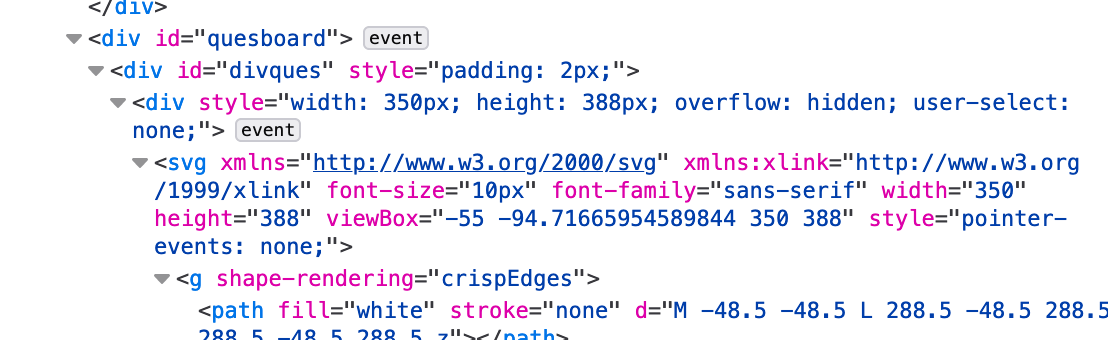
(I don't understand the rendering backend particularly well so far; I know there's also a canvas backend. And from reading the code I wouldn't have expected the font family to show up there...)
As far as I can see, editing that particular font-family does nothing whatsoever. Has anyone else confirmed this behaviour on their own machine?
Chrome 79.0.3945.79 macOS 10.15.2
Changing the font actually toggles between two different serif fonts. This is with the default browser settings.
Edit: pzv.jp does apply the sans-serif font properly.

@x-sheep thanks, that's useful
For me, it works as "expected" with
Chromium 73.0.3675.0 macOS 10.14.6
Still works with
Chromium 81.0.4000.0
I should also point out that the rest of the page is rendered in Times New Roman, which is probably the same font as used in the grid with the sans-serif option.
I found this strange fragment:
                if(pzpr.env.OS.Android){
                        ui.misc.modifyCSS({'body, .btn':{fontFamily:'Verdana, Arial, sans-serif'}});
                }
But that shouldn't affect this, since the trouble is with Windows...
I noticed the same on Windows with Chrome and Firefox:
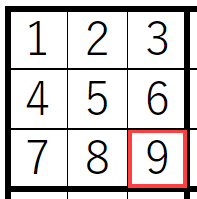
On Edge it is working when changing the font family. But on Edge it uses canvas and not svg.
The problem is here:
			initFont: function() {
				var isgothic = this.puzzle.getConfig("font") === 1;
				if (this.puzzle.pzpr.env.OS.Android) {
					this.fontfamily = isgothic
						? "Helvetica, Verdana, Arial, "
						: '"Times New Roman", ';
				} else {
					this.fontfamily = "";
				}
				this.fontfamily += isgothic ? "sans-serif" : "serif";
			},
It will remove the font itself of the CSS style font-family. font-family: "serif"; or font-family: "sans-serif" is then not working.
