robotools
AttributeError when calling vanilla.TextEditor.enable(onOff)
Hi, when I do this:
self.w.textEditor = TextEditor((10, 10, 200, 200), "text")
self.w.textEditor.enable(False)
I get an:
File "/Applications/RoboFont.app/Contents/Resources/lib/python3.6/vanilla/vanillaBase.py", line 115, in enable
    self._nsObject.setEnabled_(onOff)
AttributeError: 'NSScrollView' object has no attribute 'setEnabled_'

Try EditText instead of TextEditor. Only certain controls support disabling, and the vanilla API isn't quite clear about that. Not sure how to solve this, but it's an interesting issue.

I didn't know that EditText supports multiline text. I think that works for now, but EditText can't scroll, so I may need to go back to a read-only TextEditor later.
I suppose TextEditor.enable(onOff) can be taken off the documentation for now—but I'm also not sure how up-to-date the doc is anyway.
yeah enable(value) is a method in the parent vanillaBaseClass... so that is the reason why its ending up in the docs.
I guess the best option is to move enable(value) from the vanillaBase to the VanillaBaseControl
https://github.com/typesupply/vanilla/blob/master/Lib/vanilla/vanillaBase.py#L111
similar to the method isEnabled()
An other option could be raise an error in the TextEditor subclass, and have an adjusted doc string, so it can be documented as such.

The NSTextView has an editable property. That should have the desired effect.

That's something different from a disabled control: it will only make the editor non-editable, it won't change its appearance to "disabled".
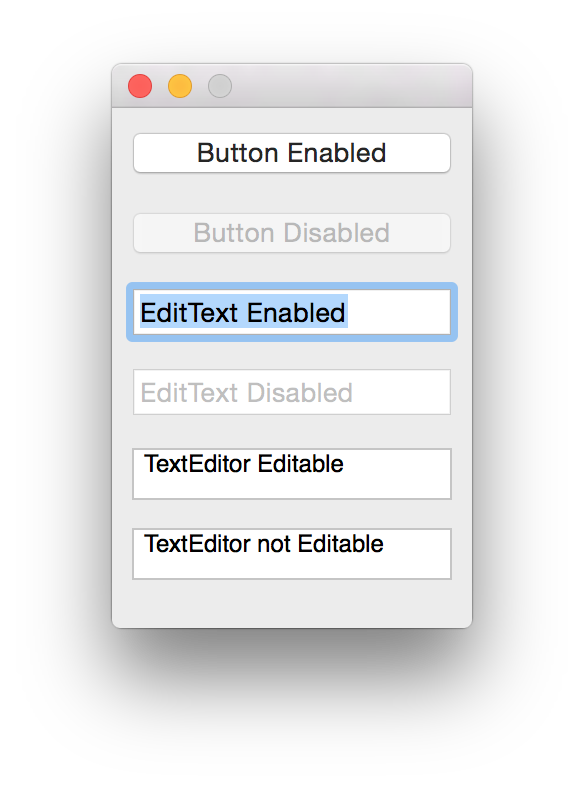
from vanilla import *

w = Window((180, 260))
w.button1 = Button((10, 10, 160, 24), "Button Enabled")
w.button2 = Button((10, 50, 160, 24), "Button Disabled")
w.button2.enable(False)
w.et1 = EditText((10, 90, 160, 24), "EditText Enabled")
w.et2 = EditText((10, 130, 160, 24), "EditText Disabled")
w.et2.enable(False)
w.te1 = TextEditor((10, 170, 160, 26), "TextEditor Editable")
w.te2 = TextEditor((10, 210, 160, 26), "TextEditor not Editable")
w.te2._textView.setEditable_(False)
w.open()
So, while the error message is confusing (TextEditor should ideally not have an enable() method), the behavior is correct, in that a TextEditor simply isn't a "control".
a combo of setEditable_, setSelectable_ and setAlphaValue_ mimics setEnabled_
from vanilla import *

w = Window((180, 260))
w.l = List((0, 0, 0, 0), [])
w.button1 = Button((10, 10, 160, 24), "Button Enabled")
w.button2 = Button((10, 50, 160, 24), "Button Disabled")
w.button2.enable(False)
w.et1 = EditText((10, 90, 160, 24), "EditText Enabled")
w.et2 = EditText((10, 130, 160, 24), "EditText Disabled")
w.et2.enable(False)
w.te1 = TextEditor((10, 170, 160, 26), "TextEditor Editable")
w.te2 = TextEditor((10, 210, 160, 26), "TextEditor not Editable")


# disable edits
w.te2._textView.setEditable_(False)
# disable selectable
w.te2._textView.setSelectable_(False)
# draw opaque
w.te2._textView.setAlphaValue_(.2)
w.open()
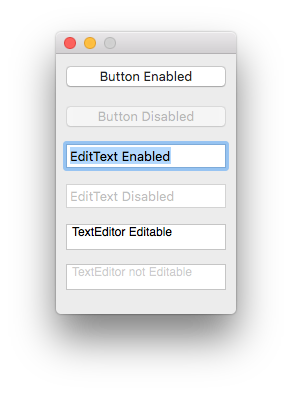
I used @typemytype's suggestion:
import vanilla

w = vanilla.Window((200, 200))
w.te = vanilla.TextEditor((0, 0, 0, 0), "Testing.")
w.te.enable(False)
w.open()