
FluentFTP
 FluentFTP copied to clipboard
 robinrodricks
39.0.1 regression: AutoConnect fails with Azure FTP servers
FTP OS: Windows
FTP Server: Azure
Computer OS: Windows 10
FluentFTP Version: 39.0.1
Framework: .NET 6
Using AutoConnect to connect to Azure App Service FTP servers (*.ftp.p.azurewebsites.windows.net) has started failing with 39.0.1 -- times out. Guessing it's related to the timeout changes?
Logs :
39.0.0:
# AutoConnectAsync()

# AutoDetectAsync(True, False)

# ConnectAsync()
Status:   Connecting to ***:21

# ConnectAsync()
Status:   Connecting to ***:990
Status:   FTPS Authentication Successful
Status:   Time to activate encryption: 0h 0m 0s.  Total Seconds: 0.1797745.
Response: 220 Microsoft FTP Service
Status:   Detected FTP server: WindowsServerIIS


39.0.1:
# AutoConnectAsync()

# AutoDetectAsync(True, False)

# ConnectAsync()
Status:   Connecting to ***:21

System.TimeoutException: Timed out trying to connect!
This exception was originally thrown at this call stack:
    FluentFTP.FtpSocketStream.ConnectAsync(string, int, FluentFTP.FtpIpVersion, System.Threading.CancellationToken)
    System.Runtime.ExceptionServices.ExceptionDispatchInfo.Throw()
    System.Runtime.CompilerServices.TaskAwaiter.ThrowForNonSuccess(System.Threading.Tasks.Task)
    System.Runtime.CompilerServices.TaskAwaiter.HandleNonSuccessAndDebuggerNotification(System.Threading.Tasks.Task)
    FluentFTP.FtpClient.ConnectAsync(FluentFTP.FtpSocketStream, System.Threading.CancellationToken)
    System.Runtime.ExceptionServices.ExceptionDispatchInfo.Throw()
    System.Runtime.CompilerServices.TaskAwaiter.ThrowForNonSuccess(System.Threading.Tasks.Task)
    System.Runtime.CompilerServices.TaskAwaiter.HandleNonSuccessAndDebuggerNotification(System.Threading.Tasks.Task)
    FluentFTP.FtpClient.ConnectAsync(System.Threading.CancellationToken)
    System.Runtime.ExceptionServices.ExceptionDispatchInfo.Throw()
    ...
    [Call Stack Truncated]

# Dispose()
Status:   Disposing FtpClient object...
Status:   Disposing FtpSocketStream...


Basically ConnectTimeout was not being honored before, so maybe you were able to connect even with a low timeout. Azure FTP is known to need higher timeouts.
If the new release does not work, try this:
client.Connect(new FtpProfile {
					Protocols = SslProtocols.Tls,
					DataConnection = FtpDataConnectionType.PASV,
					RetryAttempts = 5,
					SocketPollInterval = 1000,
					Timeout = 2000,
				});
If it still does not work, increase the timeout to around 5000 or 10000.
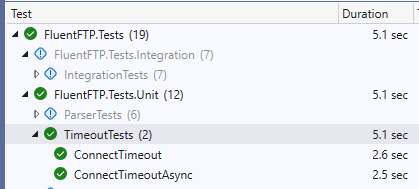
We now have unit tests for connect timeouts and they appear to be working:
Makes sense! I get a different exception with 39.0.2-beta1:
# AutoConnectAsync()

# AutoDetectAsync(True, False)

# Dispose()
Status:   Disposing FtpClient object...
Unhandled exception. System.ArgumentException: Required parameter is null or blank. (Parameter 'profile.Host')
   at FluentFTP.FtpClient.LoadProfile(FtpProfile profile) in D:\Github\FluentFTP\FluentFTP\Client\FtpClient_AutoConnection.cs:line 514
   at FluentFTP.FtpClient.AutoConnectAsync(CancellationToken token) in D:\Github\FluentFTP\FluentFTP\Client\FtpClient_AutoConnection.cs:line 589
Looking at the code, that makes sense since GetWorkingProfileFromHost, which is now returning not-null for me due to your change, doesn't set profile.Host. Unclear how that would have worked in the past for others though.
Now complaining about profile.Credentials being null:
# AutoConnectAsync()

# AutoDetectAsync(True, False)

# Dispose()
Status:   Disposing FtpClient object...
Unhandled exception. System.ArgumentException: Required parameter is null. (Parameter 'profile.Credentials')
   at FluentFTP.FtpClient.LoadProfile(FtpProfile profile) in D:\Github\FluentFTP\FluentFTP\Client\FtpClient_AutoConnection.cs:line 517
   at FluentFTP.FtpClient.AutoConnectAsync(CancellationToken token) in D:\Github\FluentFTP\FluentFTP\Client\FtpClient_AutoConnection.cs:line 589
Looking at the code, it appears that both Credentials and Encoding are required but aren't currently being set either.
This should work.. hopefully...
Uploading FluentFTP.39.0.2-BETA3.zip…
Thanks! It got much further, however it appears that it's skipping calling ConnectAsync:
# AutoConnectAsync()

# AutoDetectAsync(True, False)

# UploadBytesAsync("/site/wwwroot/somefile.json", Overwrite, False)

# FileExistsAsync("/site/wwwroot/somefile.json")

# Dispose()
Status:   Disposing FtpClient object...
Unhandled exception. FluentFTP.FtpException: Error while uploading the file to the server. See InnerException for more info.
 ---> FluentFTP.FtpException: Please call Connect() before trying to read the Capabilities!
   at FluentFTP.FtpClient.get_Capabilities() in D:\Github\FluentFTP\FluentFTP\Client\FtpClient_Properties.cs:line 545
   at FluentFTP.FtpClient.FileExistsAsync(String path, CancellationToken token) in D:\Github\FluentFTP\FluentFTP\Client\FtpClient_FileManagement.cs:line 212
   at FluentFTP.FtpClient.UploadFileInternalAsync(Stream fileData, String localPath, String remotePath, Boolean createRemoteDir, FtpRemoteExists existsMode, Boolean fileExists, Boolean fileExistsKnown, IProgress`1 progress, CancellationToken token, FtpProgress metaProgress) in D:\Github\FluentFTP\FluentFTP\Client\FtpClient_FileUpload.cs:line 993
   --- End of inner exception stack trace ---
   at FluentFTP.FtpClient.UploadFileInternalAsync(Stream fileData, String localPath, String remotePath, Boolean createRemoteDir, FtpRemoteExists existsMode, Boolean fileExists, Boolean fileExistsKnown, IProgress`1 progress, CancellationToken token, FtpProgress metaProgress) in D:\Github\FluentFTP\FluentFTP\Client\FtpClient_FileUpload.cs:line 1249
   at FluentFTP.FtpClient.UploadBytesAsync(Byte[] fileData, String remotePath, FtpRemoteExists existsMode, Boolean createRemoteDir, IProgress`1 progress, CancellationToken token) in D:\Github\FluentFTP\FluentFTP\Client\FtpClient_FileUpload.cs:line 667
My exact code:
using var ftpClient = new FtpClient(o.FtpHost, o.FtpUser, o.FtpPassword);
await ftpClient.AutoConnectAsync();
await ftpClient.UploadBytesAsync(jsonBytes, remotePath);
Closer, but not quite yet:
# AutoConnectAsync()

# AutoDetectAsync(True, False)

# ConnectAsync()
Status:   Connecting to ***:21

# Dispose()
Status:   Disposing FtpClient object...
Status:   Disposing FtpSocketStream...
Unhandled exception. System.TimeoutException: Timed out trying to connect!
   at FluentFTP.FtpSocketStream.ConnectAsync(String host, Int32 port, FtpIpVersion ipVersions, CancellationToken token) in D:\Github\FluentFTP\FluentFTP\Streams\FtpSocketStream.cs:line 1014
   at FluentFTP.FtpClient.ConnectAsync(FtpSocketStream stream, CancellationToken token) in D:\Github\FluentFTP\FluentFTP\Client\FtpClient_Connection.cs:line 723   at FluentFTP.FtpClient.ConnectAsync(CancellationToken token) in D:\Github\FluentFTP\FluentFTP\Client\FtpClient_Connection.cs:line 569
   at FluentFTP.FtpClient.AutoDetectAsync(Boolean firstOnly, Boolean cloneConnection, CancellationToken token) in D:\Github\FluentFTP\FluentFTP\Client\FtpClient_AutoConnection.cs:line 300
   at FluentFTP.FtpClient.AutoDetectAsync(Boolean firstOnly, Boolean cloneConnection, CancellationToken token) in D:\Github\FluentFTP\FluentFTP\Client\FtpClient_AutoConnection.cs:line 0
   at FluentFTP.FtpClient.AutoConnectAsync(CancellationToken token) in D:\Github\FluentFTP\FluentFTP\Client\FtpClient_AutoConnection.cs:line 597
I debugged locally and the problem is Encryption being None. Once I set it to Implicit it worked! If you add Encryption = FtpEncryptionMode.Implicit to the profile that should solve things. App Services always support FTPS so that should be safe for everyone. I'd also recommend changing Protocols from TLS 1.0 to TLS 1.2 if you're comfortable doing that -- depending on App Service configuration it may block connection attempts with TLS < 1.2.
We have a winner!
# AutoConnectAsync()

# AutoDetectAsync(True, False)

# ConnectAsync()
Status:   Connecting to ***:990
Status:   FTPS Authentication Successful
Status:   Time to activate encryption: 0h 0m 0s.  Total Seconds: 0.2446802.
Response: 220 Microsoft FTP Service
Status:   Detected FTP server: WindowsServerIIS
Thanks for your help!