
FluentFTP
 FluentFTP copied to clipboard
 robinrodricks
Received an unexpected EOF or 0 bytes from the transport stream (while uploading remote file)
FTP OS: Not sure
FTP Server: Not sure
Computer OS: Windows 10, using .NET 6.0
FluentFTP Version: 37.1.1
I'm getting a similar error to https://github.com/robinrodricks/FluentFTP/issues/410 but when trying to upload a file remotely using UploadAsync() (same issue with Upload()).
Logs :
// Connecting
# AutoConnectAsync()
# AutoDetectAsync(True, False)
# ConnectAsync()
Status:   Connecting to xxx.xx.xxx.x:xx
Response: 220 FTP FSJ2
Command:  AUTH TLS
Response: 234 Using authentication type TLS
Status:   FTPS Authentication Successful
Status:   Time to activate encryption: 0h 0m 0s.  Total Seconds: 0,1272321.
Command:  USER ***
Response: 331 Password required for ***
Command:  PASS ***
Response: 230 Logged on
Command:  PBSZ 0
Response: 200 PBSZ=0
Command:  PROT P
Response: 200 Protection level set to P
Command:  FEAT
Response: 211-Features:
Response: MDTM
Response: REST STREAM
Response: SIZE
Response: MLST type*;size*;modify*;
Response: MLSD
Response: AUTH SSL
Response: AUTH TLS
Response: PROT
Response: PBSZ
Response: UTF8
Response: CLNT
Response: MFMT
Response: EPSV
Response: EPRT
Response: 211 End
Status:   Text encoding: System.Text.UTF8Encoding+UTF8EncodingSealed
Command:  OPTS UTF8 ON
Response: 202 UTF8 mode is always enabled. No need to send this command.
Command:  SYST
Response: 215 UNIX emulated by FileZilla
Status:   Listing parser set to: Machine

// Checking if remote path exists
# SetWorkingDirectoryAsync("/cartoes/teste")
Command:  CWD /cartoes/teste
Response: 250 CWD successful. "/cartoes/teste" is current directory.

// Checking if remote temporary file exists
# FileExistsAsync("/cartoes/teste/testFile.txt.tmp")
Command:  SIZE /cartoes/teste/testFile.txt.tmp
Response: 213 0

// Deleting existing remote temporary file
# DeleteFileAsync("/cartoes/teste/testFile.txt.tmp")
Command:  DELE /cartoes/teste/testFile.txt.tmp
Response: 250 File deleted successfully

// Checking if remote file exists
# FileExistsAsync("/cartoes/teste/testFile.txt")
Command:  SIZE /cartoes/teste/testFile.txt
Response: 550 File not found

// Uploading file
# UploadAsync("/cartoes/teste/testFile.txt.tmp", Overwrite, False)
# FileExistsAsync("/cartoes/teste/testFile.txt.tmp")
Command:  SIZE /cartoes/teste/testFile.txt.tmp
Response: 550 File not found
# OpenWriteAsync("/cartoes/teste/testFile.txt.tmp", Binary)
# GetFileSizeAsync("/cartoes/teste/testFile.txt.tmp", -1)
Command:  SIZE /cartoes/teste/testFile.txt.tmp
Response: 550 File not found
Command:  TYPE I
Response: 200 Type set to I
# OpenPassiveDataStreamAsync(PASV, "STOR /cartoes/teste/testFile.txt.tmp", 0)
Command:  PASV
Response: 227 Entering Passive Mode (xxx,xx,xxx,x,xxx,xxx)
Status:   Connecting to xxx.xx.xxx.x:xxxxx
Command:  STOR /cartoes/teste/testFile.txt.tmp
Response: 150 Opening data channel for file upload to server of "/cartoes/teste/testFile.txt.tmp"
Status:   IOException for file  :  Received an unexpected EOF or 0 bytes from the transport stream.
I also tried the same operation using FileZilla and got these logs:
Status:	Resolving address of xxxx.xxxxxxxxxxxxxxxx.com.br
Status:	Connecting to xxx.xx.xxx.x:xx...
Status:	Connection established, waiting for welcome message...
Response:	220 FTP FSJ2
Command:	AUTH TLS
Response:	234 Using authentication type TLS
Status:	Initializing TLS...
Status:	TLS connection established.
Command:	USER ***
Response:	331 Password required for ***
Command:	PASS ***
Response:	230 Logged on
Command:	PBSZ 0
Response:	200 PBSZ=0
Command:	PROT P
Response:	200 Protection level set to P
Status:	Logged in
Status:	Starting upload of C:\Users\barbara.silva\Downloads\testFile.txt.tmp
Command:	CWD /cartoes/teste
Response:	250 CWD successful. "/cartoes/teste" is current directory.
Command:	TYPE I
Response:	200 Type set to I
Command:	PASV
Response:	227 Entering Passive Mode (xxx,xx,xxx,x,xxx,xxx)
Command:	STOR testFile.txt.tmp
Response:	150 Opening data channel for file upload to server of "/cartoes/teste/testFile.txt.tmp"
Response:	226 Successfully transferred "/cartoes/teste/testFile.txt.tmp"
Status:	File transfer successful, transferred 19.200 bytes in 1 second
Status:	Retrieving directory listing of "/cartoes/teste"...
Command:	PASV
Response:	227 Entering Passive Mode (xxx,xx,xxx,x,xxx,xx)
Command:	MLSD
Response:	150 Opening data channel for directory listing of "/cartoes/teste"
Response:	226 Successfully transferred "/cartoes/teste"
Status:	Directory listing of "/cartoes/teste" successful
Comparing the logs, the upload commands look pretty much the same, but with FluentFTP I keep getting the EOF error at all times.
I was also getting EOF error when calling GetListing(), but after changing to GetListingAsync() it worked fine.
Unfortunately, same thing did not happen when changing Upload() to UploadAsync().
Please let me know if any other information is needed, and thank you so much for the amazing framework!


You can try a manual connect with TLS1.2 and manual connect with insecure FTP and see if it works. This error is associated with servers that don't properly support TLS.
@robinrodricks, my application tries to access the FTP using host ftp2.farmaciassaojoao.com.br and the standard port (21). Is this enough?
This is the FtpProfile I'm getting with AutoConnectAsync():
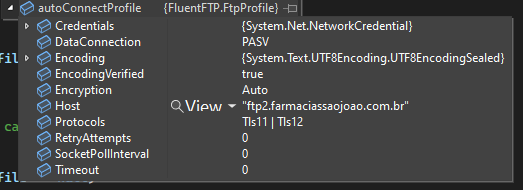
I've now forced a manual connect with this profile:
var manualFtpProfile = new FtpProfile
{
    Host = ftpClient.Host,
    Credentials = ftpClient.Credentials,
    Encoding = Encoding.UTF8,
    Protocols = SslProtocols.None,
    DataConnection = FtpDataConnectionType.PASV,
    Encryption = FtpEncryptionMode.None,
    Timeout = 30000
};
I've tried this one because I already have it mapped to cover the cenario I reported here: https://github.com/robinrodricks/FluentFTP/issues/855 (when AutoConnect() does not work)
And indeed the file upload was successful with this manual profile, so thanks for the quick suggestion.
I think I can change my application to use this simple manual profile when some error occurs during the first attempt at uploading/downloading a file, but do you think it's possible to improve this in the library code?
but do you think it's possible to improve this in the library code
Sure!
In your manual connect profile, which works:
Encryption = FtpEncryptionMode.None, effectively turns off encryption. No wonder the connect then works.
Turning off the encryption always solves encryption problems
Your actual problem is a "SSL Session Resume" failure. A newer version of FLuentFTP has better diagnostic messages in the log and would show you the error message that tells you this.
It is very probably FileZilla-Server V 0.9.60 . I can see the message 215 UNIX emulated by FileZilla, but sadly, the server maintainers have removed the version number text from their welcome message.
And your referred issue #855 is the same.
