
FluentFTP
 FluentFTP copied to clipboard
 robinrodricks
AutoConnectAsync error: Timed out trying to read data from the socket stream!
busy trying to look at the source code to see if i can see why the below happens
Error	Failed Timed out trying to read data from the socket stream!
System.TimeoutException: Timed out trying to read data from the socket stream!
 at FluentFTP.FtpSocketStream.ReadAsync(Byte[] buffer, Int32 offset, Int32 count, CancellationToken token)
 at FluentFTP.FtpSocketStream.ReadLineAsync(Encoding encoding, CancellationToken token)
 at FluentFTP.FtpClient.GetReplyAsync(CancellationToken token)
 at FluentFTP.FtpClient.HandshakeAsync(CancellationToken token)
 at FluentFTP.FtpClient.ConnectAsync(CancellationToken token)
 at FluentFTP.FtpClient.AutoDetectAsync(Boolean firstOnly, Boolean cloneConnection, CancellationToken token)
 at FluentFTP.FtpClient.AutoDetectAsync(Boolean firstOnly, Boolean cloneConnection, CancellationToken token)
 at FluentFTP.FtpClient.AutoConnectAsync(CancellationToken token)
trying to see the source code for GetReplyAsync cant see it/ find it

@robinrodricks
defiantly something funky with the AsyncConnect...

it connects with normal Connect in about 35 secs.
but seems to hang... i increased the timeouts on the Async version as I get
"Timed out trying to read data from the socket stream!" otherwise....
is there something you think im doing incorrectly, PS if i use an ftp connection which connects faster... aka closer... then it connects.. but not with this client which takes like 40 secs
wouldn't it make sense to have something which is much bigger in terms of the buf size?
public async Task<string> ReadLineAsync(System.Text.Encoding encoding, CancellationToken token) {
			var data = new List<byte>();
			var buf = new byte[1];
			string line = null;

			while (await ReadAsync(buf, 0, buf.Length, token) > 0) {
				data.Add(buf[0]);
				if ((char) buf[0] == '\n') {
					line = encoding.GetString(data.ToArray()).Trim('\r', '\n');
					break;
				}
			}

			return line;
		}
ok i figure out most of it...
i was using AutoConnectAsync(ct) which then does thing i didnt expect but to be fair i should read more
anyway what ive found is by increasing timeouts you just prolong the one which would fail! as it tries more than 1, aka its going through all till it find 1 which works, it just so happens that the first 1 it tries is wrong and fails... cool. at this point increasing the timeout just makes it look like its hanging.
leaving the timeout to 15 secs... it will then fail... BUT more coming
public override async Task<int> ReadAsync(byte[] buffer, int offset, int count, CancellationToken token)
{
	if (BaseStream == null) {
		return 0;
	}
	m_lastActivity = DateTime.Now;
	using (var cts = CancellationTokenSource.CreateLinkedTokenSource(token))
	{
		cts.CancelAfter(ReadTimeout);
		cts.Token.Register(() => Close());
		try {
			var res = await BaseStream.ReadAsync(buffer, offset, count, cts.Token);
			return res;
		}
		catch (Exception ex)
		{
			// CTS for Cancellation triggered and caused the exception
			if (token.IsCancellationRequested)
			{
				throw new OperationCanceledException("Cancelled read from socket stream");
			}
			//CTS for Timeout triggered and caused the exception
			if (cts.IsCancellationRequested)
			{
				throw new TimeoutException("Timed out trying to read data from the socket stream!");
			}
			// Nothing of the above. So we rethrow the exception.
			throw;
		}
	}
}
if these lines are there...
if (token.IsCancellationRequested)
{
   throw new OperationCanceledException("Cancelled read from socket stream");
}

//CTS for Timeout triggered and caused the exception
if (cts.IsCancellationRequested)
{
   throw new TimeoutException("Timed out trying to read data from the socket stream!");
}
then it does not try the next options to try. and never get to the 1 which would work.
aka just commenting these lines out make it then at least try the next auth and protocols, which then works perfectly.
im thinking is it not mean to be
something like
public override async Task<int> ReadAsync(byte[] buffer, int offset, int count, CancellationToken token)
{
	if (BaseStream == null) {
		return 0;
	}

	m_lastActivity = DateTime.Now;
	using (var cts = CancellationTokenSource.CreateLinkedTokenSource(token))
	{
		cts.CancelAfter(ReadTimeout);
		cts.Token.Register(() => Close());
		try {
			var res = await BaseStream.ReadAsync(buffer, offset, count, cts.Token);
			// CTS for Cancellation triggered and caused the exception
			if (token.IsCancellationRequested)
			{
				throw new OperationCanceledException("Cancelled read from socket stream");
			}
			//CTS for Timeout triggered and caused the exception
			if (cts.IsCancellationRequested)
			{
				throw new TimeoutException("Timed out trying to read data from the socket stream!");
			}
			return res;
		}
		catch (Exception ex)
		{
			// Nothing of the above. So we rethrow the exception.
			throw;
		}
	}
}
Can you try this and see if it works?
https://www.nuget.org/packages/FluentFTP/37.0.0

@robinrodricks thx i tired the latest, at least there are no buld issues now, thx
now that I'm more familiar with the project i could check it faster...
In tests, see
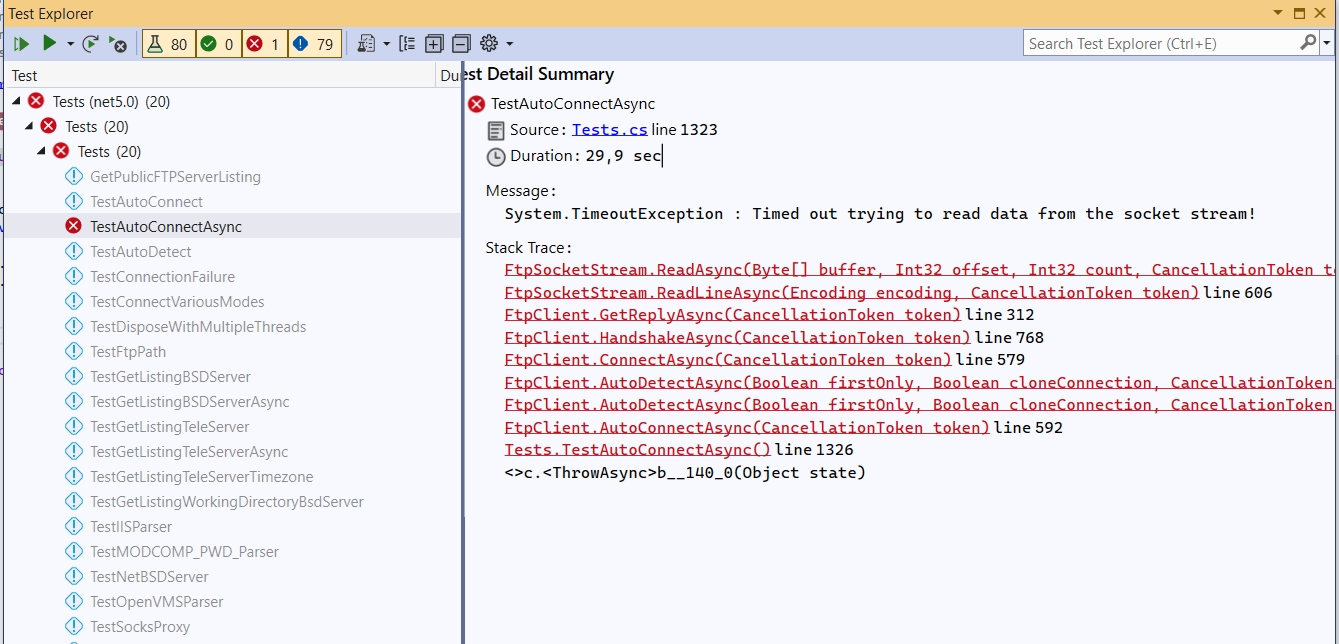
No changes... the strange thing is! that if u just Run this its passes, but if u debug it fails.
put a break point on this catch

it should hit this more than once.... as the point of auto is that it should try each until it fails....
but on first catch it exists...
but what is amazing!!! is removing

makes it work... you should be able to implement the correct logic with this information.
my guess is the timeout token is not reset when retrying.. next connection.. aka each attempt should have at least the default timeout 15 secs, my guess is that token.CandellationRequest is triggering... before it even has the time to go through the connections.
@jnyrup, project owner seems busy atm, could you confirm what I'm saying.
@Seabizkit You're saying a lot of things, so I'm not sure exactly what you're asking me to comment on. Also note that I'm not very familiar with this library, I'm just another user that wants to contribute back to the ecosystem.
await ReadAsync(buf, 0, buf.Length, token) > 0 and (await ReadAsync(buf, 0, buf.Length, token)) > 0 are semantically equivalent, the extra set of parentheses are not needed.
I have two observations when skimming the implementation of ReadLineAsync.
Note that I haven't dug further into it whether these observations are correct.
-
ReadLinesAsyncread 1 byte at a time. Other places in the code usesCalculateTransferChunkSizeto dynamically determine the buffer size. -
Each call to
ReadAsynccreates a newCancellationTokenSource.
So if I read 4k of data using ReadLinesAsync it will make 4k calls to ReadAsync each reading a single byte plus the overhead of constructing and disposing 4k instances CancellationTokenSources.

HI @jnyrup, thanks for looking sozs there is a lot going on before as i was trying to figure out what is going on....
What I'm saying is;
- download, latest repo... 2 Run TestAutoConnectAsync in debug
does it pass....? it fails for me and does not do what I except when trying to follow the logic...aka it never loops over the other connection settings.
but removing the throw inside the catch, then allows it to try the other connection settings which then allows it to pass...
I tried running TestAutoConnectAsync compiled in debug mode for the net50 target framework and it passed.
I tried both with and without a debugger attached and it made no difference.
@jnyrup wow then im at a lost, that makes no sense. fail on 1 machine and pass on another. Not sure what steps to take.. did u have a break point on ReadAsync... (dnt wait just f5 straight after)... it hits. Do you perhaps have a suggestion then to verify or work out why mine would fail. It not a big issue for me as I just avoid the AutoConnectAsync, and instead use ConnectAsync. I just wanted to contribute back to the project and thought i found logic which isnt handling specific flow.
Would love to do like a screen share or something just so i can verify I'm not missing anything. but what more could i be missing if its simply run test.
Thought I would double check and now appears to be working, I'm at a lost. Ensuring (net50) on most files namely FtpSocketStream and made sure that u at least get into method ReadAsync line 501... then when it fails as that connect is dubbed...it should try the next... but exited out completely.
What is mental is sometimes it goes into ReadAsync and sometimes it does not.
When it does not it passes when it does it fails, same break points. (the break point should be hit on every test.) but do not, if I press f5 really fast its seem to then work, but it doesn't hit the break point even though its always in debug and with breakpoints enabled.
I didn't set any break points. Settings break points would increase the risk of a timeout, which from your initial stack trace seems to be the problems you're experiencing.
There are a plenty of reasons why a test could work on one machine but fail on another. While deeply frustrating it's unfortunately not uncommon. These tests makes a real internet connection, which makes them unstable. E.g. if you turn off the WIFI while running the test will fail.
@Seabizkit
I would recommend closing this. The description "where is the implementation of GetReplyAsync" and the entire evolution of the documentation does not motivate well to understand the actual problem you are trying to solve.
Please reopen this as a new issue documenting what your real problem is, in a concise fashion.
Is the problem:
Connect does not work? Connect does not work if in debug mode? Test do not work?
I gave up after a while. Sometimes a fresh start will be the best way to succeed.

Hi @jnyrup i understand
Settings break points would increase the risk of a timeout, which from your initial stack trace seems to be the problems you're experiencing.
the issue relates to
/// <summary>
/// Returns true if the connection to the FTP server is open.
/// WARNING: Returns true even if our credentials are incorrect but connection to the server is open.
/// See the IsAuthenticated property if you want to check if we are correctly logged in.
/// </summary>
public bool IsConnected {
	get {
		if (m_stream != null) {
			return m_stream.IsConnected;
		}

		return false;
	}
}
its set to true in some cases when it it should not be my guess is its linked to the WARNING, my guess is it should be marking the IsConnected as false at some point...
as what is happing is when it get here IsConnected is true with connection details which wont work.... so wen it tries later it will fail and timeout.
public async Task<FtpReply> GetReplyAsync(CancellationToken token)
{
	var reply = new FtpReply();
	string buf;

	if (!IsConnected)
	{
		throw new InvalidOperationException("No connection to the server has been established.");
	}
digging more i get to this
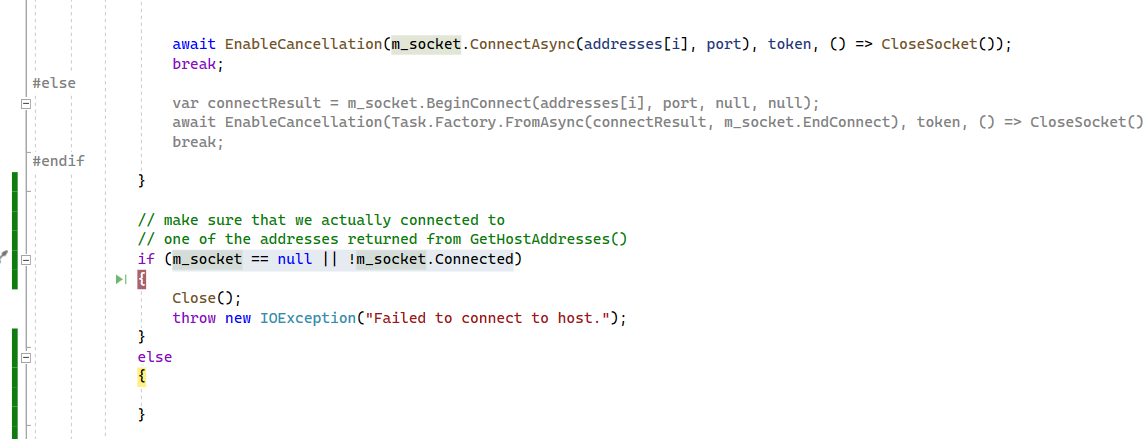
even tho if i do "m_socket == null || !m_socket.Connected"
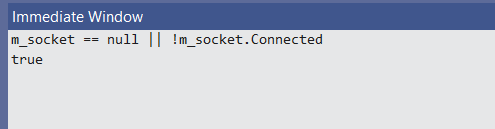
it returns true, but yet im in the else block...
seems hit and miss when this happens but this is the behavior im getting
I'm sorry, I don't follow what you're trying to say and I don't have the time to try to figure it out. I agree with everything @FanDjango wrote above. I can recommend reading https://stackoverflow.com/help/minimal-reproducible-example for tips on how write a good question.
If you haven't already read the documentation of this library, please see https://github.com/robinrodricks/FluentFTP/wiki#3-logging-and-troubleshooting
@FanDjango
Connect does not work?
AutoConnectAsync doesn't work 100% not even 50% of the time.
Connect does not work if in debug mode?
AutoConnectAsync A little more complex to answer, sometime passes sometimes fails,
Test do not work?
test validates what I was experiencing in my own code. TestAutoConnectAsync has the same experience.
I gave up after a while. Sometimes a fresh start will be the best way to succeed.
perhaps but was simple trying to try work through this massive lib. I'm surprised that no 1 else is see the same results, needed some validation... Honing down on what is happening.... giving details may help uncover what is happening, if i knew it would be easy and i wouldnt be here.
Ok. Lets be systematic.
If not in debug mode, AutoConnectAsync fails always.
Questions:
Only for this one server, or for many servers or for all servers?
Does AutoConnect (not async) work? I am assuming: yes.
Can you put together a minimum piece of code that tries to autoconnect, post this here and also the log?
Then you posted:
but what is amazing!!! is removing
and an image
makes it work... you should be able to implement the correct logic with this information.
Question: Removing what? Are you saying: Removing the comments makes it work? Do you realize what that sounds like? Oh, I see, you mean you commented out those lines, and then it works (ASYNC, ALL THE TIME, EVEN IN DEBUG)?
Since there is a final throw in there, shouldn't there by an exception to be seen? Maybe it is caught further up the chain, so put a breakpoint on that throw and show us the actual exception that is happening? Are you saying it is a timeout?
Using Debug and trying to step through the connect process is difficult due to timeout reasons. Consider putting temporary log statement in strategic locations.
If your server permits this, check that this is not connected to ssl, try an unencrypted connection. Also identify if the protocols chosen by AutoConnect might be unsuitable.
And finally, try commenting out only one of the specific catchers, first the cancel one, and then the timeout one. Which one is the "bad" one?
Then we can progress from there...
Afaik there is no difference in debug/release code, so the lib should have matching behavior regardless of build flags. Maybe just some .net exception handling is different in these modes, which may be triggering an edge case.
@FanDjango and @jnyrup, firstly, thank you guys for responding on issues faced by other users, I appreciate it.
I agree with the both of you. The issue makes no sense to me either.
@Seabizkit can you please confirm if AutoConnect works and the async API does not work. Is this the crux of your question?
In my case the problem is the async version of AutoConnect(), it does not honor the timeout settings. If I wrap the sync version into await Task.Factory.StartNew(client.AutoConnect) then the timeout values are honored.

In my case the problem is the async version of AutoConnect(), it does not honor the timeout settings. If I wrap the sync version into await Task.Factory.StartNew(client.AutoConnect) then the timeout values are honored.
So please post this as a new issue. Random issues posted to existing threads are not observed.