

 rnmapbox
Can't build app for IOS Simulator for architecture arm64 on M1
Describe the bug
When building for simulator it gives this error.
building for iOS Simulator, but linking in dylib built for iOS, file '/Users/umer/Developer/realitycoin_ios/ios/Pods/Mapbox-iOS-SDK/dynamic/Mapbox.framework/Mapbox' for architecture arm64
To Reproduce
yarn install @react-native-mapbox-gl/maps and pod install then build app from xcode for simulator
- Platform: iOS
- Platform OS: 15
- Device: iphone SE
- Emulator/ Simulator: yes
- Dev OS: Mac OS 12.0.1
- react-native-mapbox-gl Version ^8.5.0
- Mapbox GL version [e.g. 6.3.0]
- React Native Version 0.66.3


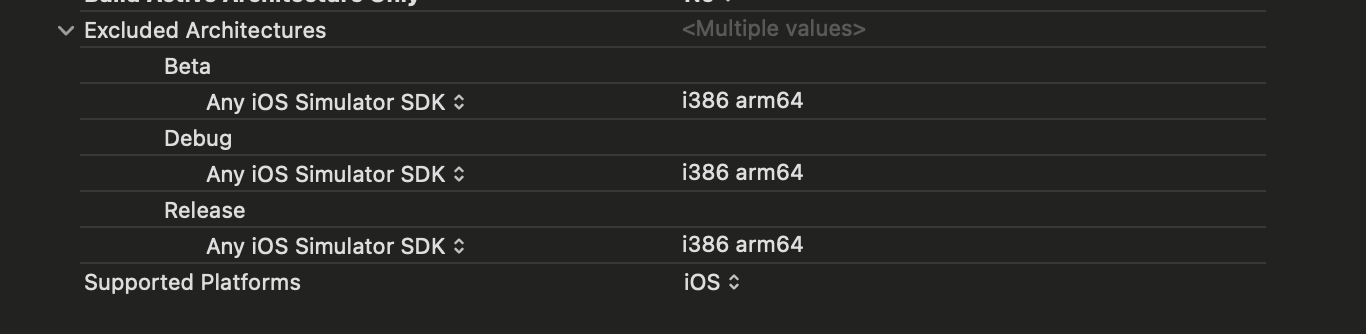

I tried the solution @antoshindanil mentioned but didn't work so I research again and found this one more thing.
installer.pods_project.targets.each do |target| target.build_configurations.each do |config| config.build_settings["ONLY_ACTIVE_ARCH"] = "NO" end end
Now the app installs gives me error for info.plist not found for mapbox. I tried adding it manually and still it didn't work.
This is what I am getting in xcode after installation Unable To Install “RealityMiner” Domain: IXUserPresentableErrorDomain Code: 1 Failure Reason: Please try again later. Recovery Suggestion: Failed to load Info.plist from bundle at path /Users/umer/Library/Developer/CoreSimulator/Devices/6A40C184-FF0E-402B-A74C-4D85CB3500BC/data/Library/Caches/com.apple.mobile.installd.staging/temp.zCbF3E/extracted/RealityCoin.app/Frameworks/MapboxMobileEvents.framework; Extra info about "/Users/umer/Library/Developer/CoreSimulator/Devices/6A40C184-FF0E-402B-A74C-4D85CB3500BC/data/Library/Caches/com.apple.mobile.installd.staging/temp.zCbF3E/extracted/RealityCoin.app/Frameworks/MapboxMobileEvents.framework/Info.plist": Couldn't stat /Users/umer/Library/Developer/CoreSimulator/Devices/6A40C184-FF0E-402B-A74C-4D85CB3500BC/data/Library/Caches/com.apple.mobile.installd.staging/temp.zCbF3E/extracted/RealityCoin.app/Frameworks/MapboxMobileEvents.framework/Info.plist: No such file or directory User Info: { IDERunOperationFailingWorker = IDELaunchiPhoneSimulatorLauncher; }
Same problem to me. Also couldn't upload Archive to Testflight. This error starts yesterday and i didn't change anything in project.
Invalid Bundle Structure - The binary file 'deliservice.app/Frameworks/MapboxMobileEvents.framework/MapboxMobileEvents' is not permitted. Your app can’t contain standalone executables or libraries, other than a valid CFBundleExecutable of supported bundles. Refer to the Bundle Programming Guide at https://developer.apple.com/go/?id=bundle-structure for information on the iOS app bundle structure. With error code STATE_ERROR.VALIDATION_ERROR.90171 for id 6ce17692-6517-409e-bf6c-c295873dcab7
Android build is ok

@Villar74 @umerjabbar try react-native-clean-project after applying changes in Podfile, then install pods. React native have post install hook for excluding, but for m1, that hook exclude only i386 arch. You can try to exclude arm64 after installing pods if you have any troubles with simulator. Right now i don't have any issues with archive or run app in simulator
Hi @antoshindanil I tried it as well and it still doesn't work same error.
If you have an M1 mac, I have found some workarounds for this:
- if building with Xcode, the start Xcode using Rosetta (Finder->Go->Applications-> select Xcode -> Cmd-I-> Open using rosetta)
- if using react-native run-ios:
- use an x86_64 version of node - and not the auto-installed arm64 version
- or use
arch -x86_64 react-native run-ioswhen building
All of the above has the effect that the build runs in x86_64 mode.

If you have an M1 mac, I have found some workarounds for this:
- if building with Xcode, the start Xcode using Rosetta (Finder->Go->Applications-> select Xcode -> Cmd-I-> Open using rosetta)
- if using react-native run-ios:
- use an x86_64 version of node - and not the auto-installed arm64 version
- or use
arch -x86_64 react-native run-ioswhen buildingAll of the above has the effect that the build runs in x86_64 mode.
Thanks for you solution. using rosetta is worked for me for M1 🥇

For anyone coming across this. I was finally able to resolve issue by going though https://khushwanttanwar.medium.com/xcode-12-compilation-errors-while-running-with-ios-14-simulators-5731c91326e9
update:
while following the instructions above, I still had an issue when pod install would reset Excluded Architechure back to i386 in main project. As @antoshindanil mentioned, that happens because of RN's post install hook that overwrites those settings.
so instead of
post_install do |installer|
  installer.pods_project.build_configurations.each do |config|
    config.build_settings["EXCLUDED_ARCHS[sdk=iphonesimulator*]"] = "arm64"
  end
end
I used this
post_install do |installer|
  projects = installer.aggregate_targets
    .map{ |t| t.user_project }
    .uniq{ |p| p.path }
    .push(installer.pods_project)

  projects.each do |project|
    project.build_configurations.each do |config|
      config.build_settings['EXCLUDED_ARCHS[sdk=iphonesimulator*]'] = 'arm64'
    end

    project.save()
  end
end

@Nodman is there a way to do this in expo? Because the config plugin mapbox provides doesn't seem to work properly.


@mfazekas Do we have any patch available to fix this issue before the v10 gets released?

Worth pointing out that Xcode 14.3+ no longer supports Rosetta. So don't upgrade if you need to run 8.x on an M1 machine.
