

 rizonesoft
About Preserve Caret Position
translation text I use notepad3 to read TXT documents. I have a problem. I don't know if it's a bug. for instance:
- Open a TXT document, The caret is on the first line,
- Use the cursor keys (direction keys) to navigate to the tenth line,
- I accidentally pressed the spacebar,
- I closed notepad3,
- Notepad3 asks me if I want to save, I choose 'no'.
- When I opened the txt file again, The caret is on the first line, not the tenth.
- When I accidentally input any character, I use Ctrl + Z to return to the original state, Instead of closing notepad3 directly,
- When I open the txt document again, the caret can be in the correct position.
- If I enter any characters and I delete them, Then press Ctrl + s to save,
- When I open the txt document again, the caret can be in the correct position.
- If I enter any characters and I delete them, Then I close notepad3 directly. It asks me if I want to save it. I choose 'no'.
- When I reopened the txt document, the caret was not in the correct position, The situation is the same as in Article 6. above ? original text 我使用 Notepad3 阅读 txt文档。 我遇到一个问题,我不知道它是不是 bug。 比如说: 1、 打开某个 txt 文档, 插入符号处于第一行, 2、 使用 光标键 (方向键) 浏览到第十行, 3、 我不小心按了一下空格键, 4、 我关闭 Notepad3 , 5、 Notepad3 询问我是否要保存, 我选择 'no'。 6、 当我再一次打开那个 txt 文档时, 插入符号处于第一行,而不是第十行。 7、 当我不小心输入了任意字符,我使用 ctrl+z 回到原始状态, 而不是直接关闭 Notepad3, 8、 当我再一次打开那个 txt 文档时,插入符号可以在正确位置。 9、 如果我输入了任意字符,我又删除了它们, 然后按 ctrl+s 保存, 10、 当我再一次打开那个 txt 文档时,插入符号可以在正确位置。 11、 假如我输入了任意字符,我又删除了它们, 然后我直接关闭 Notepad3 ,它询问我是否保存,我选择 'no'。 12、 当我重新打开那个 txt 文档时,插入符号不在正确位置, 和第六条的情况相同。 以上 ?

The caret position is only persisted (if this option is active) if document is saved. Do you ask for change request "preserve caret position always on closing document" ?

@RaiKoHoff
I hope that no matter what I do, it always remembers the last caret position.
Just like AkelPad.
https://sourceforge.net/projects/akelpad/files/AkelPad%204/4.9.8/
@RaiKoHoff
To avoid accidental input,
I open the 'Notepad 3', press Alt + F, and choose the 'Read Only File Attribute',
I hope this will prevent any characters from entering,
However, it can still input characters, but it can't be saved.
Why did I do this? Is to make the caret in the correct position.
As long as there is no unexpected input, the position of the caret is correct.
Remember the last position of the caret. You can continue next time you read.
Sincerely
As the name says: Read Only File Attribute sets the read only attribute of the file in the file system , so you can not save the document, independant from changes you are still able to do on loaded document.
There is no switch to make a View Only Document (read only).
@RaiKoHoff
Enable the read-only attribute in Notepad + +, which will prohibit any character input.
I hope that after enabling the read-only attribute, Notepad 3, like Notepad + +, prohibits any character input.
Note: instead of modifying the file attributes in the file manager, choose the read-only attribute in the Notepad menu.
Maybe no good idea to synchronize Read Only File Attribute and Document View Only mode.
I prefer two different switches (needs to add Document View Only switch) - if this is really needed.
Some other opinions ?
The caret position is only persisted (if this option is active) if document is saved. Do you ask for change request "preserve caret position always on closing document" ?
I hope that no matter what I do, it always remembers the last caret position. Why did I do this? Is to make the caret in the correct position.
Hi @Rainer,
I don't think its a Read Only File Attribute issue ?
I think @loome will be happy with Preserve Caret Position ticked, if the caret position is maintained not just with a save operation, but every time a document is opened and closed. 🤔

@RaiKoHoff
Distinguish between reading mode and read-only property, it's a good idea.
In read mode, remember the caret position automatically, used for reading next time.
@hpwamr
I use a translator and everybody communication, there will be a meaning is not accurate, please forgive me.
I use Notepad3 to read TXT,
I have already checked Notepad3 remember the caret position in the menu.
Without having an input, the position of the caret is correct.
Next time you open the document can be read on.
If having an input, then the caret position, it is not what I want.
See the instructions in this subject.
About read-only property or reading model, that in order to avoid unexpected input.
that in order to avoid unexpected input.
Well in this case, undo exists and it does the job properly! 😉
if the caret position is maintained not just with a save operation, but every time a document is opened and closed. 🤔
Without having an input, the position of the caret is correct.
Sorry for my mistake, I just checked and you're right the position of the caret is preserved in any case. 👍
Distinguish between reading mode and read-only property, it's a good idea.
Hello @loomee ,
Feel free to test the "BETA/RC PortableApps", version "Notepad3Portable_5.22.212.1_beta.paf" or newer, see 1st list in issue #1129.
"Notepad3Portable BETA/RC PortableApps" version can be used with or without ".7z" extension.
Also, feel free to test the "BETA/RC Setup", version "Notepad3_5.22.212.1_beta_Setup" or newer, see the 2nd list in issue #1129.
Comments and suggestions are welcome... 😃
Hello @loomee ,
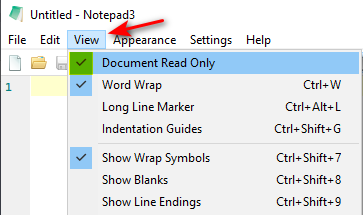
Does this Document Read Only feature respond correctly to your request for a Read Only Mode? 🤔
@hpwamr
Sorry to get back to you now.
I experienced 'Notepad3Portable_5.22.214.1_beta'.
'Document Read Only' works fine.
It avoids accidental typing.
It can also automatically remember the position of the caret.
It's the effect I want.
Thank you very much!
I don't know which way would be better. For example, when using AkelPad, if you encounter accidental input, When I close the program, it asks me if I want to save and I choose 'no' I opened that document again, and the position of the caret was the effect I expected. But when I use Notepad3, if I encounter accidental input, When I close the program, it asks me if I want to save and I choose 'no' I opened that document again, and the position of the caret was not the effect I expected. But now, the notepad3 has a reading mode (Document View Only mode), which can avoid accidental input, and there is no need to worry.
Hello @hpwamr
I don't know if it is abnormal situation.
I use the "Notepad3Portable_5.22.302.1_beta",
I have enabled the document view-only,
I accidentally Press the TAB-key,
Notepad3 ask me:
The document is locked for view only. Do you like to unlock it for editing?
I choose to cancel, Or I press the esc-key.
When I close notepad3, asked me if I save it.
If I accidentally enter other characters, it do not.
thx
I accidentally Press the TAB-key,
I confirm your finding. It seems to be a bug. 🤔
@hpwamr Ok, and the other: About this dialog: "The document is locked for view only. Do you like to unlock it for editing?" Could add an option, (do not ask me next time). Or it play a sound, when the document is view-only, I accidentally pressed some keys.
Sincerely
Hello @loomee ,
Feel free to test the "BETA/RC PortableApps", version "Notepad3Portable_5.22.830.1_beta.paf" or newer, see 1st list in issue #1129.
"Notepad3Portable BETA/RC PortableApps" version can be used with or without ".7z" extension.
Also, feel free to test the "BETA/RC Setup", version "Notepad3_5.22.830.1_beta_Setup" or newer, see the 2nd list in issue #1129.
Comments and suggestions are welcome... 😃
Instead of showing the dialog, how about tool-tip popup, telling you to be in read-only doc mode ?
Instead of showing the dialog, how about tool-tip popup, telling you to be in read-only doc mode ?
Maybe not a bad idea ? 👍 @loomee , @hfstar-duan, @jupester, What do you think about the @RaiKoHoff proposal ? 🤔
Instead of showing the dialog, how about tool-tip popup, telling you to be in read-only doc mode ?
Maybe not a bad idea ? +1 @loomee , @hfstar-duan, @jupester, What do you think about the @RaiKoHoff proposal ? thinking Also can. However, I think it's good now. When you want to save the file, it is already prompted that it is a read-only file, and there is no need to add a pop-up window indicating that the file is read-only mode.

Correction:
Instead of showing the dialog, how about tool-tip popup, telling you to be in read-only doc mode ?
It might not be a bad idea, but the dialog has the advantage of letting you turn off the display of the message again ? 🤔
, telling you to be in read-only doc mode ?
In my humble opinion, the perfect solution is: a tooltip popup that tells you that you are in read-only document mode. In this pop-up window, an optional option is added, [Ignore this message prompt], if it is checked, this pop-up window prompt will be ignored.
Correction:
Instead of showing the dialog, how about tool-tip popup, telling you to be in read-only doc mode ?
It might not be a bad idea, but the dialog has the advantage of letting you turn off the display of the message again ? thinking This is a good idea. The pop-up prompt window adds an optional checkbox for [Ignore this message prompt], which is perfect.
Dialog changed in current beta, don't ask me again checkbox needs inversed OK/Cancel logic, so be aware of it.
Alternates to dialog : Play Sound and/or show tooltip 🤔
Dialog changed in current beta,
don't ask me againcheckbox needs inversed OK/Cancel logic, so be aware of it. Alternates to dialog : Play Sound and/or show tooltip thinking Okay, I'll take a look when the new beta comes out.
Okay, maybe, when don't ask me again has been checked (means no feedback in case of typing while read-only mode active), playing a sound (if beeps are not disabled) would be a good idea ?
Okay, maybe, when
don't ask me againhas been checked (means no feedback in case of typing while read-only mode active), playing a sound (if beeps are not disabled) would be a good idea ?
This is also a very good idea and scheme.