

 rizonesoft
Feature Request: Add Tidy HTML/XML files
Hello!
Is it possible add a feature to tidy HTML or XML files for better view in this fantastic editor?
Some files are minified and is very difficult to read any information.
There is a engine for this task in Github: https://github.com/htacg/tidy-html5
Thank you.
Marcílio

Nice piece of software. Regarding the huge amount of code and tons of configuration settings, I don't think of code integration (support, care of code base, merging updates, problem-fixing request, configuration management, etc.). Maybe using the standalone executable as an external pre-processor (leke drepWinNP3 for file search and pattern replacing). Sure, this would prevent in-place tidy/pretty-printing... 🤔

In my research, I learned that's possible use tidy in cli:
-
tidy -xml -iq %1to show the XML/HTML on cli but closing soon; -
tidy -xml -iqm %1to change the original file, but not showing on the file already opened....need reopen the same file to view the change.
Thinking about it, using ALT + L calling a .BAT file with this commands could be a good start....I guess.
What you think about it?
The ALT+L command will reopen the transformed file automatically, so a batch script tidy.cmd side-by-side to tidy.exe:
@echo off
.\tidy.exe -xml -iqm %*
exit
with a link to the preferred tools directory (default: <Desktop> tidy.cmd.lnk) will do the job quite nicely.
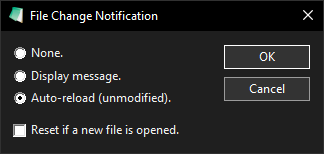
Is it possible show the opened file "tidied" without save file?
Give to user the option to save or not...
The Settings option Save Before Running Tools may not work as expected:
It should better be called: Ask to Save Before Running Tools.
- If the option is ON and the file is modified, a requester for saving the changes is shown.
- If the option is OFF, the tool is started without saving changes.
If a modified file has not been saved, the "Auto-reload (unmodified)" option will cause the:
 dialog pop up before the modified file is loaded from storage - this is for safety reasons not to lose all modifications accidentally and should not be changed.
If this behavior should be changed I would prefer a community discussion including suggestions before...
@RaiKoHoff
this is for safety reasons not to lose all modifications accidentally and should not be changed.
I prefer not change.
@marciliocn
But can use:


I put following batch script int a Notepad3's sub-dir 'tools' , together with the tidy.exe.
This 'tools sub-dir is also the preferred dir of Alt+L (Open with... : dir can be set within this dialog).
@echo off
%~dp0tidy.exe -xml -iqm %*
%~dp0..\Notepad3.exe /n %*
exit
This will open a new NP3 instance with the "tidied" file from disk, while the not stored changes are still kept in NP3 1st instance. Of cause, you are not able to see the modified "tidied" document without saving it.
But is is no problem to save the modified file, call (Alt+L) with the siple script (keep the "Auto-reload (unmdified)." option):
@echo off
%~dp0tidy.exe -xml -iqm %*
exit
Then the "modified & tidied" file is automatically visualized in your NP3 instance, while pressing the Undo removed the tidy.exe changes, 2nd Undo removes your modifications step by step.
I think, this last workflow will be close enough to your vision (only the save requester is a little inconvenience - but this does not pay for the effort of integrating the tidy feature by source code).
I put following batch script int a Notepad3's sub-dir 'tools'
Hello @RaiKoHoff , I suggest to add them in directory \Build\Add-on ? Or moving Add-on in \Tools ? 🤔

Hello @hpwamr : I didn't thought about deploying tidy.exe & script with Notepad3 - maybe only a "how to" description in Readme.md. Above explanation was only a description of my personal workflow for "tidy".