
cutter

cutter copied to clipboard
 rizinorg
Colors for selected text should be really contrast!
- Operating System: Windows 7 x64
- Cutter version: 2.1.2-git-1211 baeffba7d1b2f783c06cc3af51ba7533b3f6df15

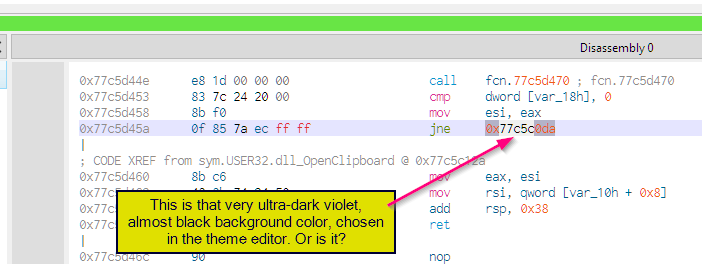
Can you see - easily and immediately - which text is eelected to be copied into clipboard?
Because i cannot.
Just in case, it was the JNE's target address, the 0x77c5c0da
The selection should be VERY easy to see.
If you do a "dark font on light canvas" scheme - then selection should be the opposite, white on black.
Maybe this "selected text" entry can be removed from the palette and instead the ad hoc colours be computed:
- foreground and background colors just swapped
- both foreground and background colors have their RGB components binary NOT-ted ( ~ in C terms ).
This would not look cute, but would be easily seen.
As of now you seem to only have background color setting for selected text, not foreground.
- This is not enough.
- Even if fixable by user, it better be correct out of the box
- theme editor seems broken here anyway



Perfect, I hope this can be done on mac using html-css language.
HTML/CSS is completely irrelevant here.
