
cutter

cutter copied to clipboard
 rizinorg
Can't see disassembly for Xtensa LX6 object files (.o)
Environment information
- Operating System: Ubuntu 18.04
- Cutter version:
Version 1.10.3
Using r2-4.4.0
Based on Qt 5.14.2 (GCC 5.4.0 20160609, 64 bit)
Optional Features:
Python: ON
Python Bindings: ON
- Obtained from:
- [ ] Built from source
- [x] Downloaded from release
- [ ] Distribution repository
- File format:
Describe the bug
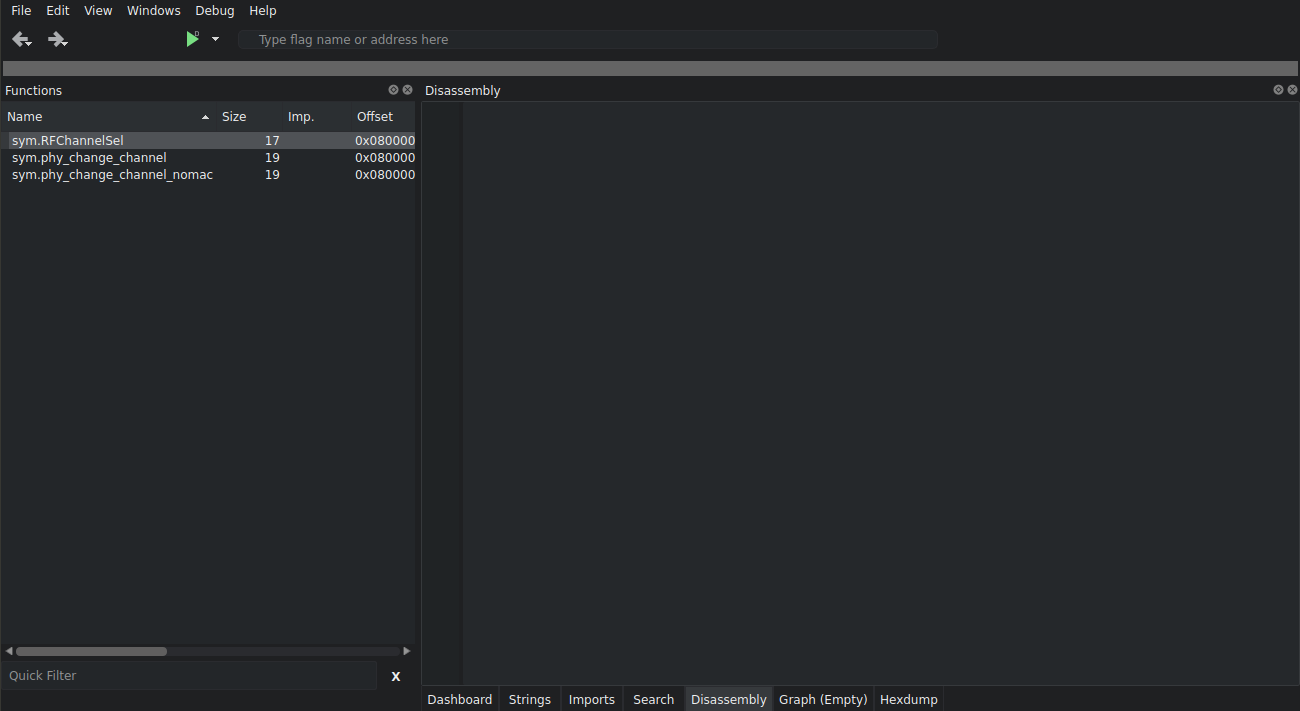
Object files can be opened very well, however, the Disassembly section doesn't show anything when a function is clicked.
To Reproduce
Steps to reproduce the behavior:
- Download some code to reverse:
git clone https://github.com/espressif/esp32-wifi-lib
cd esp32-wifi-lib/esp32/ && make objs && cd objs
xtensa-esp32-elf-ar x ../libphy.a
- Open
phy.ofor example - Tap on any function
- Go to Disassembly view, should show nothing.
Expected behavior
Show disassembly of Xtensa code.
Screenshots
Additional context
#676 , happens on Linux too, crashes, and a new window is opened.

