rizinorg
Graph should update after editing branch instruction
Environment information
- Operating System: Ubuntu 18.04.3
- Cutter version: 1.10.3
- Obtained from:
- [x] Built from source
- [ ] Downloaded from release
- [ ] Distribution repository
- File format: ELF
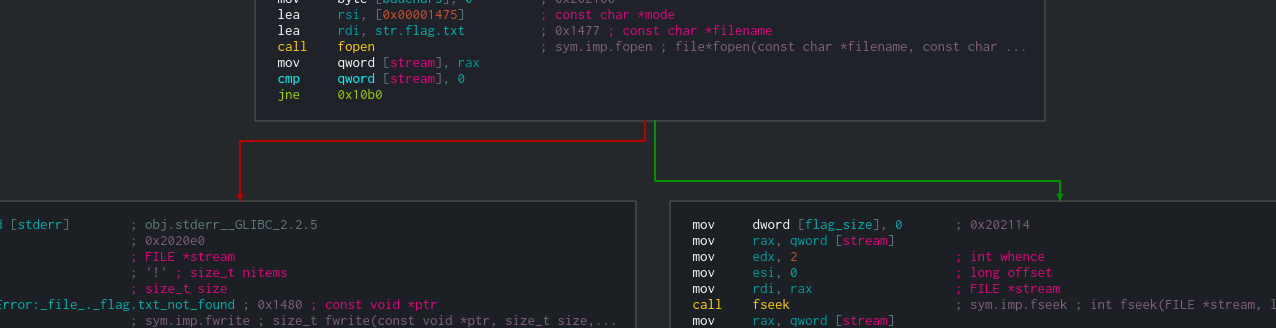
Describe the bug After editing a conditional branch instruction (jz, jle, etc...) to a non-conditional branch instruction (jmp, nop, etc...), the graph does not update its basic blocks and branch arrows. (see below screenshots). Similarly, when editing a non-conditional branch instruction (mov, nop, etc...) to a branch instruction (conditional or non-conditional), the graph does not update accordingly.
To Reproduce
Steps to reproduce the behavior:
- Go to Graph Display
- Right click on a conditional branch instruction (the last instruction of a basic block)
- Edit->Nop Instruction
Similarly,
- Go to Graph Display
- Right click on any instruction that is not the last of its basic block
- Edit->Instruction
- Type in "jmp 0x1337" or "jz 0x1337"
Expected behavior It makes sense that after editing an instruction that affects the control flow, the graph will update accordingly. For example, if I modify a "jz 0x1337" to a "nop", I expect that the current basic block and the following basic block (the one where the branch is not taken) will merge into one. Similarly, if I modify a "nop" to a "jz 0x1337", I expect that the current basic block will end, and 2 new arrows will appear, pointing to 2 new basic blocks.
Note that the graph does not update even after relaunching Cutter and opening the same project.
Screenshots
Before edit:
After edit:
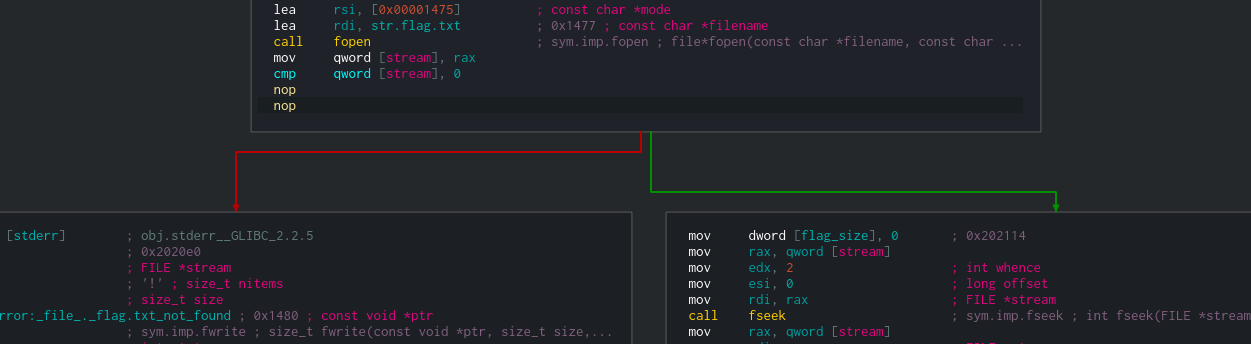
The block that belongs to the red arrow should be combined into the basic block, and the block that belongs to the green arrow should not appear.
Similarly,
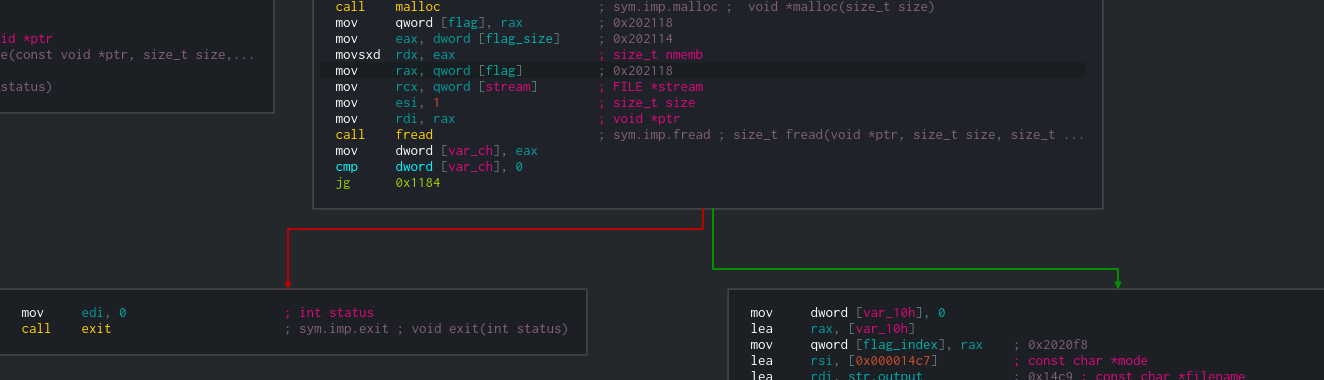
Before edit:
After edit to jmp (non-conditional branch):
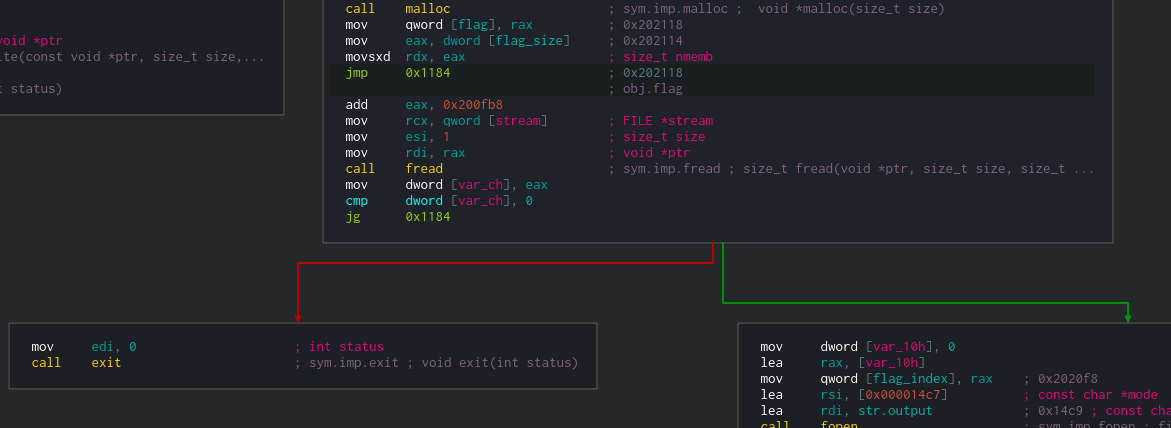
I expect the basic block will 'end' on the jmp instruction, and only one arrow will be coming out of it.
After edit to je (conditional branch):
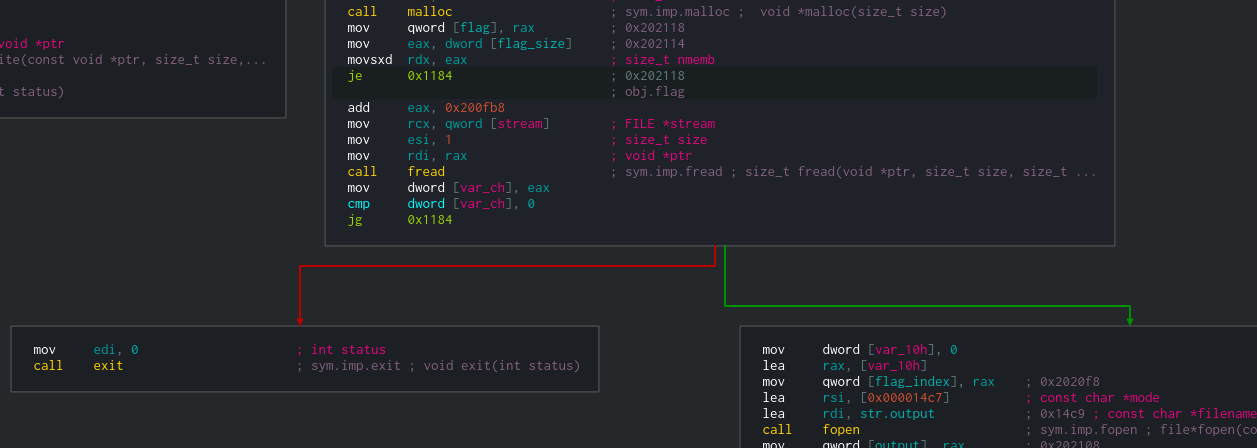 I expect that basic block will 'end' on the je instruction, and 2 new arrows will be created from it. One to a new basic block that will contain the following "add" command, and one to the basic block at 0x1184.
Additional context

Thank you for a detailed explanation! This is indeed a bug, and it caused by radare2. Few months ago, I opened an issue in radare2 regarding this. You can check it out in https://github.com/radareorg/radare2/issues/15644
I will keep this detailed issue you opened as a reference here as well. Meantime, a workaround I can suggest is to undefined and re-define the function.
Thank you!