

 rigaya
6900 XT with h.265 10-bit produces bad video
I am attempting to convert a video using my AMD 6900 XT, but it only produces a green square. I'm not exactly sure why, and I haven't been able to find much information anywhere else... Any help would be super appreciated!
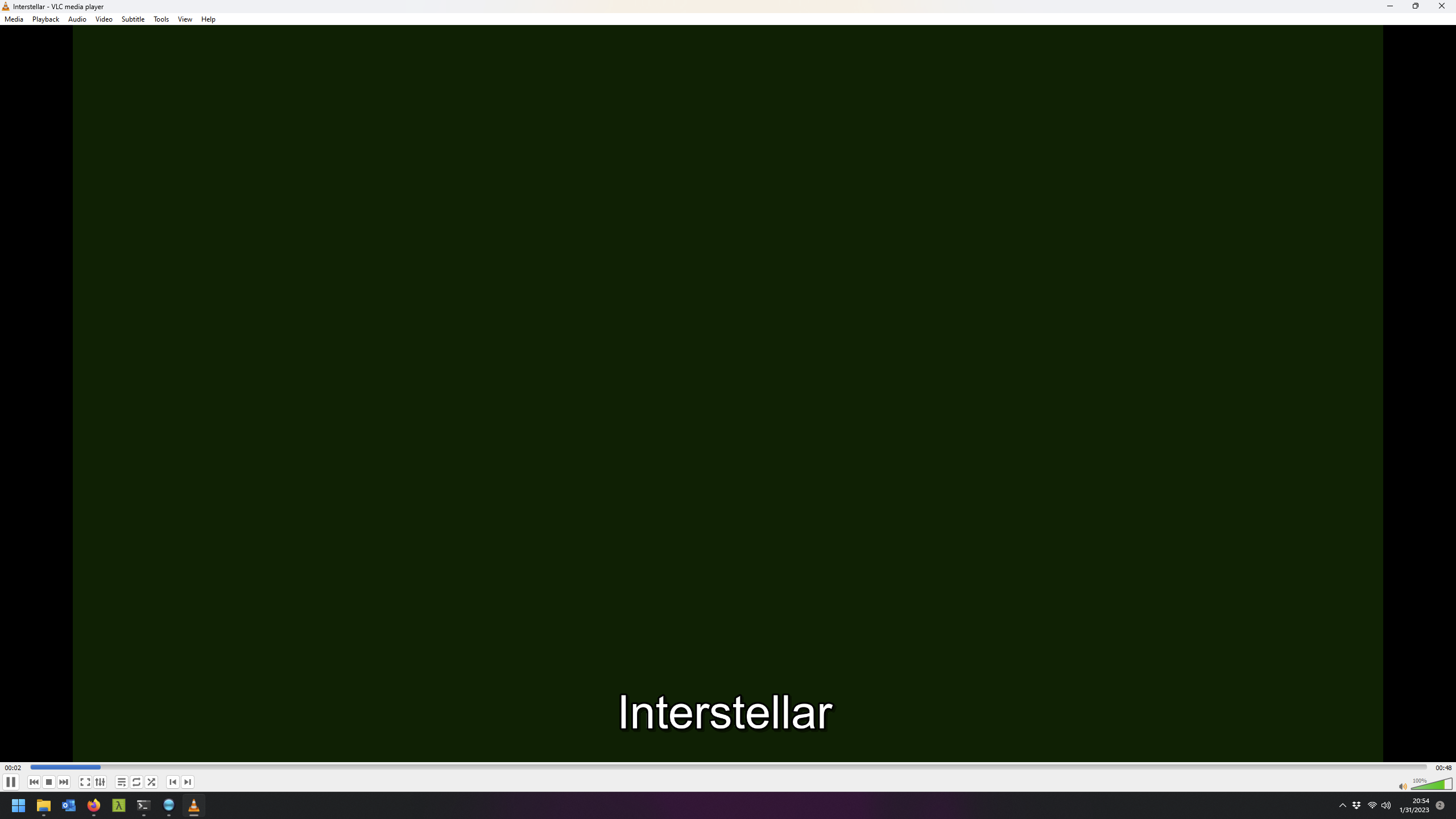
Source Details:
index: 0
codec_name: hevc
codec_long_name: H.265 / HEVC (High Efficiency Video Coding)
profile: Main 10
codec_type: video
codec_tag_string: '[0][0][0][0]'
codec_tag: '0x0000'
width: 3840
height: 2160
coded_width: 3840
coded_height: 2160
closed_captions: 0
film_grain: 0
has_b_frames: 3
sample_aspect_ratio: 1:1
display_aspect_ratio: 16:9
pix_fmt: yuv420p10le
level: 153
color_range: tv
color_space: bt2020nc
color_transfer: smpte2084
color_primaries: bt2020
chroma_location: topleft
refs: 1
r_frame_rate: 24000/1001
avg_frame_rate: 24000/1001
time_base: 1/1000
start_pts: 0
start_time: '0.000000'
extradata_size: 140
Encoder Command:
"C:\Users\jacob\Desktop\fastflix\VCEEncC\VCEEncC64.exe" --avhw -i "D:\Interstellar.mkv" --video-metadata copy --metadata copy --video-metadata title="Interstellar" --chapter-copy -c hevc --vbr 15000 --preset slow --tier high --level auto --colormatrix bt2020nc --transfer smpte2084 --colorprim bt2020 --master-display "G(13250,34500)B(7500,3000)R(34000,16000)WP(15635,16450)L(40000000,50)" --max-cll "1242,436" --output-depth 10 --motion-est q-pel --chromaloc auto --colorrange auto --avsync cfr --audio-copy 1,2 --audio-metadata 1?language=eng --audio-metadata 1?title="Surround 5.1" --audio-metadata 1?handler="Surround 5.1" --audio-metadata 2?language=eng --audio-metadata 2?title="Surround 5.1" --audio-metadata 2?handler="Surround 5.1" -m default_mode:infer_no_subs -o "D:\Interstellar-fastflix-ef7a.mkv"
Encoder Output:
--------------------------------------------------------------------------------
D:\Interstellar-fastflix-8bd2.mkv
--------------------------------------------------------------------------------
VCEEnc (x64) 8.01 (r1377) by rigaya, Jan 30 2023 12:39:37 (VC 1934/Win)
OS:            Windows 11 x64 (22621) [UTF-8]
CPU:           AMD Ryzen 9 5900X 12-Core Processor [4.71GHz] (12C/24T)
GPU:           AMD Radeon RX 6900 XT, AMF Runtime 1.4.29 / SDK 1.4.28
Input Info:    avvce: H.265/HEVC, 3840x2160, 24000/1001 fps
Output:        H.265/HEVC  main @ Level 5 (main tier)
               3840x2160p 1:1 23.976fps (24000/1001fps)
               avwriter: hevc, dts, dts, chap => matroska
Quality:       slow
VBR:           15000 kbps
Max bitrate:   25000 kbps
QP:            Min: 0:0, Max: 51:51
VBV Bufsize:   25000 kbps
Bframes:       0 frames
Pre Analysis:  off
Ref frames:    2 frames
LTR frames:    0 frames
Motion Est:    Q-pel
Slices:        1
GOP Len:       240 frames
VUI:              matrix:bt2020nc,colorprim:bt2020,transfer:smpte2084,range:limited,chromaloc:topleft
MasteringDisp: G(0.265000 0.690000) B(0.150000 0.060000) R(0.680000 0.320000)
               WP(0.312700 0.329000) L(4000.000000 0.005000)
MaxCLL/MaxFALL:1242/436
Others:        skipframe:on deblock

I also got the problem, but switching software decoder on the player helped. Therefore, it might be problem of decoder.

